
- 00000018WIA30C3EE20GYZ
- id_131071403.0
- Aug 29, 2019 1:58:00 AM
GEM MCQA setup - Head Neck Unit (HNU) face bill
Prerequisites
| Required persons | Preliminary requirements | Procedure | Finalization |
|---|---|---|---|
| 1 | Not Applicable | 30 minutes | Not Applicable |
| Item | Quantity | Effectivity | Part number | Manufacturer |
|---|---|---|---|---|
| Large Cylindrical Unified Phantom (For 1.5T) | 1 | - |
5342679 | - |
| TL Unified Phantom (For 1.5T) | 1 | - |
5343347 | - |
| Large Cylindrical Unified Phantom (For 3.0T) | 1 | - |
5342679-2 | - |
| TL Unified Phantom (For 3.0T) | 1 | - |
5343347-2 | - |
| Head Neck Unit (HNU) Phantom Positioner (For both 1.5T and 3.0T) | 1 | - |
5405750 | - |
| The 1.5T GEM Coil MCQA will utilize the 1.5T phantoms, which are green in color. The 3.0T GEM Coil MCQA will utilize the 3.0T phantoms, which are pink in color. | - | - | - | - |
Procedure
- Place the HNU posterior unit on the GEM table as shown.
Figure 1. Placement of HNU Posterior Unit 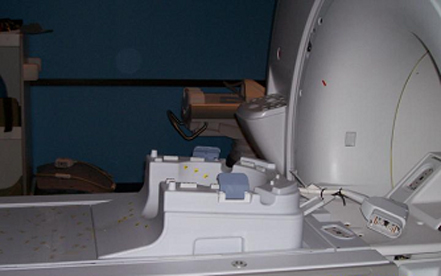
- Place the HNU Phantom Positioner into the HNU posterior unit,
then place the Large Cylindrical Unified Phantom and TL Unified Phantom
into the HNU Phantom Positioner.
Figure 2. Placement of Large Cylindrical and TL Unified Phantoms 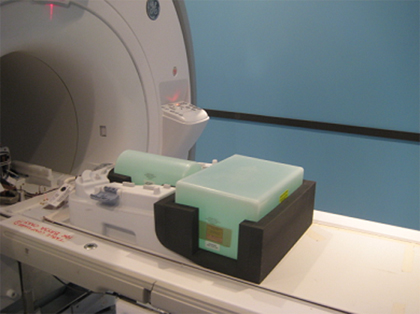
- Connect the HNU face unit with the HNU posterior unit.
Figure 3. Connection of HNU Face and Posterior Units 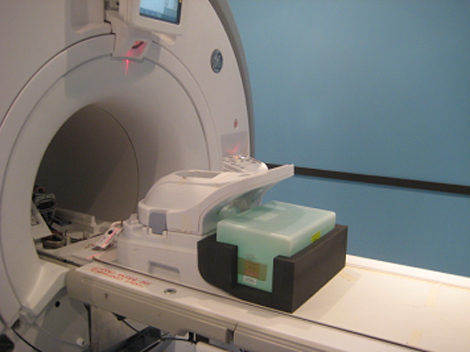
- Connect the coil to the P2 Port on the GEM table, landmark the
coil at the crosshair mark (indicated below), and press Advance to Scan.
Figure 4. Landmarking Coil 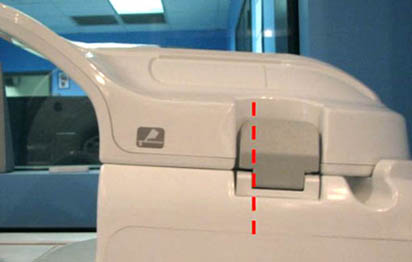
- Run the Multi-Coil Quality Assurance Tool. Ensure that the correct coil is selected
in the Current Coil field: 1.5T_GEM_HNU_Face_Bill
(shown below) or 3.0T_GEM_HNU_Face_Bill for a 3.0T system.
Figure 5. MCQA Tool Menu 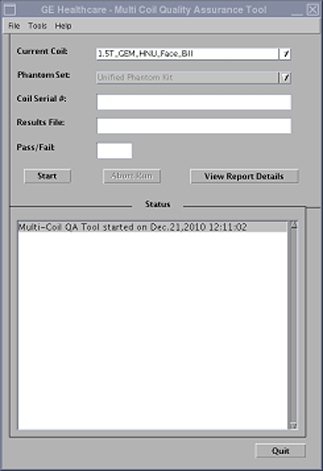
Finalization
No finalization steps.