• SIGNA™ Hero 3.0T Service Methods
  • 5852800-8EN Revision 1.0
  • Object ID: 00000018WIA30EE3B30GYZ
  • Topic ID: id_2012508 Version: 2.2
  • Date: Apr 23, 2020 8:43:10 PM

Removing the Global Operator Cabinet Audio Assembly (GOCAA)

Procedure

  1. Remove the GOC service cover screws.
    Figure 1. Remove the service cover and disconnect ground cable
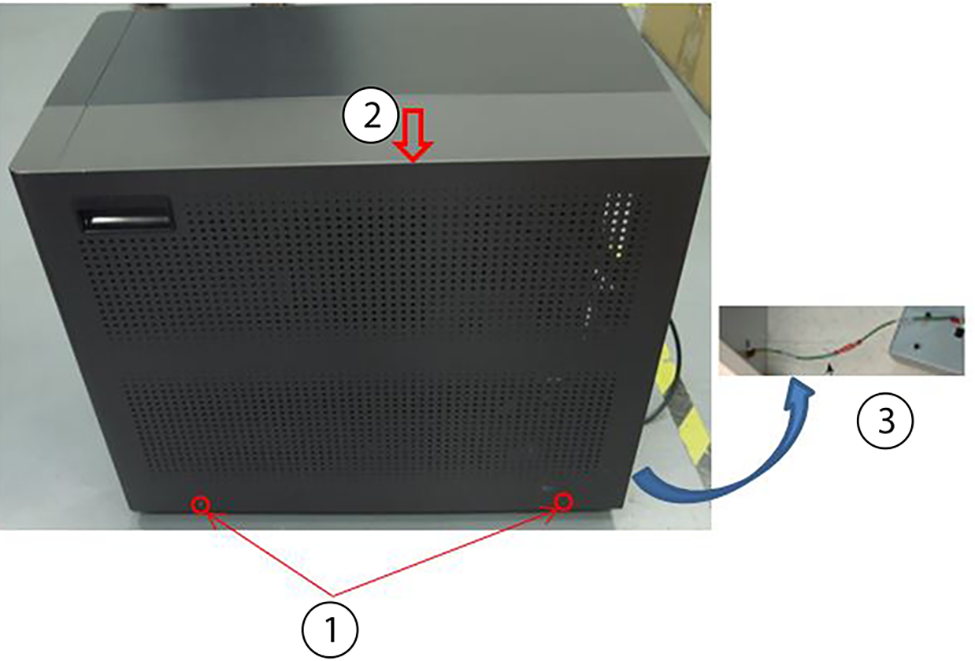
    1Cover screws (2)
    2Service cover
    3Ground wire
  2. Carefully lift the service cover up until the ground cable can be disconnected.
  3. Lift the service cover until you have access to the ground wire. Do not apply pressure to the ground cable while lifting.
  4. Disconnect the ground wire and fully remove the cover.
  5. Remove all cables that are connected to the GOCAA.
    Note: Make sure to note the cable locations for reattachment.
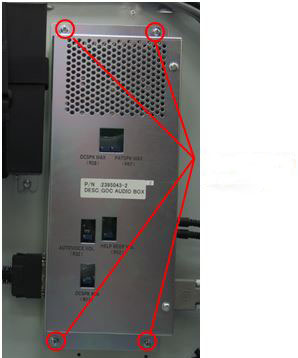
  6. Loosen four screws securing the audio box to free it from GOC frame.
    Figure 2. Loosen the four screws