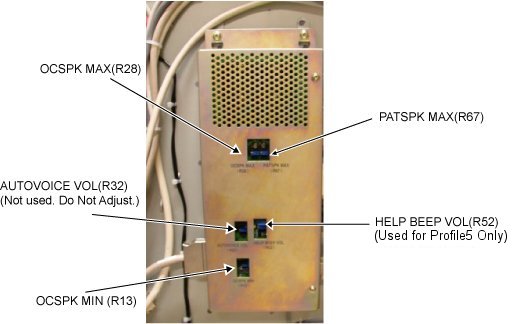
Maximum patient speaker volume R67 (operator’s voice)
Note: The minimum patient speaker volume is fixed; there is no adjustment for it. Do not adjust AUTOVOICE VOL (R32) or HELP BEEP VOL (R52) (used only for Profile5).
Procedure
Adjust the maximum SCIM/keyboard speaker volume (R28) - Patient's voice.
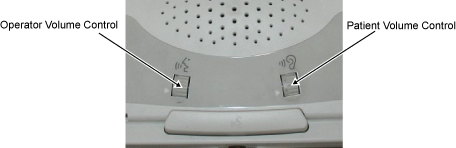
Adjust the patient volume control on the SCIM to the maximum setting by rotating the volume wheel Up with your finger.
Set R28 to the factory ideal location.
Rotate R28 control counterclockwise until an audible clicking sound is heard at the minimum location, then advance control clockwise 12.5 turns from the minimum location. If successful, skip to Step c.
If an R28 clicking sound cannot be heard, rotate R28 control counterclockwise at least 30 turns to reach the minimum location, then advance control clockwise 12.5 turns to the factory ideal location.
While one person speaks into the patient microphone in the magnet bore, the second person should adjust R28 on the GOCAA to set the desired maximum SCIM/keyboard speaker volume.
This is an iterative process. Repeat the voice test until the maximum desired level is achieved.
Adjust the minimum SCIM/keyboard speaker volume (R13) – Patient’s Voice.
Adjust the patient volume control on the SCIM to the minimum setting by rotating the volume wheel Down with your finger.
Set R13 to the factory ideal location.
Rotate R13 control counterclockwise until an audible clicking sound is heard at the minimum location, then advance control clockwise 6 turns from the minimum location. If successful, skip to Step c.
If an R13 clicking sound cannot be heard, rotate R13 control counterclockwise at least 30 turns to reach the minimum location, then advance control clockwise 6 turns to the factory ideal location.
While one person speaks into the patient microphone in the magnet bore, the second person should adjust R13 on the GOCAA to set the desired minimum SCIM/keyboard speaker volume.
Adjust the maximum patient speaker volume (R67) - Operator's voice.
Make sure that the magnet room door is open, so that the person at the SCIM making the adjustment can hear the comments from the person listening at the rear of the magnet.
Adjust the operator volume control on the SCIM to the maximum setting by rotating the volume wheel Up with your finger.
Set R67 to the factory ideal location.
Rotate R67 control counterclockwise until an audible clicking sound is heard at the minimum location, then advance control clockwise 9 turns from the minimum location. If successful, skip to Step d.
If an R67 clicking sound cannot be heard, rotate R67 control counterclockwise at least 30 turns to reach the minimum location, then advance control clockwise 9 turns to the factory ideal location.
While one person listens to the patient speaker at the rear of the magnet and provides information about the volume and sound quality, the second person should speak into the SCIM microphone and adjust R67 on the GOCAA to set the desired maximum patient speaker volume.
Set the Operator Volume to 4 and make sure that there is no howling sound (feedback) heard at the patient speaker. If there is a howling sound (feedback), slowly rotate R67 counterclockwise until howling stops.
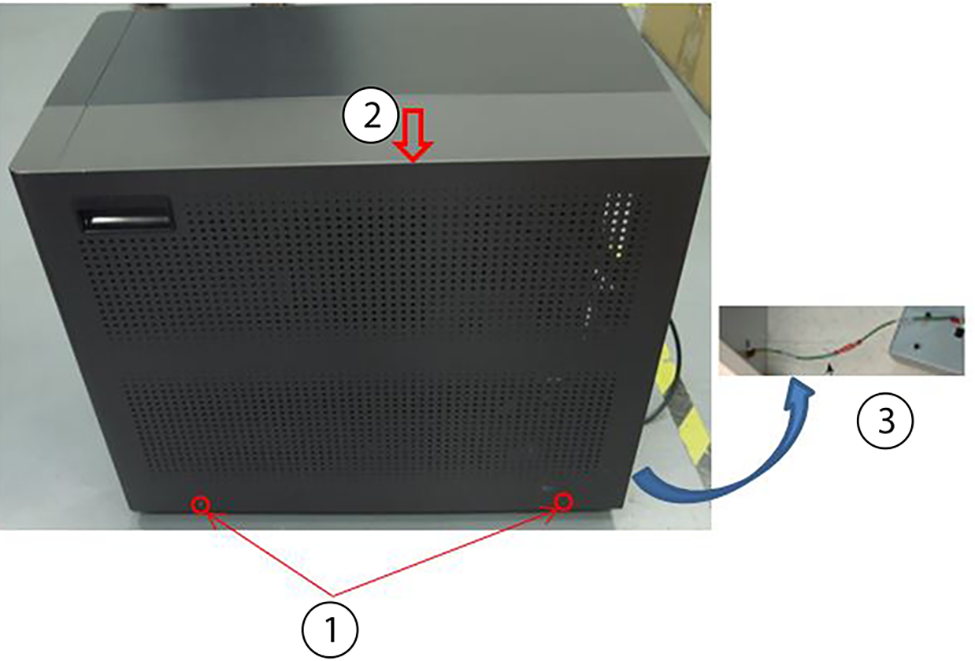
Position the service cover on the GOC.
Figure 3. Install the service cover
1
Cover screws (2)
2
Service cover
3
Ground wire
Connect the ground wire. Move the cover to the final install position.