
- Discovery MR750w and SIGNA™ Architect T 3.0T System Service Methods
- 5690002-2EN Revision 4
- 00000018WIA3042DD50GYZ
- id_20275851.6
- Sep 16, 2020 10:21:25 AM
Replacing the table rotary pump couplers
Replaces the table female or dock male rotary pump coupler.
Prerequisites
| Personnel requirements | |||
|---|---|---|---|
| Required persons | Preliminary requirements | Procedure | Finalization |
| 1 | - | 15 minutes | 10 minutes |
| Tools and test equipment | |||
|---|---|---|---|
| Item | Quantity | Part number | Manufacturer |
| Nonmagnetic Titanium Service Tool Kit, Small Set | 1 | 5113258 | - |
| Mirror or smartphone with selfie capability | 1 | - | - |
| 2.5 mm Allen Wrench, Titanium | 1 | 5109893-3 | - |
| 3 mm Allen Wrench, Short Shaft, Titanium | 1 | 5109893-5 | - |
| Replacement parts | |||
|---|---|---|---|
| Item | Quantity | Part number | Manufacturer |
| Patient Table Hydraulic Rotary Pump Female Coupler | 1 | 5336201 | - |
| Half Dock Driver Coupling | 1 | 5172896 | - |
| Safety |
|---|
|
Before working in any GE Healthcare MR suite or performing any GE Healthcare service procedure, you must:
If you have any safety concerns at any time, do not begin work or immediately stop work and move to a safe location. Immediately contact your supervisor or site safety officer for instructions on how to proceed. |
About this task
Note: Order the 2.5 mm or 3 mm titanium Allen wrench(es) listed above if not readily available and keep the wrench(es) in the toolbox for future use.
Do one or both of the following tasks, as required, and then do Finalizing the table rotary pump coupler replacement.
Replacing the table female coupler
Removes the female coupler from the patient table rotary pump and installs a replacement coupler.
Prerequisites
| Personnel requirements | |||
|---|---|---|---|
| Required persons | Preliminary requirements | Procedure | Finalization |
| 1 | - | 15 minutes | - |
| Tools and test equipment | |||
|---|---|---|---|
| Item | Quantity | Part number | Manufacturer |
| Nonmagnetic Titanium Service Tool Kit, Small Set | 1 | 5113258 | - |
| Mirror or smartphone with selfie capability | 1 | - | - |
| 2.5 mm Allen Wrench, Titanium | 1 | 5109893-3 | - |
| Replacement parts | |||
|---|---|---|---|
| Item | Quantity | Part number | Manufacturer |
| Patient Table Hydraulic Rotary Pump Female Coupler | 1 | 5336201 | - |
Procedure
- Press the brake lock pedal to lock the table in a stationary position.
Figure 1. Caster brake pedal 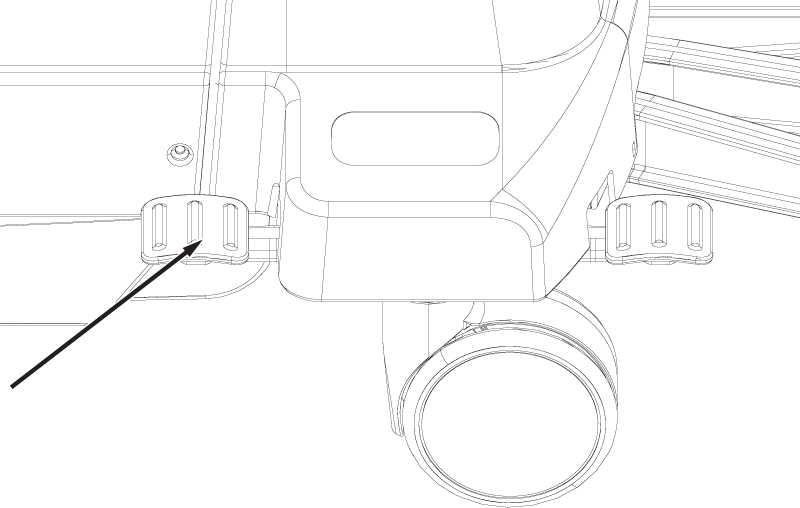
- Rotate the female coupler, using needle-nose pliers in the wide open position, until the half coupling screw is accessible through the cutout in the bearing guide.Note: Place a mirror or smartphone in selfie mode under the bearing to view the cutout.
Figure 2. Bearing guide cutout 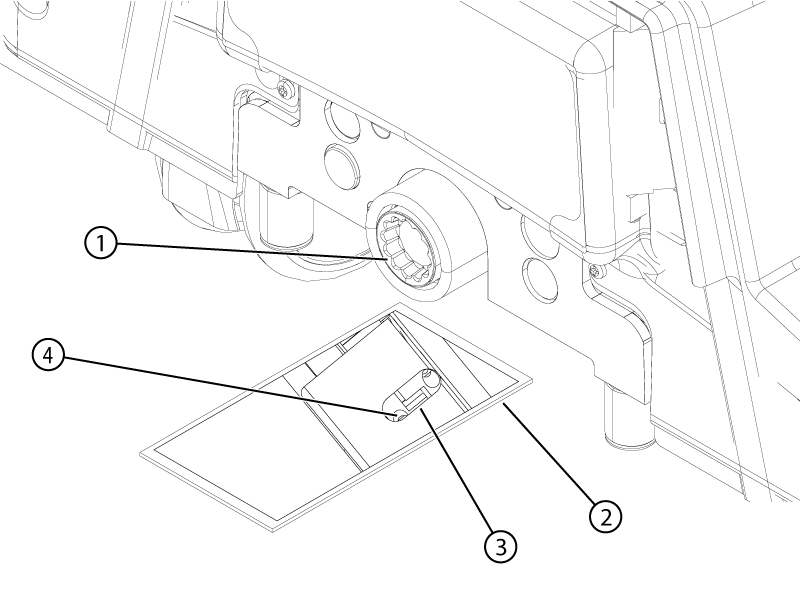
1 Female coupler 2 Mirror or smartphone 3 Bearing guide cutout 4 Female coupler half coupling screw - Remove the female coupler from the bearing guide.Note: Use small needle-nose pliers to remove the female coupler from the bearing guide.
Figure 3. Female coupler 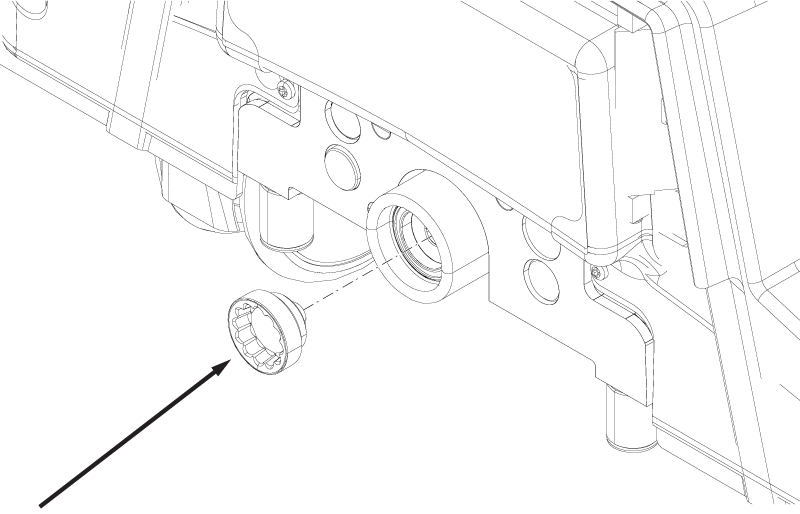
Replacing the dock male coupler
Removes the male coupler from the patient table dock and installs a replacement coupler.
Prerequisites
| Personnel requirements | |||
|---|---|---|---|
| Required persons | Preliminary requirements | Procedure | Finalization |
| 1 | - | 15 minutes | - |
| Tools and test equipment | |||
|---|---|---|---|
| Item | Quantity | Part number | Manufacturer |
| 3 mm Allen Wrench, Short Shaft, Titanium | 1 | 5109893-5 | - |
| Replacement parts | |||
|---|---|---|---|
| Item | Quantity | Part number | Manufacturer |
| Half Dock Driver Coupling | 1 | 5172896 | - |
Procedure
- Locate the coupler screw hole on the side of the male coupler.
Figure 4. Male coupler screw hole 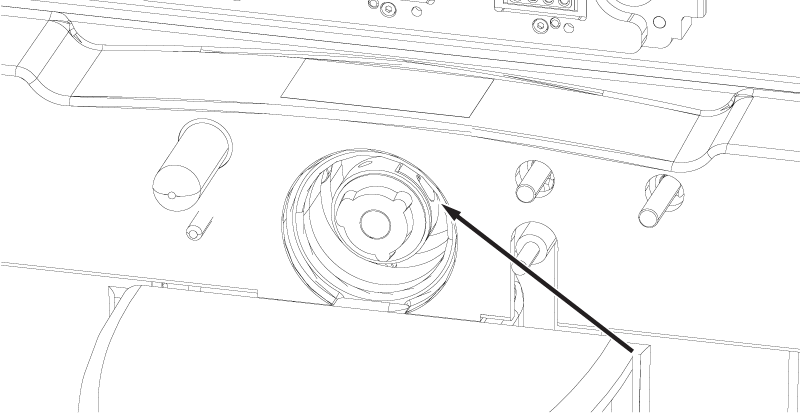
- Remove the male coupler from the dock.
Figure 5. Male coupler 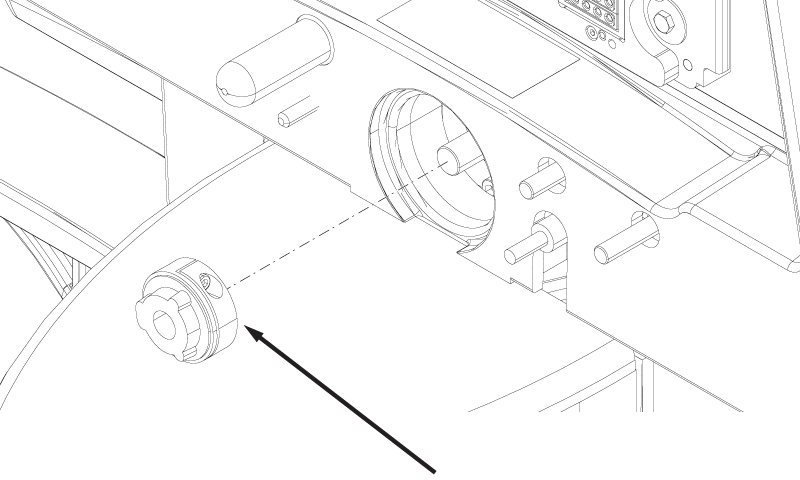
Finalizing the table rotary pump coupler replacement
Tests the operation of the patient table following replacement of the female or male rotary pump coupler.
Prerequisites
| Personnel requirements | |||
|---|---|---|---|
| Required persons | Preliminary requirements | Procedure | Finalization |
| 1 | - | 10 minutes | - |