• Discovery MR750w and SIGNA™ Architect T 3.0T System Service Methods
  • 5690002-2EN Revision 4
  • Object ID: 00000018WIA3004C030GYZ
  • Topic ID: id_12374938 Version: 1.6
  • Date: Jan 17, 2020 11:32:44 AM

3.0T MNS Cabinet Component Replacements

Prerequisites

Table 1. Personnel requirements
Required personsPreliminary requirementsProcedureFinalization
1-4Not Applicable10-45 min. (see Procedure Overview)Not Applicable
Table 2. Tools and test equipment
ItemQuantityEffectivityPart numberManufacturer
Phillips Screwdriver1---
5/16 inch Wrench1---
8 mm Wrench1---
Cut-Resistant Protective Gloves1---
Table 3. Replacement parts
ItemQuantityEffectivityPart numberManufacturer
RF Controller Module1-

2206456-24

-
Driver Module1---
RF Power Amplifier Module1-

2206456-3

-
RF Amplifier Combiner Coupler1-

2206456-4

-
RF Power Supply1-

2206456-8

-
5 Amp, 250 V Fuse1-

46-170021P29

-
Table 4. Safety
Table 5. Required conditions
ConditionReferenceEffectivity
Install anti-tip legs on both sides of the MNS cabinet. The anti-tip legs are strapped inside the rear of the cabinet on the left side. Remove the anti-tip legs from the cabinet, and align them with the screw openings at the bottom of the cabinet. Screw on leg on each side.
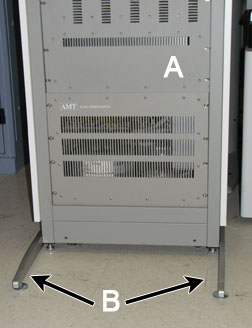
Figure 1. MNS Anti-Tip Legs Installed
AFront of MNS cabinet
BAnti-tip legs
--

About this task

Overview

This document outlines how to replace the FRUs for the 8 kW MNS cabinet: AMT system control module, driver module, power amplifier module, combiner, power supply, and fuses. The table below details each component's personnel requirements and procedure timing.

FRU Persons Required Procedure Timing
AMT System Control Module130 min.
Driver Module130 min.
Power Amplifier Module130 min.
Combiner130 min.
Power Supply445 min.
Fuses110 min.
Topic ID: id_SL2328578-1071425

Introduction to MNS Cabinet

About this task

This section displays the location of MNS FRUs in the MNS cabinet from a front and rear view.

Procedure

  1. MNS cabinet front view of FRU components.
    Figure 2. MNS Cabinet Front View
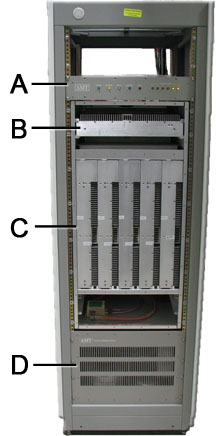
    A AMT control module
    B Driver module (pre-driver)
    C Power amplifier modules
    D Power supply
  2. MNS cabinet rear view of FRU components.
    Figure 3. MNS Cabinet Rear View
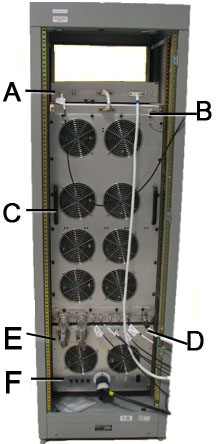
    A AMT control module
    B Driver module (pre-driver), located behind fan plate
    C Power amplifier modules, located behind fan plate
    D Combiner, located behind fan plate
    E Power supply
    F Fuses
Topic ID: id_SL2270264-1071425

Replacing AMT System Control Module

About this task

Refer to Figure 2 and Figure 3 for FRU locations.

Procedure

  1. Install anti-tip legs on both sides of the MNS cabinet Figure 1. The anti-tip legs are strapped inside the rear of the cabinet on the left side. Remove the anti-tip legs from the cabinet, and align them with the screw openings at the bottom of the cabinet. Screw one leg on each side.
  2. Perform LOTO on the XFRD amplifier and the PEN cabinet. See the MR Service Safety Manual, PN 5452735.
  3. Open the rear rack cabinet door.
  4. Disconnect the system power cable at J12 on the power supply.
    Figure 4. AMT System Control Module - Cabinet Connections
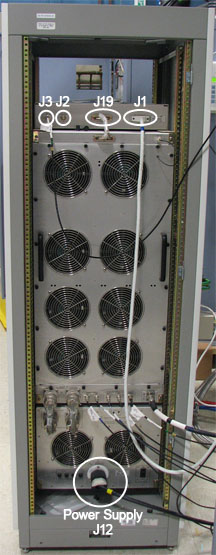
  5. Disconnect cable J3 (RF IN) on the rear of the system control module.
  6. Disconnect the system interface cable at J19.
  7. Disconnect the RF interface cable at J1.
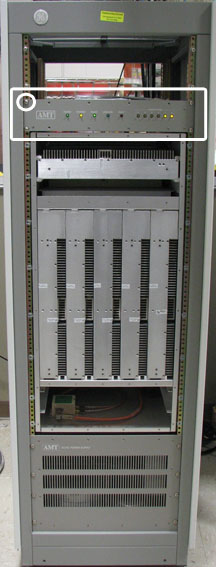
  8. Working from the front of the system control module, carefully remove the four large mounting screws that attach the module to the rack. Set the screws aside in a safe place.
    Figure 5. AMT Location in MNS Cabinet
  9. Working from the front, carefully slide the control module out of the front of the rack.
  10. Set the removed unit aside in a safe place.
  11. Remove the FRU system control module from its packaging and inspect it for damage.
  12. Working from the front of the rack, align the system control module with the slides and carefully slide it into the rack.
  13. Reattach the system control module to the rack using the four large screws removed in Step 8.
  14. Working from the rear, reconnect the RF interface cable at J1.
  15. Reconnect the system interface cable at J19.
  16. Reconnect cable at J3 (RF IN).
  17. Working from the front of the rack, reconnect the system power cable at J12 on the power supply.
  18. Remove LOTO from the XRFD amplifier and the PEN cabinet. See the MR Service Safety Manual, PN 5452735.
Topic ID: id_SL2270282-1071425

Replacing Driver Module

About this task

Refer to Figure 2 and Figure 3 for FRU locations.

Procedure

  1. Install anti-tip legs on both sides of the MNS cabinet Figure 1. The anti-tip legs are strapped inside the rear of the cabinet on the left side. Remove the anti-tip legs from the cabinet, and align them with the screw openings at the bottom of the cabinet. Screw one leg onto each side.
  2. Perform LOTO on the XFRD amplifier and the PEN cabinet. See the MR Service Safety Manual, PN 5452735.
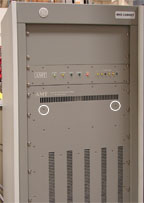
  3. Working from the front of the rack, carefully remove the two mounting screws that attach the driver module to the rack. The screws are located below the driver module air intake vents. Set the screws aside in a safe place.
    Figure 6. Driver Module Mounting Screws
  4. Open the rear rack cabinet door.
  5. Disconnect the system power cable at J12 on the power supply Figure 4.
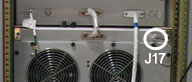
  6. Disconnect the fan AC power cable at J17 at the rear of the cabinet.
    Figure 7. MNS Cabinet - AC Power Cable
  7. Loosen the 20 thumbscrews that attach the fan panel to the rack.
  8. Carefully allow the top of the fan panel to pivot away from the cabinet, then carefully lift the fan panel up and away from the rack.
  9. Use a 5/16 inch wrench to remove the RF cable at J25.
    Figure 8. RF Cables on Driver Module
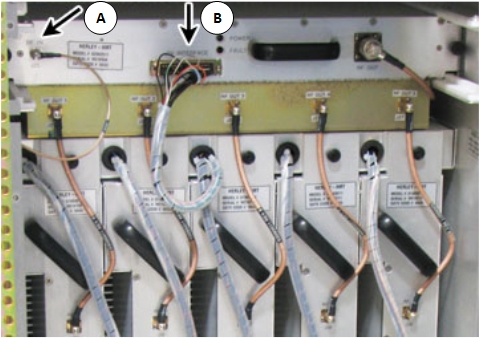
    AJ26 INTERFACE
    BJ25 RF IN
  10. Remove J26 RF interface cable.
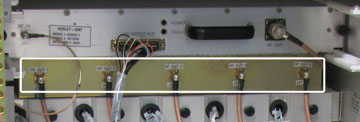
  11. Carefully remove the RF output cables 1 through 5 from J27-1 through J27-5 on the driver module.
    Figure 9. RF Output Cables
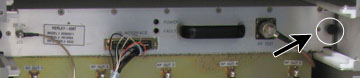
  12. Loosen the two thumbscrews that attach the driver module to the rack.
    Figure 10. Driver Module - Rack Thumbscrew
  13. Carefully slide the driver module out of the rear of the rack.
  14. Set the removed unit aside in a safe place.
  15. Remove the FRU driver module from its packaging and inspect it for damage.
  16. Align the driver module with the slides and carefully slide it into the rack.
  17. Tighten the two thumbscrews that attach the driver module to the rack.
  18. Reattach RF output cables 1 through 5 to J27-1 through J27-5 on the driver module.
  19. Reattach the RF interface cable to J26.
  20. Use a 5/16 in. wrench to reattach the RF cable to J25.
  21. Carefully lift the fan panel into place and position it on the rack.
  22. Tighten the 20 thumbscrews that attach the fan panel to the rack.
  23. Reconnect the fan AC power cable to J17 at the rear of the cabinet Figure 7.
  24. Reconnect the system power cable to J12 on the power supply Figure 4.
  25. Insert the two mounting screws that attach the driver module to the rack. The screws are located on the front of the cabinet and below the driver module air intake vents Figure 6.
  26. Remove LOTO for the XRFD amplifier and the PEN cabinet. See the MR Service Safety Manual, PN 5452735.
Topic ID: id_SL2270305-1071425

Replacing Power Amplifier Module(s)

About this task

Refer to Figure 2 and Figure 3 for FRU locations.

Procedure

  1. Install anti-tip legs on both sides of the MNS cabinet Figure 1. The anti-tip legs are strapped inside the rear of the cabinet on the left side. Remove the anti-tip legs from the cabinet, and align them with the screw openings at the bottom of the cabinet. Screw one leg onto each side.
  2. Perform LOTO on the XFRD amplifier and the PEN cabinet. See the MR Service Safety Manual, PN 5452735.
  3. Open the rear rack cabinet door.
  4. Disconnect the system power cable at J12 on the power supply Figure 4.
  5. Disconnect the fan AC power cable at J17 at the rear of the cabinet Figure 7.
  6. Loosen the 20 thumbscrews that attach the fan panel to the rack.
  7. Carefully allow the top of the fan panel to pivot away from the cabinet, then carefully lift the fan panel up and away from the rack.
  8. Disconnect all the power amplifier interface cables at connectors J29-A through J29-E; or, for an individual module replacement, disconnect only that module's connectors.
    Figure 11. RF Cables for Power Amplifier
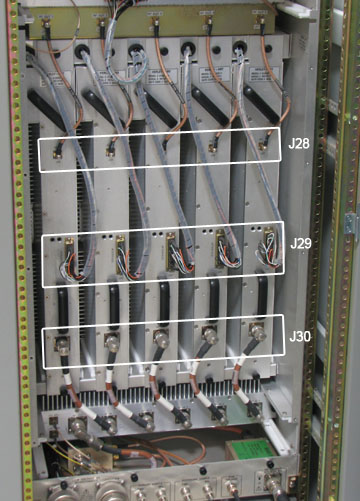
  9. Disconnect the RF input cables at J28-A through J28-E; or, for an individual module replacement, disconnect only that module's cables with a 5/16 inch wrench.
    Figure 12. Removing RF Input Cables
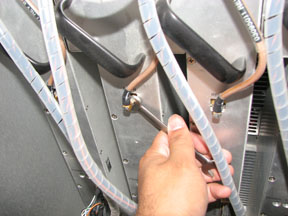
  10. Disconnect the RF output cables at J30-A through J30-E; or, for an individual module replacement, disconnect only that module's RF output cables.
  11. Working from the front of the rack, remove the two corresponding screws that attach the power amplifier module to the front panel. The screws are located next to the air intake vents. Keep the screws.
    Figure 13. MNS Cabinet Front Screws Location
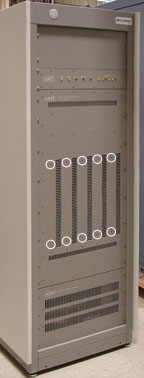
  12. At the rear of the cabinet, loosen the two thumbscrews that attach the power amplifier.
  13. Working from the rear of the rack, carefully slide the power amplifier module out of the rack.
    Figure 14. Removing the Power Amplifier Module
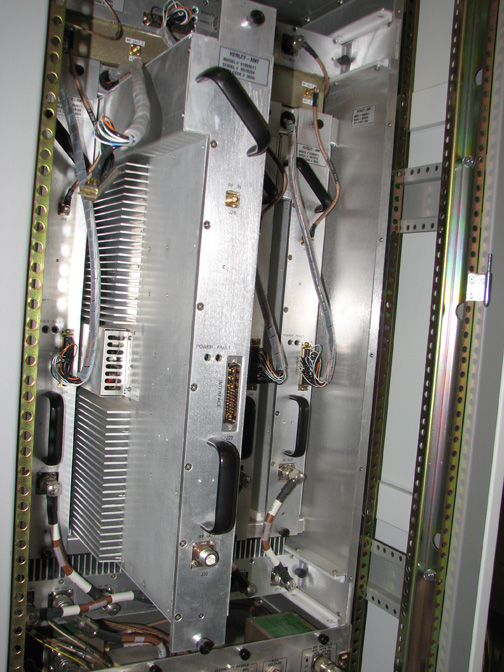
  14. Set the removed unit aside in a safe place.
  15. Remove the FRU amplifier module from its packaging and inspect it for damage.
  16. Working from the rear of the rack, align the power amplifier module with the slides and carefully slide it into the rack.
  17. Working from the front of the rack, reattach the power amplifier module to the rack using the two screws removed earlier.
  18. Reattach the RF output cables at J30-A through J30-E.
  19. Reattach the RF input cables at J28-A through J28-E.
  20. Reconnect the power amplifier interface cables at J29-A through J29-E.
  21. Carefully lift the fan panel into place and position it on the rack.
  22. Tighten the 20 thumbscrews that attach the fan panel to the rack.
  23. Reconnect the fan AC power cable to J17 at the rear of the cabinet Figure 7.
  24. Reconnect the system power cable to J12 on the power supply Figure 4.
  25. Remove LOTO from the XRFD amplifier and the PEN cabinet. See the MR Service Safety Manual, PN 5452735.
  26. Perform 8kW 3.0T MNS Amplifier Calibration.
Topic ID: id_SL2270329-1071425

Replacing Combiner

About this task

Refer to Figure 2 and Figure 3 for FRU locations.

Procedure

  1. Install anti-tip legs on both sides of the MNS cabinet Figure 1. The anti-tip legs are strapped inside the rear of the cabinet on the left side. Remove the anti-tip legs from the cabinet, and align them with the screw openings at the bottom of the cabinet. Screw one leg onto each side.
  2. Perform LOTO on the XFRD amplifier and the PEN cabinet. See the MR Service Safety Manual, PN 5452735.
  3. Open the rear rack cabinet door.
  4. Disconnect the system power cable at J12 on the power supply Figure 4.
  5. Disconnect the fan AC power cable at J17 at the rear of the cabinet Figure 7.
  6. Loosen the 20 thumbscrews that attach the fan panel to the rack.
  7. Carefully allow the top of the fan panel to pivot away from the cabinet, then carefully lift the fan panel up and away from the rack.
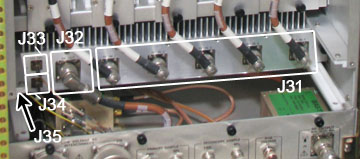
  8. Disconnect the thermostat cable at J35.
    Figure 15. Connections on Combiner
  9. Use a 5/16 inch wrench to remove the RFL RF cable from J33.
  10. Use a 5/16 inch wrench to remove the FWD RF cable from J34.
  11. Disconnect the RF output cable from J32.
  12. Disconnect RF input cables 1 through 5 from J31-1 through J31-5.
  13. Loosen the two thumbscrews that attach the combiner to the cabinet.
  14. Working from the rear of the rack, carefully slide the combiner out of the rear of the rack.
  15. Set the removed unit aside in a safe place.
  16. Remove the FRU combiner from its packaging and inspect it for damage.
  17. Working from the rear of the rack, align the combiner with the slides and carefully slide it into the rack.
  18. Working from the front of the rack, tighten the two thumbscrews that attach the combiner to the cabinet.
  19. Reconnect RF input cables 1 through 5 to connectors J31-1 through J31-5.
  20. Reconnect the RF output cable to J32.
  21. Use a 5/16 in. wrench to reconnect the FWD RF cable to J34.
  22. Use a 5/16 in. wrench to reconnect the RFL RF cable to J33.
  23. Reconnect the thermostat cable to J35.
  24. Tighten the 20 thumbscrews that attach the fan panel to the rack.
  25. Reconnect the fan AC power cable to J17 at the rear of the cabinet Figure 7.
  26. Reconnect the system power cable to J12 on the power supply Figure 4.
  27. Remove LOTO from the XRFD amplifier and the PEN cabinet. See the MR Service Safety Manual, PN 5452735.
Topic ID: id_SL2270357-1071425

Replacing Power Supply

About this task

Refer to Figure 2 and Figure 3 for FRU locations.

Procedure

  1. Install anti-tip legs on both sides of the MNS cabinet Figure 1. The anti-tip legs are strapped inside the rear of the cabinet on the left side. Remove the anti-tip legs from the cabinet, and align them with the screw openings at the bottom of the cabinet. Screw one leg onto each side.
  2. Perform LOTO on the XFRD amplifier and the PEN cabinet. See the MR Service Safety Manual, PN 5452735.
  3. Open the rear rack cabinet door.
  4. Disconnect the system power cable at J12 on the power supply.
    Figure 16. MNS Power Supply Connections
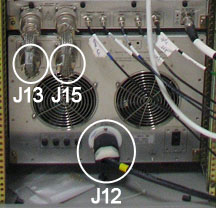
  5. Remove the power supply low-voltage interconnect cables from J13 and J15.
  6. Remove the protective earth grounding cable from the grounding stud.
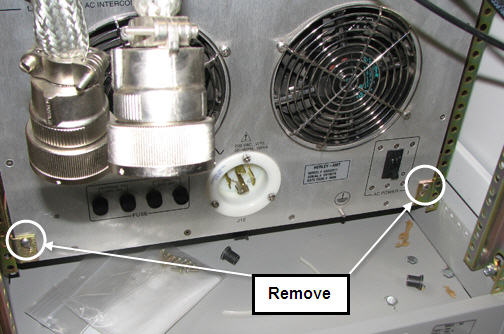
  7. Remove the two screws that attach the power supply to the rack. The screws are located in the lower left and right corners of the power supply. Keep the screws.
    Figure 17. Removing Screws
  8. On the front of the MNS cabinet, remove the eight large screws that attach the power supply to the rack. Set the screws aside in a safe place.
    Figure 18. Location of Screws to Remove
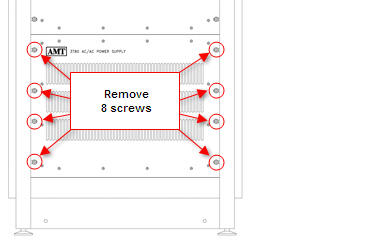
  9. Remove 16 screws securing front cover of power supply.
  10. Working from the front, with the help of three additional field engineers, carefully slide the power supply out of the front of the rack.
    Figure 19. Power Supply Partially Removed
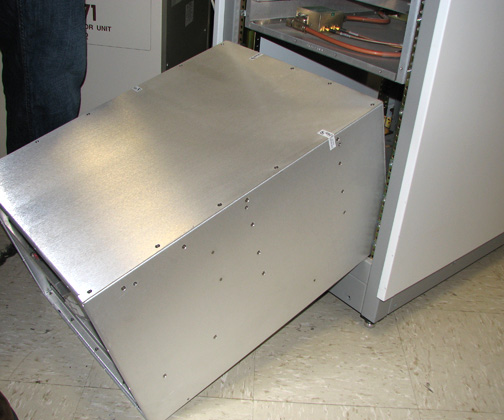
    Note:

    It may be easier to partially remove the power supply before setting it on the floor, as shown above.

  11. With additional personnel, set the removed unit aside in a safe place.
  12. With additional personnel, remove the FRU power supply from its packaging and inspect it for damage.
  13. Working from the front, with the help of additional personnel, carefully slide the replacement power supply into the front of the rack.
  14. Reattach the two screws, removed earlier, that attach the power supply to the rack. The screws are located in the lower left and right corners of the power supply on the back side of the MNS cabinet. Be sure that the power supply FRU is pushed in from the front.
  15. Reattach the front cover of the power supply using the 16 screws previously removed.
  16. Reattach the eight large screws, removed earlier, that attach the power supply to the front of the rack.
  17. Reattach the protective earth grounding cable to the grounding stud.
  18. Reattach the power supply low-voltage interconnect cables to J13 and J15.
  19. Reconnect the system power cable to J12 on the power supply.
  20. Close the rear rack cabinet door.
  21. Remove LOTO from the XRFD amplifier and the PEN cabinet. See the MR Service Safety Manual, PN 5452735.
Topic ID: id_SL2270374-1071425

Replacing Fuses

About this task

The fan module and the internal power supply are equipped with replaceable fuses. The fans are equipped with two 250 volt, 8 amp, time-delay type 8AT fuses. The internal power supply is equipped with two 250 volt, 5 amp, time-delay type 5AT fuses. Refer to Figure 3 for details.