- SIGNA™ Hero 3.0T Service Methods
- 5852800-8EN Revision 1.0
- Object ID: 00000018WIA30A5A650GYZ
- Topic ID: id_2024933 Version: 2.5
- Date: Nov 8, 2021 2:09:22 PM
Running LVShim - Gradshim for systems running PX29.1 or later
Procedure
- Set the universal phantom pad on the table and align the crosshairs at 1080 mm away from home.
- Put the sphere on the pad with the strap (in the groove) in the orientation shown below, making sure the laser lights are cross-centered on the sphere and phantom pad.
Figure 1. Sphere phantom position Note: This image is a representative example. Actual systems may vary.
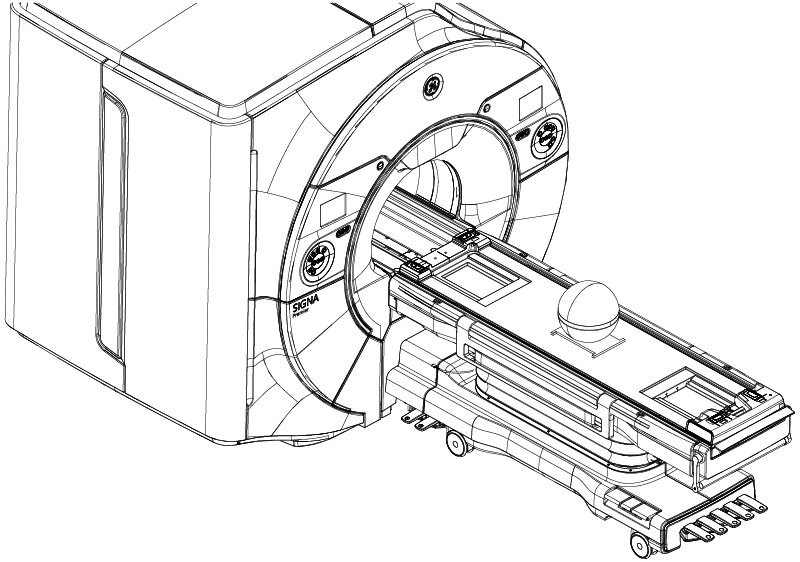
- Set up and align the LVShim phantom. Align the phantom so that:
- The strap on the phantom is aligned parallel to the table surface.
- The phantom is centered left to right with respect to the cradle top.
- Landmark on the universal phantom pad crosshairs.Note: The landmarking tolerances of the LVShim tool are: I/S: ± 3 mm, A/P: ± 30 mm, R/L: ± 5 mm. Ensure accuracy of the placement for landmarking.Note: Due to the tight landmarking tolerance, it is important to align the lasers on the cross lines of the universal positioner before setting the sphere.
- Press Advance to Scan.Note: The tool checks phantom positioning and will fail if the above landmarking specs are out of tolerance.
- Start the LVShim tool from the Common Service Desktop on the Calibration tab.
- Select the gradshim mode:
Option Description Auto mode Running LVShim in Auto mode Manual mode Running LVShim in Manual mode