Dispose of as a hazardous waste according to state and federal regulations.
About this task
The Echo Planar Test (EPT) combines the functionality of the B0 Dither Calibration and Group Delay Calibration into a single tool with a simple user interface. The output is suitable for remote support access, trending, and automatic checking of results against acceptance limits. EPT automatically updates the Echo Planar Image (EPI) calibration files.
Topic ID: id_SL3888111-1178713
Setup
Procedure
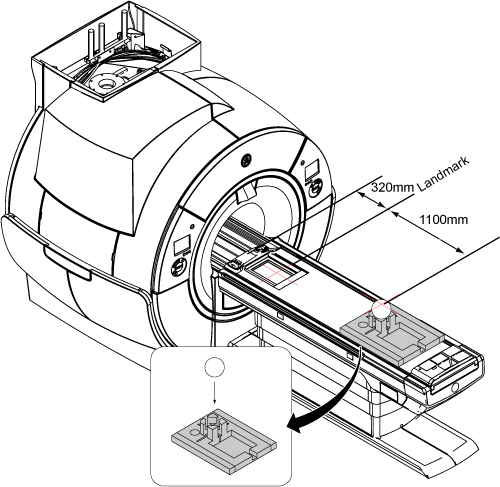
Move the Cradle 320mm from Home Position and Landmark.
Note: 3.0T uses pink phantoms.
Place a foam positioner and a 100 mm sphere in the positioner. Move the table into the bore to 1100 mm from landmark. Slide the foam positioner so the center of the 100 mm sphere is at the axial alignment light, and then press the MOVE TO SCAN button.
Figure 1. Positioning Phantom on Table
Topic ID: id_SL3888117-1178713
Run EPT Calibration Tool
Procedure
Start the Echo Planar Test calibration tool:
(For non-proprietary service tools) From the Common Service Desktop, select Calibration > Echo Planar Test. Select Click here to start this tool.
The Echo Planar Test window appears with partial test selection.
Figure 2. Echo Planar Test Window (without Service Key)
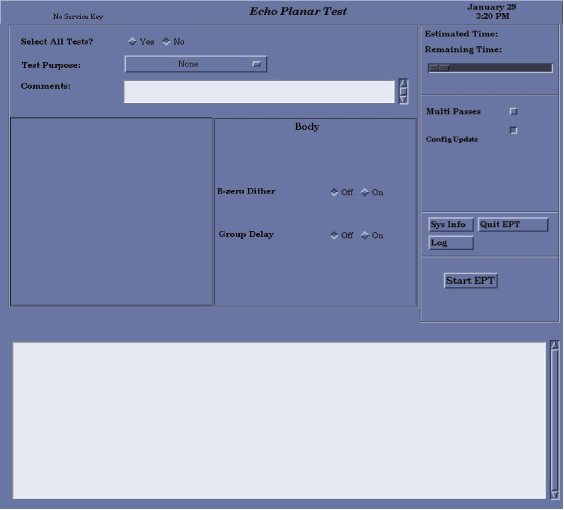
For calibration, set the Select All Tests? option to Yes.
The default is No.
For troubleshooting, select individual tests as desired.
Two lines of Comments: can be entered, if desired. If no comments are entered, the text NO COMMENT is entered into the results file.
Select a Test Purpose from the menu.
For normal operation, the options buttons on the screen are set correctly by default. You can change the options to suit the tests you need to run.
To perform more than one pass of the tests, select Multi Passes and enter a number in the text box.
One or more of the selected tests can automatically update the configuration files with new calibration data if the new data is within specification. Select Config Update before starting EPT.
CAUTION
Equipment Movement!
The test you are about to initiate moves the cradle.
Please take appropriate precautions to ensure that no one is in its path.
Select Start EPT. Running all the tests takes about 30 minutes and thoroughly tests the system’s EPI performance.
While EPT is running, each test is displayed in the message window showing the amount of time the test requires to run.
Note: For 3.0T systems, B0 Dither is no longer run. Zeros are placed in the B0 Dither calibration files.
Topic ID: id_SL766521-1178713
Test Termination Procedure
Procedure
When the tests are complete, one of the following messages appears:
Your tests completed successfully.
A serious system problem has been detected. This problem IS expected to impact image quality.
EPT was unable to determine PASS/FAIL status of the tests.
If the tests completed successfully, proceed to Finalization below.
If the tests fail, open the Report Manager to view the test results and identify the failing tests.
Topic ID: id_14952180
Finalization
Procedure
Select Quit EPT and confirm.
Note: If the EPT process is not shut down in an orderly manner, the service protocol directions may need to be reset. Open a C-shell (click C Shell in the Service Desktop Manager) and enter the following:
/usr/g/bin/eptEnter
reseteptEnter
Remove service equipment from the system.
Continue with the next calibrations or perform a SaveInfo.
Reset TPS to bring the system back into a known state.
Perform a Check Scan to verify that the scanner is working properly before customer turnover.