
- SIGNA™ Hero 3.0T Service Methods
- 5852800-8EN Revision 1.0
- 00000018WIA304A0E20GYZ
- id_131064035.1
- Jul 13, 2021 7:09:35 PM
ICN On/Off procedure for Dell R-620/630
Prerequisites
| Required persons | Preliminary requirements | Procedure | Finalization |
|---|---|---|---|
| 1 | 0 minutes | 30 minutes | 0 minutes |
| ||||||||

About this task
The ICN is powered down when the host software is shut down. To shut the ICN down individually, use the VRE Power Control utility.
If the preferred shutdown method does not work, a last resort is to use the ICN power button.
Switch On ICN from VRE Power Control
Procedure
Powering down ICN from VRE power control
About this task
Procedure
- At the host computer, on the Service Browser, select Utilities > Toolbox > VRE > Power Control
Figure 1. Power Control 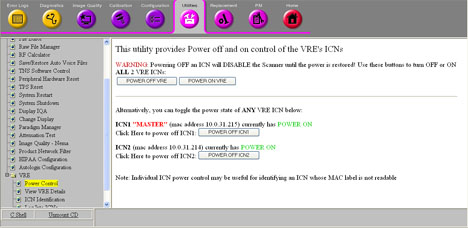 Note: The number configuration should match the number of VREs. The illustration above shows images from a system with a Sun 4100 ICN. Systems with a R-620/630 ICN have only one ICN selection.
 - Refresh the Power Control link to see the current state of the ICN.
Figure 2. ICN 1 switched off 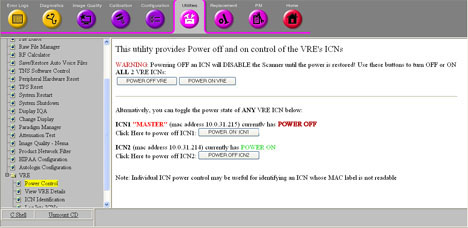
- The Dell ICN is powered down when the green power LED located on the upper left side of the front of the ICN for Dell R-620/630 is not illuminated.
Figure 3. ICN Front Panel (Dell R-620/630) 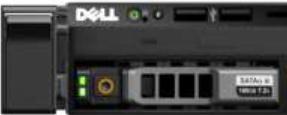
Powering Down from Root Level
About this task
If the application's software is down, you can power down the ICNs by using command line at the root level.
Procedure
- In the xterm window, type: /etc/init.d/poweron_vres stop and press Enter.
Figure 4. VRE Stop command 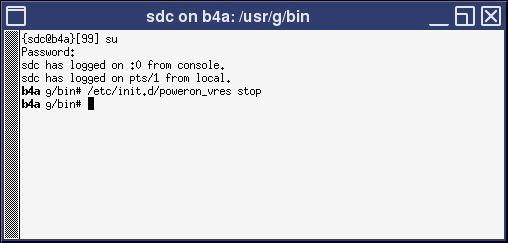
The ICN(s) should turn off after one minute.
The Dell ICN is powered down if the green power LED located on the upper left side of the front of the ICN is not illuminated.
Power off ICNs manually
Procedure
Momentarily press the power button. (For Dell ICN, the green LED is also the power button.) This brings down the ICN in a soft method. It takes a minute or two for the operating system to boot down.Notice 
The Dell ICN is powered down if the green power LED located on the upper left side of the front of the ICN is not illuminated.
Finalization
Finalization
No finalization steps.