
- SIGNA MR355 / SIGNA MR360
- Service Manual
- 5856356-3EN Revision 5.0
- Basic Service Documentation. Copyright General Electric Company.
- 00000018WIA30BBDF20GYZ
- id_131058261.2
- Jul 6, 2019 12:03:29 AM
CSA Troubleshooting Flow Chart
CSA Troubleshooting Flow Chart
Follow the Flow Chart below and identify the CSA problem.
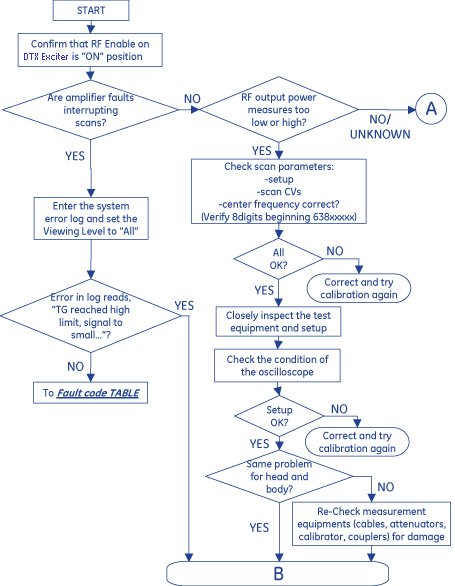
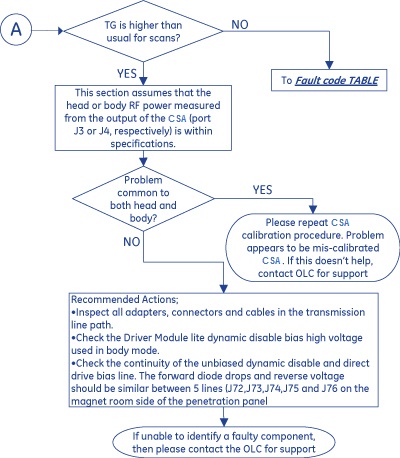
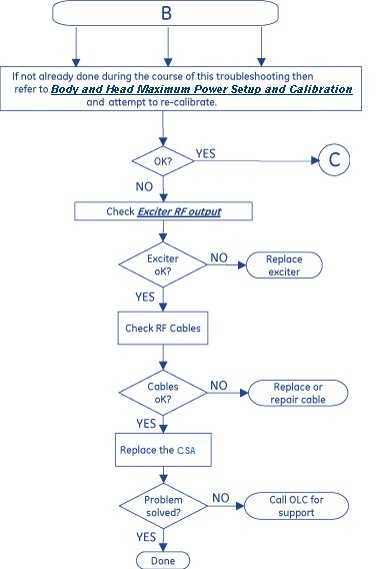
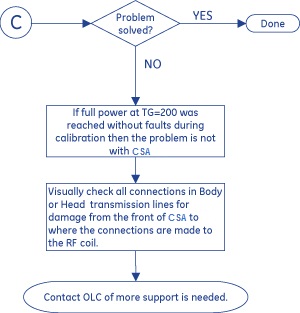
1.5T CSA RF fault code and Error Condition/Recommended Actions
Table 1 contains a list of 1.5T CSA RF fault code and Error Condition/Recommended Actions. If the fault code is not listed in the table, then contact the OLC for support
| Fault Code | Description | Error Condition and Recommended Actions |
| 101406 | "RF Amplifier P15V Power Supply Low Fault.\n\ RF Amplifier P15V power supply voltage dropped below specified minimum voltage.\n\ P15V: %.2f V, Lower spec: %.2f V" | Power cycle the CSA so that the power is off for 3 minutes and then attempt to reproduce. If fault persists, replace CSA. |
| 101407 | "RF Amplifier N15V Power Supply Low Fault.\n\ RF Amplifier N15V power supply voltage dropped below specified minimum voltage.\n\ N15V: %.2f V, Lower spec: %.2f V" | Power cycle the CSA so that the power is off for 3 minutes and then attempt to reproduce. If fault persists, replace CSA. |
| 101408 | "RF Amplifier MV Power Supply Low Fault.\n\ RF Amplifier MV (P48V) power supply voltage dropped below specified minimum voltage.\n\ MV: %.2f V, Lower spec: %.2f V" | Power cycle the CSA so that the power is off for 3 minutes and then attempt to reproduce. If fault persists, replace CSA. |
| 101409 | "RF Amplifier High Voltage Power Supply Low Fault.\n\ RF Amplifier high voltage (P165V) power supply voltage dropped below specified minimum voltage.\n\ HV: %.2f V, Lower spec: %.2f V" | Power cycle the CSA so that the power is off for 3 minutes and then attempt to Scan. Check incoming AC line phases to CSA. If fault persists, replace CSA. (It is difficult to know how long the unit will run. You may want to order an amplifier in case the unit fails within the next fer days.) |
| 101410 | "RF Amplifier P15V Power Supply High Fault.\n\ RF Amplifier P15V power supply voltage went above specified maximum voltage.\n\ P15V: %.2f V, Upper spec: %.2f V" | Power cycle the CSA so that the power is off for 3 minutes and then attempt to reproduce. If fault persists, replace CSA. |
| 101411 | "RF Amplifier N15V Power Supply High Fault.\n\ RF Amplifier N15V power supply voltage went above specified maximum voltage.\n\ N15V: %.2f V, Upper spec: %.2f V" | Power cycle the CSA so that the power is off for 3 minutes and then attempt to reproduce. If fault persists, replace CSA. |
| 101412 | "RF Amplifier MV Power Supply High Fault.\n\ RF Amplifier MV (P48V) power supply voltage went above specified maximum voltage.\n\ MV: %.2f V, Upper spec: %.2f V" | Power cycle the CSA so that the power is off for 3 minutes and then attempt to reproduce. If fault persists, replace CSA. |
| 101413 | "RF Amplifier High Voltage Power Supply High Fault.\n\ RF Amplifier high voltage (P165V) power supply voltage went above specified maximum voltage.\n\ HV: %.2f V, Upper spec: %.2f V" | Power cycle the CSA so that the power is off for 3 minutes and then attempt to Scan. If fault persists, replace CSA. (It is difficult to know how long the unit will run. You may want to order an amplifier in case the unit fails within the next few days.) |
| 101414 | "RF Amplifier Peak RF Device Current Overload Fault.\n\ The RF Amplifier detected a peak current overload condition in one or more RF devices.\n\ HC: %.2f A, Upper spec: %.2f A.\n\ If research PSD is being used, please verify the PSD parameters." | Power cycle the CSA so that the power is off for 3 minutes, and check RF Amp error(s) that may point to the real cause don't precede this error(s). If so, then invetigate preceeding error(s) first. If fault persists, replace CSA. |
| 101415 | "RF Amplifier Cold Plate Temperature Fault.\n\ RF Amplifier device cold plate temperature (sensor 1) exceeds specification.\n\ Cold Plate Temp1.: %.2f degrees C, Upper spec: %.2f degrees C. " | Check coolant flow/temperature. Check inside of Cabinet is not Over temperature. If coolant flow/temperature and cabinet temperature OK and the fault persists, may need to replace CSA. (Additional time may be required to allow the system to cool, e.g. 15-20 minutes.) |
| 101416 | "RF Amplifier Cold Plate Temperature Fault.\n\ RF Amplifier device cold plate temperature (sensor 2) exceeds specification.\n\ Cold Plate Temp2.: %.2f degrees C, Upper spec: %.2f degrees C. " | Check coolant flow/temperature. Check inside of Cabinet is not Over temperature. If coolant flow/temperature and cabinet temperature OK and the fault persists, may need to replace CSA. (Additional time may be required to allow the system to cool, e.g. 15-20 minutes.) |
| 101417 | "RF Amplifier RF Device Shorted Fault." | Power cycle the CSA so that the power is off for 3 minutes and then attempt to Scan. If fault persists, replace CSA. (It is difficult to know how long the unit will run. You may want to order an amplifier in case the unit fails within the next few days.) |
| 101418 | "RF Amplifier Junction Temp Fault.\n\ RF Amplifier device junction temperature exceeds specification.\n\ Junction Temp.: %.2f degrees C, Upper spec: %.2f degrees C. " | Make certain that this error isn't being preceeded by another in the error log. If another RF error preceeds it, troubleshoot the other error first. Check coolant flow/temperature. Check inside of Cabinet is not over temperature. Confirm that the system center frequency consists of 8 digits and is correct. If other potential sources have been eliminated and the fault persists, replace CSA. |
| 101419 | "RF Amplifier Excessive VSWR Fault." | Visually check all connections in Body or Head transmission lines for damage from the front of CSA to where the connections are made to the RF coil. Perform BODY AND HEAD MAXIMUM POWER RF OUTPUT CHECK. If all connections are good and the Maximum Power RF Output check is passed, and the problem persists, may need to replace CSA or contact OLC for support. |
| 101420 | "RF Amplifier Excessive Input Drive Fault.\n\ RF Amplifier detects input 1 exceeds specification.\n\ Possible causes: Defective exciter,\n\ or defective RF Amplifier." | Run R1 loopback test firstly, If R1 loopback OK and the fault persists, may need to replace CSA. |
| 101421 | "RF Amplifier FWD2 Body Peak Power Fault.\n\ Peak power from FWD2 Body Channel of RF Amplifier exceeds specification.\n\ Possible causes: The PSD exceeds system limits, RF Gain miscalibration,\n\ defective Exciter, or defective RF Amplifier." | Perform BODY MAXIMUM POWER RF OUTPUT CHECK. Check Exciter RF output and RF Cables. If the problem persists, may need to replace CSA. |
| 101422 | "RF Amplifier FWD2 Head Peak Power Fault.\n\ Peak power from FWD2 Head Channel of RF Amplifier exceeds specification.\n\ Possible causes: The PSD exceeds system limits, RF Gain miscalibration,\n\ defective Exciter, or defective RF Amplifier." | Perform HEAD MAXIMUM POWER RF OUTPUT CHECK. Check Exciter RF output and RF Cables. If the problem persists, may need to replace CSA. |
| 101423 | "RF Amplifier FWD1 Body Peak Power Fault.\n\ Peak power from FWD1 Body Channel of RF Amplifier exceeds specification.\n\ Possible causes: The PSD exceeds system limits, RF Gain miscalibration,\n\ defective Exciter, or defective RF Amplifier." | Perform BODY MAXIMUM POWER RF OUTPUT CHECK. Check Exciter RF output and RF Cables. If the problem persists, may need to replace CSA. |
| 101424 | "RF Amplifier FWD1 Head Peak Power Fault.\n\ Peak power from FWD1 Head Channel of RF Amplifier exceeds specification.\n\ Possible causes: The PSD exceeds system limits, RF Gain miscalibration,\n\ defective Exciter, or defective RF Amplifier." | Perform HEAD MAXIMUM POWER RF OUTPUT CHECK. Check Exciter RF output and RF Cables. If the problem persists, may need to replace CSA. |
| 101425 | "RF Amplifier AC Ready Fault.\n\ Possible Causes: Internal RF amplifier cables are loose or faulty.\n\ If the fault persists, replace the RF amplifier." | If the fault persists, replace the RF amplifier. |
| 101426 | "RF Amplifier PSMB Detector Fault.\n\ Possible Causes: Internal RF amplifier cables are loose or faulty.\n\ If the fault persists, replace the RF amplifier." | If the fault persists, replace the RF amplifier. |
| 101427 | "RF Amplifier RFPA Detector Fault.\n\ Possible Causes: Internal RF amplifier cables are loose or faulty.\n\ If the fault persists, replace the RF amplifier." | If the fault persists, replace the RF amplifier. |
| 101428 | "RF Amplifier RF Lock Fault.\n\ RF Amplifier detected RF Lock signal for an extended period of time.\n\ | Possible UPM fault or system issue. Check patient weight value entered by customer for scan and make sure it has not been significantly under-reported. Check TG from customer scans and make sure if it has not inversed from what it is normally due to a system hardware problem. Investigate the cause of any substantial increase in TG. Check Coil Loss and Cable Loss values for the coil in use when the fault happens are correct. Perform UPM functional check. If fault persists, contact OLC for support. |
| 101430 | "RF Amplifier UNBLANK Connection Fault.\n\ Possible Causes: The UNBLANK cable is loose or faulty.\n\ If the fault persists, replace the RF amplifier." | Check cable connection between CSA J20 and Drive Module by run related diagnostic test. Replace cable if defective.If problem persists, may need to replace Drive Module or CSA. |
| 101431 | "RF Amplifier Isolated 5V Fault.\n\ Possible Causes: The CAN cable is loose or faulty.\n\ If the fault persists, replace the RF amplifier." | Power cycle the CSA so that the power is off for 3 minutes and then attempt to reproduce. If fault persists, replace CSA. |
| 101432 | "RF Amplifier FWD2 Body Rf Connection Fault.\n\ Possible Causes: Internal RF amplifier cables are loose or faulty.\n\ If the fault persists, replace the RF amplifier." | Replace CSA |
| 101433 | "RF Amplifier FWD2 Head Rf Connection Fault.\n\ Possible Causes: Internal RF amplifier cables are loose or faulty.\n\ If the fault persists, replace the RF amplifier." | Replace CSA |
| 101434 | "RF Amplifier FWD1 Body Rf Connection Fault.\n\ Possible Causes: Internal RF amplifier cables are loose or faulty.\n\ If the fault persists, replace the RF amplifier." | Replace CSA |
| 101435 | "RF Amplifier FWD1 Head Rf Connection Fault.\n\ Possible Causes: Internal RF amplifier cables are loose or faulty.\n\ If the fault persists, replace the RF amplifier." | Replace CSA |
| 101436 | "RF Amplifier IN1 Rf Connection Fault.\n\ Possible Causes: Internal RF amplifier cables are loose or faulty.\n\ If the fault persists, replace the RF amplifier." | Replace CSA |
| 101437 | "RF Amplifier Fan 1 Fault.\n\ RF Amplifier detects fan 1 self-test failure." | Replace CSA |
| 101438 | "RF Amplifier Fan 2 Fault.\n\ RF Amplifier detects fan 2 self-test failure." | Replace CSA |
| 101439 | "RF Amplifier Fan 3 Fault.\n\ RF Amplifier detects fan 3 self-test failure." | Replace CSA |
| 101440 | "RF Amplifier (CSA10kW) Undefined Fault.\n\ Error vector%d, Bitmap: 0x%08x." | Replace CSA |
| 101441 | "RF Amplifier Bias Check Fail.\n\ RF Amplifier detects auto bias has not completed." | [RF Amplifier detected Bias Check Fail] TPS reset. If problem persists, replace RF Amplifier. |
| 101442 | "RF Amplifier Manufacturer Info Check Fail.\n\ RF Amplifier detects manufacturer info has not been configured." | [RF Amplifier detected Manufacturer Info Check Fail] TPS reset. If problem persists, replace RF Amplifier. |
| 101444 | "The RF Amplifier failed its measurement diagnostic on the 0x%2x Channel.\n\ Current DAC : 0x%x.\n\ Detected ADC : 0x%x." | [RF Amplifier detected Measurement Diagnostic Fail] Diagnose RFA and RFPM again. If problem persists, replace RF Amplifier. |
| 2254783 | "The %b detected a Power Fault on the %b %b Average.\b\ Calculated Average = %6.1f.\n\ Limit = %6.1f." | [RFPM detected PWR LIMIT EXCEED] TPS reset may recover it. |
| 2257259 | "Large difference was detected between the two Power Monitors.\b\ Difference is in the %b Average.\n\ Monitor 1 reads %6.1f W/kg.\n\ Monitor 2 reads %6.1f W/kg." | [RFPM detected LARGE_DIFFERENCE_DETECTED] TPS reset may recover it. |
| 2257262 | "Unable to open the %s file. Please fix and TPS Reset." | [RFPM detected FILE OPEN FAIL] Fix the config files then TPS reset may recover it. |
| 2257268 | "The %b has not been Calibrated.\n\ No Scanning will be Allowed until Calibrated." | [RFPM detected NOT CALIBRATED] TPS reset. If problem persists, replace RF Amplifier. |
| 2257299 | "The cumulative SAR limit over multiple exams for this patiend id has exceeded. Scan Stopped." | Possible UPM fault or system issue. Check patient weight value entered by customer for scan and make sure it has not been significantly under-reported. Check TG from customer scans and make sure if it has not invresed from what it is normally due to a system hardware problem. Investigate the cause of any substantial increase in TG. Check Coil Loss and Cable Loss values for the coil in use when the fault happens are correct. Perform UPM functional check. If fault persists, contact OLC for support |
| 2278504 | "%b task health check is failed. Average power monitor is insane, TPS reset may recover it" | [RFPM detected TASK HEALTH CHECK FAIL] TPS reset may recover it. |
| 2278505 | "%b FPGA health check is failed. Average power monitor is insane, TPS reset may recover it" | [RFPM detected FPGA HEALTH CHECK FAIL] TPS reset may recover it. |
| 2278506 | "%b health check is failed. TPS reset may recover it" | [RFPM detected HEALTH CHECK FAIL] TPS reset may recover it. |