- id_2002951
- Version: 2.1
- Date: Jul 5, 2019 7:49:03 AM
Installing software updates from SIGNA applications
Procedure
- If service updates are available, click More Info to see details from the Read Me file contained in the service pack.
Figure 1. RSD SDC user interface
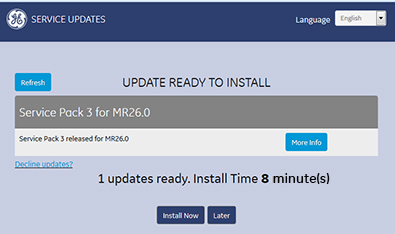
- Choose one of the following installation options:
- Click Install Now to install the update. An installation confirmation will show when the update is complete.
- Click Later to skip the update for the current session. The system will prompt to install the updates at the next system start up.
- Click Decline Updates? to decline installation update. You must enter your name, role, and reason for declining the update in the Decline System Update form. Click Decline Update to submit the form. A confirmation message is displayed.