• Discovery MR750w and SIGNA™ Architect T 3.0T System Service Methods
  • 5690002-2EN Revision 4
  • Object ID: 00000018WIA30E2F030GYZ
  • Topic ID: id_12373868 Version: 1.20
  • Date: Feb 7, 2022 4:46:42 PM

LPCA Cable Tracks Replacement

Prerequisites

Table 1. Personnel requirements
Required personsPreliminary requirementsProcedureFinalization
1Not Applicable90 minutes30 minutes
Table 2. Tools and test equipment
ItemQuantityEffectivityPart numberManufacturer
Assorted cable tiesMultiple---
Non-magnetic service tool kit1-

-
MCRv tool kit 1-

5182417-2

-
Table 3. Consumables
ItemQuantityEffectivityPart numberManufacturer
Loctite 2421-

46-170686P1

-
Table 4. Replacement parts
ItemQuantityEffectivityPart numberManufacturer
A-Port legacy cable track assembly1-

See FRU manual

-
GEM P1 only cable track assembly1-

See FRU manual

-
P1 only cable track assembly, 3.0T1-

See FRU manual

-
Safety

Before working in any GE Healthcare MR suite or performing any GE Healthcare service procedure, you must:

  • Have read and understood all hazard conditions and safety requirements in the latest revision of the GE Healthcare MR Service Safety Manual (5452735).
  • Have successfully completed all relevant GE Healthcare Environmental Health and Safety (EHS) courses (or for non-GE employees, equivalent workplace training courses).
  • Comply with all site-specific training and workplace safety requirements.

If you have any safety concerns at any time, do not begin work or immediately stop work and move to a safe location. Immediately contact your supervisor or site safety officer for instructions on how to proceed.

About this task

Overview

The LPCA of 32–channel systems contains two independent tracks. This procedure describes the replacement of either LPCA cable track. The tracks are FRU assemblies, meaning if one or more cables within a track fails, the entire track is replaced. Each track contains different cables, and each track has different connector types at both ends. Because of these differences, the procedure for replacing one cable track differs from the procedure for replacing the other cable track.

As viewed from the front of the magnet, the P1 coil connectors track is on the left side of the rear pedestal and is designated by three FRUs noted in Replacement Parts. (See Table 5 for all RRx receive chain cable types.) The A-port and other associated cable tracks are located on the right side of the rear pedestal (see Table 6 for all cable types).

Topic ID: id_SL1985118-1061485

Remove Cable Track

Procedure

  1. At the operator control panel, drive the LPCA and cradle through the magnet bore to within 1 foot (30 cm) of the end of the rear bridge.

    This provides enough room to work on the LPCA.

    The LPCA will not move if the patient table is disconnected or not at the high limit before LPCA movement.

  2. At the foot of the table, twist or squeeze the cradle release handle to detach the cradle from the LPCA. Pull the cradle by hand to the home position so it is fully retracted onto the patient table.
  3. Undock the patient table and move it away from the magnet.
  4. Perform LOTO on the rear pedestal. See the MR Service Safety Manual (5452735.
  5. Perform system shutdown.
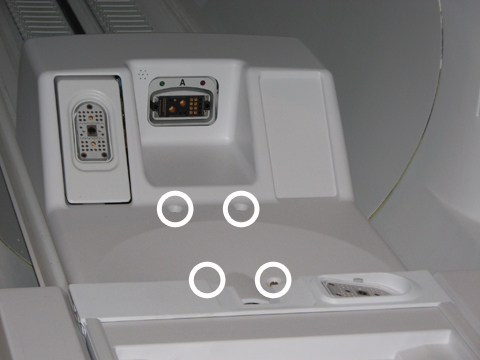
  6. Remove the LPCA cover.
    Figure 1. LPCA Cover Screw Locations
  7. Remove both rear pedestal side covers.
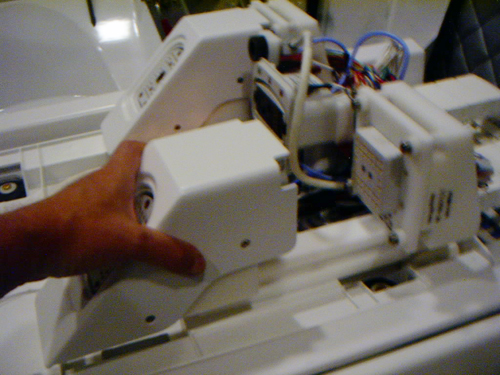
  8. Remove the P1 and/or P2 quick release modules. Use sufficient force to pull the module forward to slide it off the track.
    Figure 2. Remove the Quick Release Module
  9. To create enough space to remove and replace P1/P2 cable connectors, do the following:
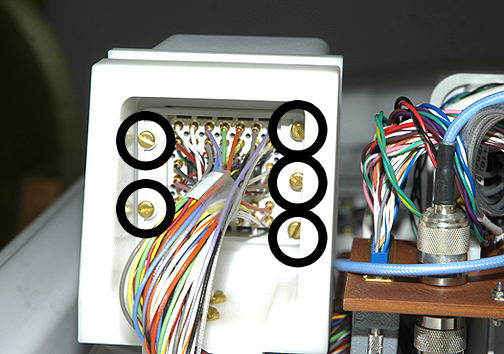
    1. At the rear of each cable mount bracket, remove two screws from the left side and three screws from the right side, and then set the cable connector aside.
      Figure 3. Cable Connector Screws
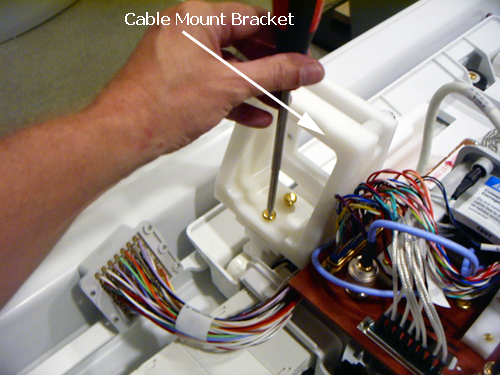
    2. Remove both bottom cable mount bracket screws, and then set the cable mount bracket aside.
    Figure 4. Cable Mount Bracket Screws
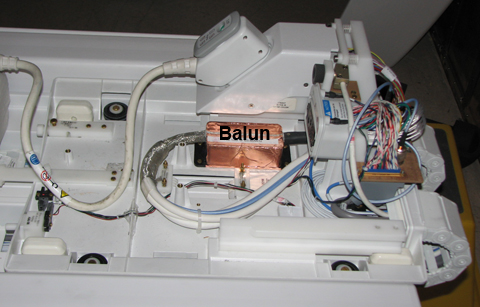
  10. Remove four slotted brass screws from the front and back of the balun.
    Figure 5. Balun
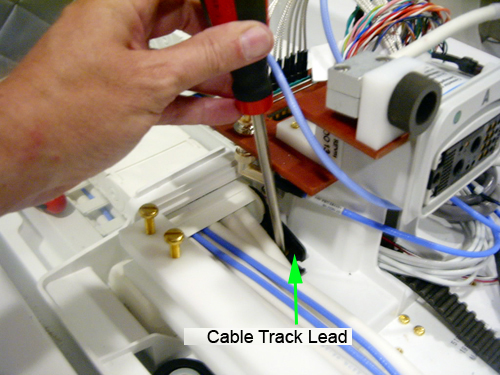
  11. Remove the two slotted head brass screws that secure the cable track lead to the base of the LPCA.
    Figure 6. Cable Track Lead Screw Locations
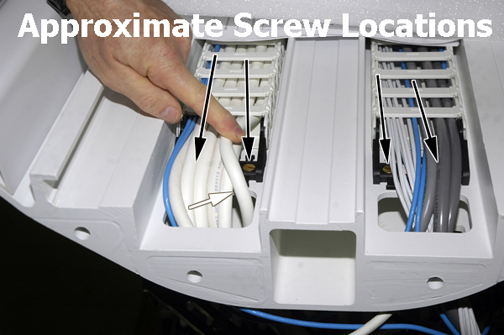
  12. Remove the two slotted head screws that secure the cable track lead to the front of the rear pedestal bridge.
    Figure 7. Bridge Cable Track Screw Locations
  13. Disconnect all cable connections that feed from the front end of the cable track to points throughout the rear pedestal.
    Note: Take note of cable routing and tie wrap locations.
    Table 5. 32-Channel P-Port Cable Track Connection Points (No Reroute Box)—RRx Systems
    LPCA end Pedestal end
    PED-LPCA J5PED J1, blue cable (on the right side)
    PED load B, blue cable (at the back of the rear pedestal)
    PED-hub-slot 1-P1
    PED-hub-slot 2-P1
    PED-hub-slot 11 J1, on RFCB slot 11 in RF hub
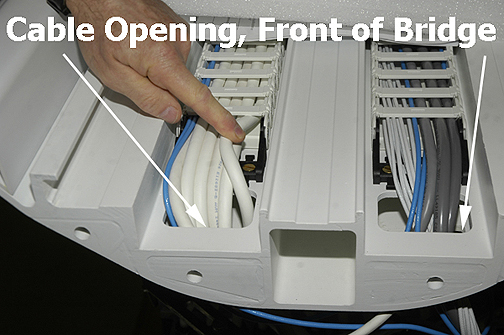
  14. Feed loose end of cable connections up through the opening at the front of the rear pedestal bridge and let them lay freely on the bridge.
    Figure 8. Cable Track Opening in Bridge
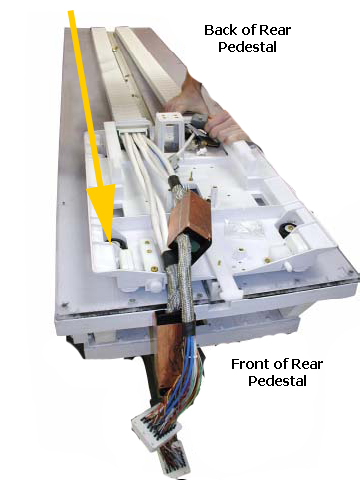
  15. Starting at the rear of the LPCA, pull cable connectors through the cable well of the bridge, under the LPCA, and out of the back of rear pedestal. Allow the cable track to hang freely.
  16. Starting from the front of the LPCA, pull the cable track (the side that includes the baluns) through the opening on the LPCA in a forward direction.
    Figure 9. Removal Path of P1/P2 Cable Track
Topic ID: id_SL2207285-1061485

Removal of A-Port Connector Cable Track

Procedure

  1. Drive the LPCA and cradle into the bore to within 1 foot (30 cm) of the end of the bridge.
  2. At the foot of the table, twist or squeeze the cradle release handle to detach the cradle from the LPCA, and then pull the cradle by hand to the home position so that it is fully retracted back onto the table top.
  3. Undock the table and relocate it away from the magnet.
  4. Perform LOTO on the rear pedestal, and. See the MR Service Safety Manual, PN 5452735.
  5. Perform system shutdown.
  6. Remove the LPCA cover. See Figure 1.
  7. Remove both rear pedestal side covers.
  8. Remove the P1 and/or P2 quick release modules. Use sufficient force to pull the module forward so it slides off the track. See Figure 2.
  9. To create enough space to remove and replace the A-port connector cable track, remove the two slotted brass screws from the bottom of the P2 cable mount bracket as shown in Figure 4 and set it aside.
    Note: Do not remove the connector from the cable mount bracket.
  10. Remove four slotted brass screws from top of LPCA bulkhead plate. Carefully move wires out of the way when removing screws.
    Figure 10. Top of Bulkhead Plate
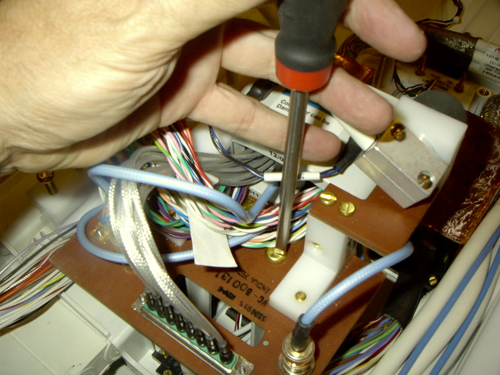
  11. On the bottom of the bulkhead plate, remove the J1 connector first. Tilt the plate up to allow easier access to the retaining screws of J1.
  12. With the plate still tilted, remove the remaining connectors (J2, J4, and J5) from the bottom of the plate.
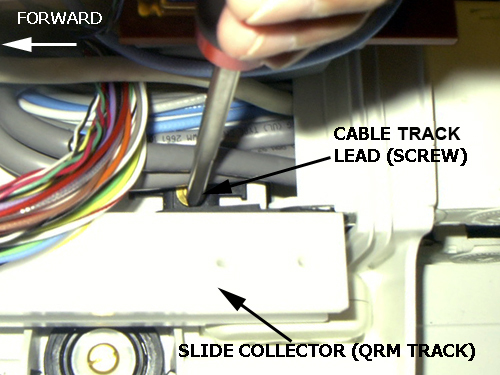
  13. Remove the two slotted head brass screws that secure the cable track lead to the base of the LPCA.
    Figure 11. Cable Track Lead Screws
  14. At the back of the LPCA, pull the cable track through the cable frame (opening) of the LPCA assembly and let it hang freely.
  15. Remove the two standard head screws that secure the cable track lead to the front of the rear pedestal bridge. See Figure 7.
  16. Disconnect all cable connections that feed from the front end of the cable track to points throughout the rear pedestal.
    Table 6. 32 Channel A-Port Legacy Cable Track Connection Points
    LPCA End Other End
    PED-LPCA J1PED-Hub-slot1 A
    PED-LPCA J5PED J2, blue cable (on the right side)
    PED-LPCA J2PED-Hub-slot_11 J6
    Rear microphoneRun M3346 MAG-SRI-J31
    PED-LPCA J4PED-Load-A, at the back of the rear pedestal
    PED-LPCA J3PED-TIM J1 (LPCA LED and switch cable)
  17. Feed the loose end of cable connectors up through the opening at the front of the rear pedestal bridge and let it lay freely on bridge.
    Note: Maneuver the J6 connector so that it is level (straight) and angled in a diagonal to pass through the opening in the bridge.
  18. At the front of the rear pedestal bridge, pull the cable track through the cable well until the cable clears the underside of the LPCA.
Topic ID: id_SL1985126-1061485

Installation of New Cable Track

Procedure

  1. Move the replacement cable track into position.
  2. To ensure proper installation and reconnection of cables, reverse the Removal procedures above (Step 16 or Remove Cable Track).
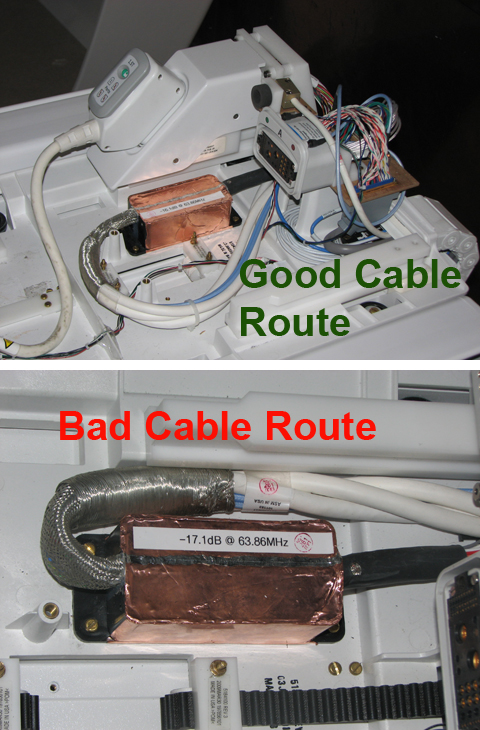
    Note: Wire tie the cables out of the way of the quick release module and slide mounting. The quick release module must slide freely without interference.
    Figure 12. Proper Cable Routing
  3. Slide the quick release module to ensure it is fully inserted and there is no interference from the cable installation.
  4. Apply two drops of Loctite to each screw, then connect the four screws that secure the track assembly to the bridge and LPCA.
    Note: Failure to apply Loctite to each cable chain screw before installation may result in screws working loose later and causing spike noise.
  5. Remove LOTO. See the MR Service Safety Manual, PN 5452735.
  6. Start up the software .
  7. Replace the LPCA cover.
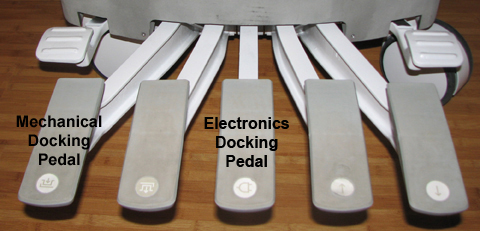
  8. Dock the patient table to drive the LPCA to the home position and reattach it to the cradle/patient table. Be sure to dock the electronics on 32-channel systems by pressing the foot pedal.
    Figure 13. Electronics Docking Pedal
Topic ID: id_15229259

Finalization

Procedure

Perform Check Scan.