- id_2011697
- Version: 4.0
- Date: Jul 10, 2019 4:11:54 PM
Changing the BIOS password - admin password unknown - HP Z420
Change the BIOS password if the admin password is unknown.
important: Disconnect the power cord from the computer and allow the internal components to cool before doing these steps.
 |
|

 |
|
Procedure
- Shut down the operating system, power off the workstation and external devices, and disconnect the workstation power cord.
- (Optional) Disconnect the keyboard, monitor, and other external devices that are connected to the workstation.
- Remove the access panel.
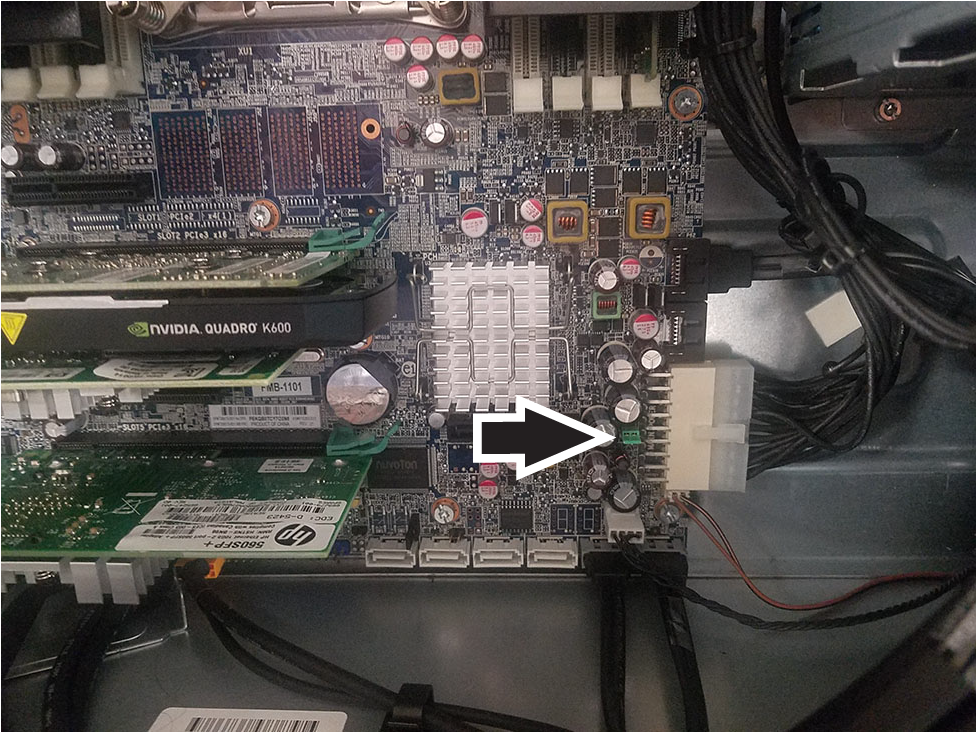
- Locate the password header and jumper. The password header is E49.
Figure 1. Jumper location
- Make sure the power cord is disconnected from the power outlet.
- Remove the jumper from pins 1 and 2.note: The password jumper is colored so it can be easily identified.
- Reconnect all components and the power to the workstation.
- Restart the workstation to the point where there is video.
- Shut down the workstation and reinstall the jumper. This will clear the passwords.
- Replace the access panel.
- Restart the workstation.