- id_2011693
- Version: 4.0
- Date: Jul 10, 2019 4:10:31 PM
Enabling or disabling emergency logon authority
Emergency logon allows the user to access the MR applications without logging in using a password. This may not be desired depending on the security level required at your site.
Prerequisites
| Safety |
|---|
|
Before working in any GE Healthcare MR suite or performing any GE Healthcare service procedure, you must:
If you have any safety concerns at any time, do not begin work or immediately stop work and move to a safe location. Immediately contact your supervisor or site safety officer for instructions on how to proceed. |
Procedure
- From Tools, launch the service browser.
- Select .
Figure 1. Emergency logon
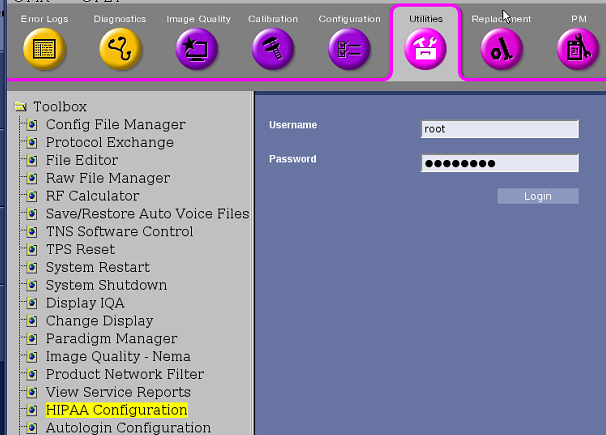
- Click Click here to go to the link.
- Log on using your user name and password.
- Select Emergency Logon Allowed.
- Change the Emergency Roles options to the desired setting.
Figure 2. Emergency logon configuration
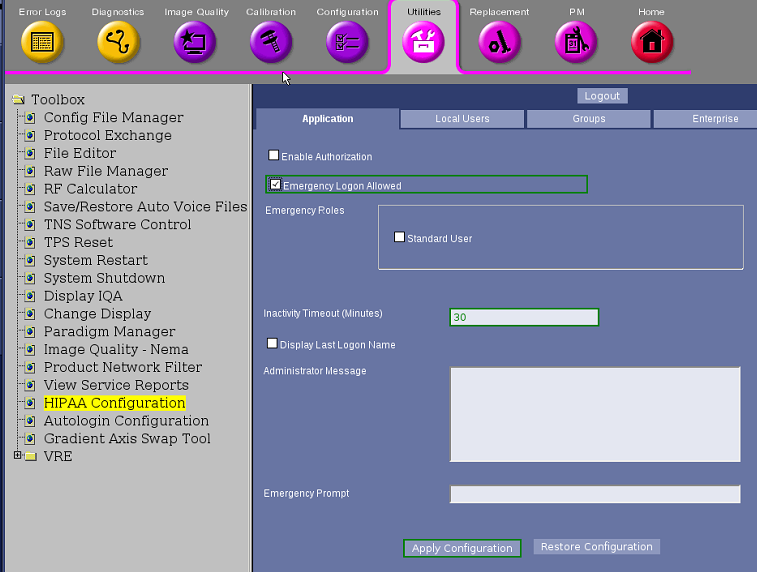
- Set Inactivity Timeout (Minutes) to 30.
- Click Apply Configuration.