
- Optima MR450w BASE 1.5T System Service Methods
- 5690012-2EN Revision 3
- 00000018WIA30CC5840GYZ
- id_20150164.0
- Feb 22, 2021 9:54:36 PM
Removing the DVD drive - Dell T5820
Remove the DVD drive from the host computer.
Prerequisites
| Personnel requirements | |||
|---|---|---|---|
| Required persons | Preliminary requirements | Procedure | Finalization |
| 1 | - | 15 minutes | - |
| Tools and test equipment | |||
|---|---|---|---|
| Item | Quantity | Part number | Manufacturer |
| Screwdriver | 1 | - | - |
| ESD Mat | 1 | - | - |
| ESD Strap | 1 | - | - |
| 4 mm Hex Key Wrench | 1 | - | - |
| Required conditions |
|---|
| To prevent damage, do not remove the new DVD drive from its antistatic packaging until you are ready to install it. |
|
Use an antistatic wrist strap and mat while performing this procedure to prevent electrostatic discharge (ESD). |
| Access to both the front and rear of the operator console is required. Move the console away from walls and remove obstacles in the room. |
Procedure
- Remove the two screws that secure the left side panel of the GOC.
Figure 1. GOC left side panel 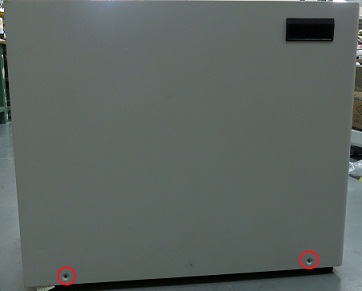 Note: The side panel has a short ground lead connecting it to the main chassis. When removing the side panel, do not strain this ground lead.
 - Disconnect the short ground lead that connects the side panel to the GOC main chassis at the center of the lead.
Figure 2. Left side panel ground lead 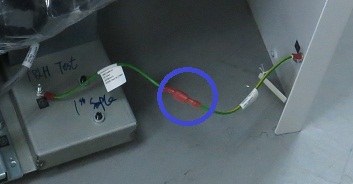
- Remove the side cover.
- Press the latch.
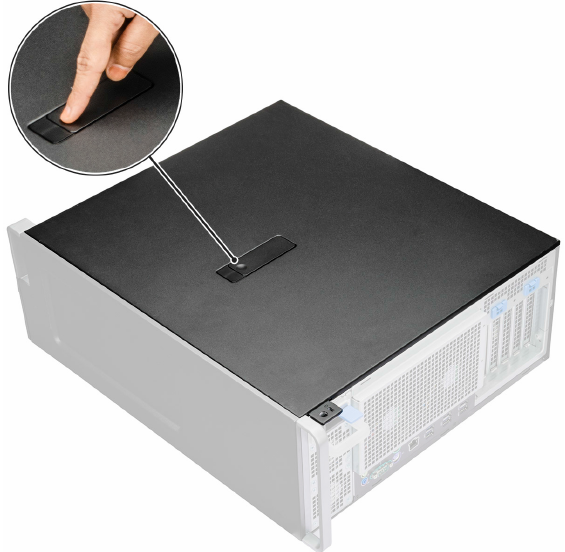
- Pull the latch upward and rotate it to release the cover.
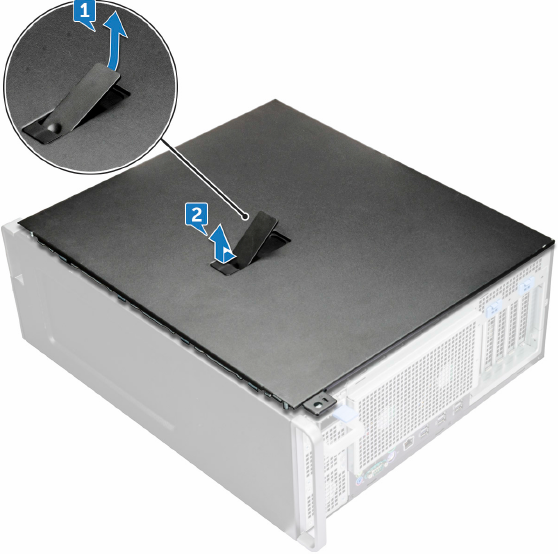
1 Pull the latch upward 2 Rotate the latch to release the cover
- Press the latch.
- Remove the DVD drive.
- Remove the screw that secures the DVD drive and push the DVD drive out of the chassis.
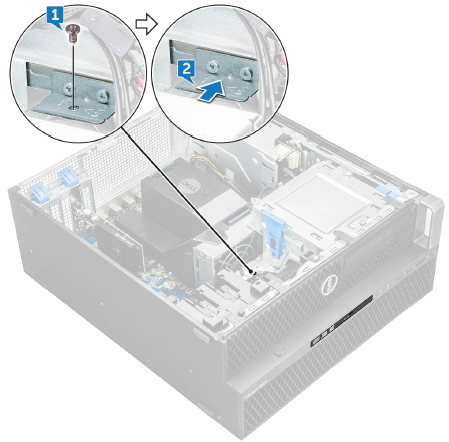
1 Screw 2 Push the DVD drive out of the chassis - Slide the DVD drive out of the host PC.
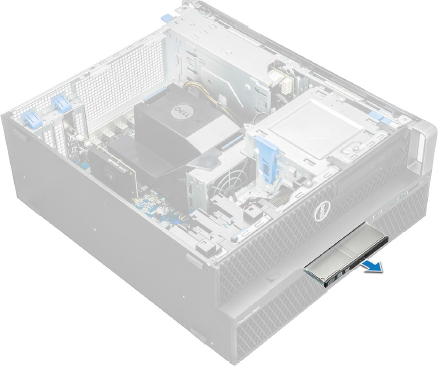
- Remove the screw that secures the DVD drive and push the DVD drive out of the chassis.