
- Optima MR450w BASE 1.5T System Service Methods
- 5690012-2EN Revision 3
- 00000018WIA30E1E030GYZ
- id_123735051.2
- Jul 5, 2019 10:03:33 PM
HP 8400 Ethernet Switch Replacement
Prerequisites
| Required persons | Preliminary requirements | Procedure | Finalization |
|---|---|---|---|
| 1 | Not Applicable | 15 minutes | 5 minutes |
| Item | Quantity | Effectivity | Part number | Manufacturer |
|---|---|---|---|---|
| Standard Screwdriver | 1 | - | - | - |
| ||||

Procedure
- Remove the three screws at the rear of the GOC that secure the
right side panel.
Figure 1. Removing Screws 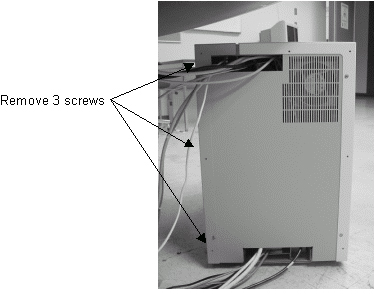
- Remove all cables connected to the Ethernet switch, and make
a note of the labeling for reconnection.
Figure 2. Removing Cables 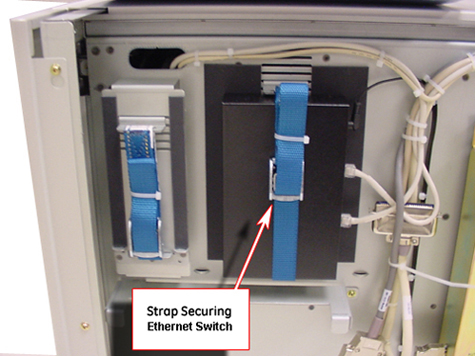
Finalization
- Restore power to the GOC and reboot the computer.
- Perform a test scan to ensure proper operation.