- Optima MR450w BASE 1.5T System Service Methods
- 5690012-2EN Revision 3
- 00000018WIA3067E030GYZ
- id_123739941.10
- Dec 16, 2019 12:34:22 PM
HP Z420 Computer Replacement
Prerequisites
| Required persons | Preliminary requirements | Procedure | Finalization |
|---|---|---|---|
| 2 | Not Applicable | 120 minutes | 30 minutes |
| Item | Quantity | Effectivity | Part number | Manufacturer |
|---|---|---|---|---|
| Screwdriver set | 1 | - | - | - |
| Item | Quantity | Effectivity | Part number | Manufacturer |
|---|---|---|---|---|
| HP Z420 computer | 1 | - | - | - |
| Side holder bracket | 1 | - |
See the FRU manual. | - |
| Back holder bracket | 1 | - |
See the FRU manual. | - |
| Dust filter (if needed) | 1 | - | - | - |
| ||||
About this task
Overview
This procedure provides instruction to replace the HP Z420 host computer with another HP Z420.
Prepare Workstation for Host Computer Removal
Procedure
Remove Host Computer from GOC
Procedure
- Remove the two screws that secure the left side panel of the GOC.Note:
The side panel has a short ground lead connecting it to the main chassis. When removing the side panel, do not strain this ground lead.
Figure 1. Left Side Panel Ground Lead 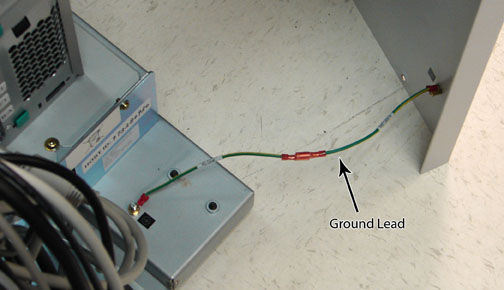
- Remove all the cables connected to the host computer.
Confirm that the cables are properly labeled. Note their locations for reattachment.
Figure 2. HP Z420 Cable Configuration 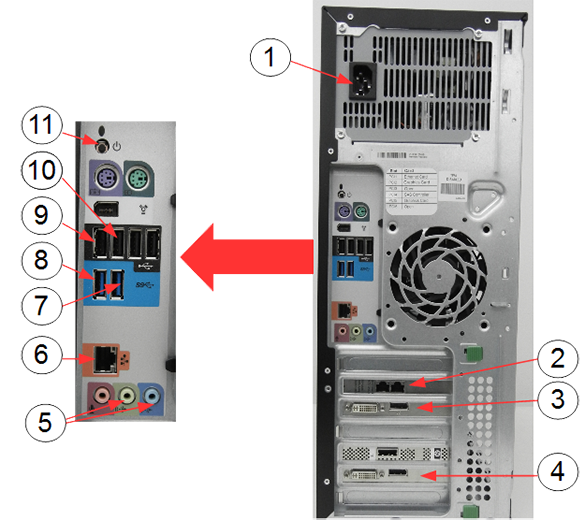
Item Description 1 Power supply 2 Ethernet cable to PGR J2 3 IRDC connection to LCD monitor 4 System monitor connection to LCD monitor 5 GOCAA (line in, line out) 6 Ethernet switch 7 IRDC USB ports 8 USB serial converter 9 Keyboard USB extension cable 10 Mouse USB cable 11 Rear power button - Loosen the strap and remove the hook.
Figure 3. Removing Strap 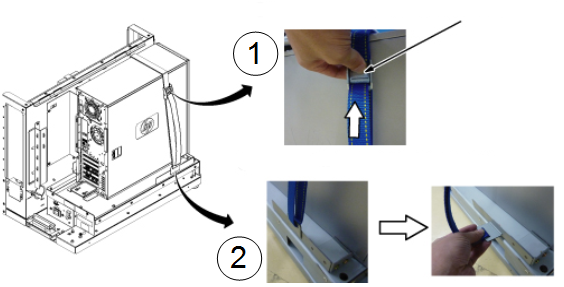
Item Description 1 Press release lever of buckle and loosen strap. 2 Remove the hook. - Remove the host computer from the GOC.
Figure 4. Removing HP Z420 Computer from GOC 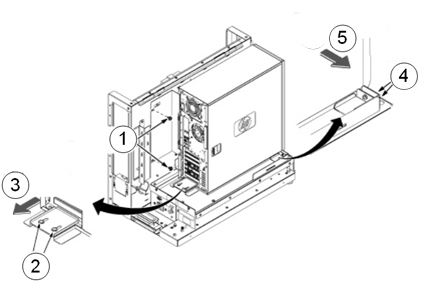
Item Description 1 Remove the two screws securing the back bracket to the GOC. 2 Loosen the two screws on the back slide plate. 3 Slide the plate backward. 4 Loosen the two screws on the side slide plate. 5 Slide the plate in the direction of the arrow.
Install New Host Computer
About this task
The replacement computer may have two Torx/slot screws (not Phillips) that must be removed before attaching the back bracket. Remove the screws using a slot screwdriver. Install the Torx/slot screws into the defective computer before returning it for repair.
Procedure
- Position the computer in the GOC as shown below.
Figure 5. Computer Placement 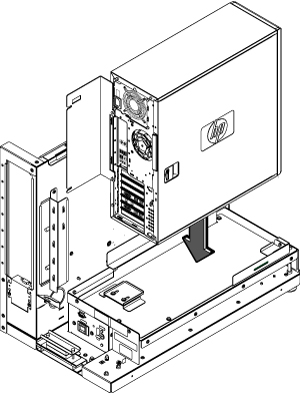
- To secure the computer:
Figure 6. Securing Computer 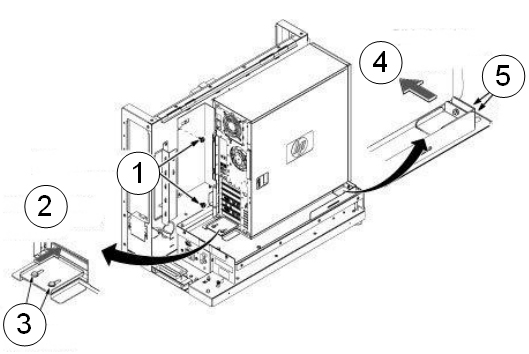
Item Description 1 Transfer the back bracket to the new host and secure with the two screws. 2 Slide the plate toward the PC until it bumps. 3 Secure with two screws. 4 Slide the plate toward the PC until it bumps. 5 Secure with two screws. - Tighten the strap as follows:
- Hook the bracket to the slot of the bottom plate.
- Pull and tighten the strap to secure the computer.
Figure 7. Tighten Strap 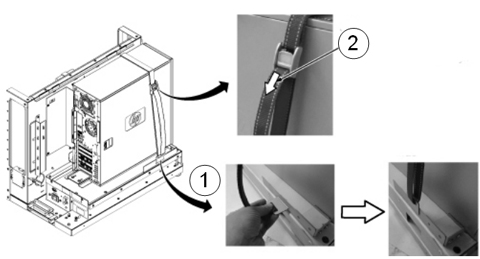
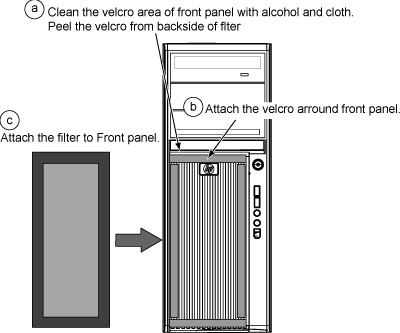
Item Description 1 Insert the strap hook into the bracket. 2 Pull the strap in the direction of the arrow and tighten. - Remove the dust filter from the old computer. Remove the Velcro strips from the inside of the front cover of the old machine and the dust filter. Attach them to the inside of the new machine’s cover. Attach the Velcro strips to the dust filter. Install the dust filter. If the old filter is not reusable, install a new one.
Figure 8. Attaching Dust Filter