
- Optima MR450w BASE 1.5T System Service Methods
- 5690012-2EN Revision 3
- 00000018WIA3015E030GYZ
- id_123749461.2
- Jul 5, 2019 6:08:29 PM
HP Z400 Ethernet Switch Replacement
Prerequisites
| Required persons | Preliminary requirements | Procedure | Finalization |
|---|---|---|---|
| 1 | Not Applicable | 15 minutes | 5 minutes |
| Item | Quantity | Effectivity | Part number | Manufacturer |
|---|---|---|---|---|
| Standard Screwdriver | 1 | - | - | - |
| ||||

Procedure
- Remove the right cover of the GOC, and disconnect the ground
lead that connects the cover to the main chassis.Note:
Avoid straining the short ground lead.
Figure 1. Removing Right Cover 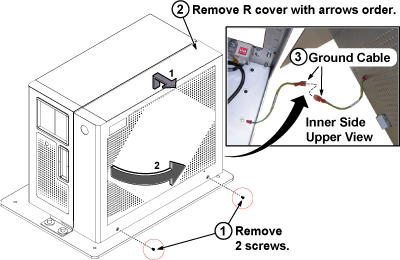
- Remove all cables connected to the Ethernet switch, and make
a note of labeling for reconnection.
Figure 2. Cable Removal from Ethernet Switch 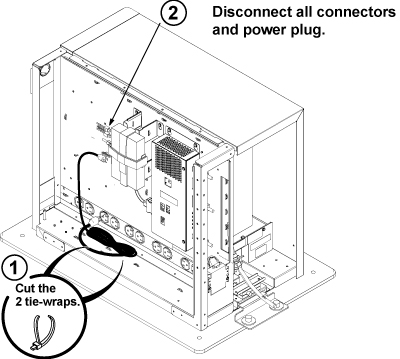
- Remove the Ethernet switch from the Ethernet switch support
bracket on the GOC.
Figure 3. Ethernet Switch Removal 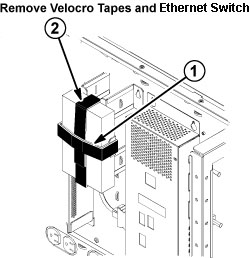
Finalization
- Restore power to the GOC and reboot the computer.
- Perform a test scan to ensure proper operation.