Setting up software tool to calibrate UPM - MNS forward power
Sets up software for calibrating Universal Power Monitor (UPM) and Multi-Nuclear Spectroscopy (MNS) forward power.
About this task
This procedure applies to both the AMT and
CPC amplifiers.
Procedure
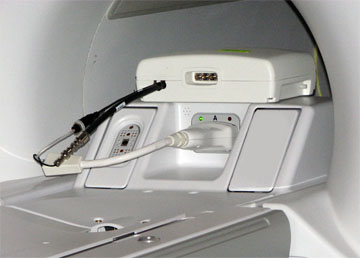
Attach the MNS 31P TR switch cabling to the LPCA A connector.
Figure 1. MNS 31P TR switch connection to LPCA (MR750 system shown)
Move the cradle to the Home position and then drive it into the bore.
Press Landmark when the alignment light is approximately where the center of the head coil would be.
Start the UPM tool:
(For non-proprietary Service Tools) From the Common Service Desktop, select Calibration > UPM Tool > Click here to start this tool.
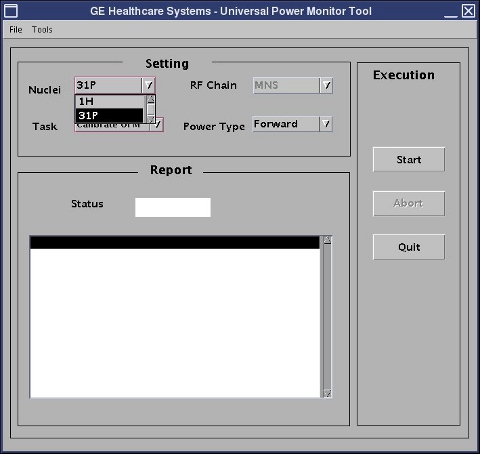
The UPM tool window appears.Figure 2. UPM tool
Make the following selections for the settings:
Table 1. Settings for MNS RF chain
Setting
Value
Task
Calibrate UPM
RF Chain
MNS
Power Type
Forward
Select Start, make sure that the hardware setup is correct, and select Yes.
After approximately 1 minute, you are asked to confirm the peak power value output from the amplifier. The peak power should be within the limits specified in 8 kW 3.0T MNS Amplifier Calibration. If the power read from the power meter is within these limits, click Yes. Otherwise, click No and recheck calibration of the RF amplifier.
The window shows the current step in progress, and indicates Pass/Fail when complete.