• Discovery MR750 3.0T System Service Methods
  • 5690009-2EN Revision 4
  • Object ID: 00000018WIA30430450GYZ
  • Topic ID: id_2021407 Version: 3.1
  • Date: Dec 18, 2020 3:29:43 PM

Finalizing UPM - MNS setup and calibration

Finalizes setup and calibration of the Universal Power Monitor (UPM) and Multi-Nuclear Spectroscopy (MNS) components.

Procedure

  1. If you have not run the UPM MNS functional check during this procedure, run UPM - MNS Functional Check.
  2. In the UPM Tool, select Quit.
  3. Set RF Enable S2 to Disable (down) on the exciter.
    Figure 1. MNS exciter RF enable S2 switch location in disable (down)
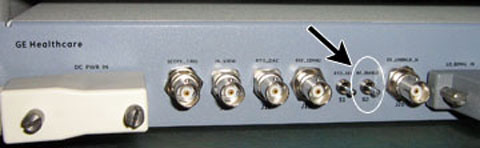
  4. Remove the cables and power measurement equipment from the MNS amplifier.
  5. Reattach the RF OUT cable at the rear of the cabinet.
  6. Set SW2 to TR Enable (up) on the driver module.
  7. Set RF Enable S2 to Enable (up) on the exciter.