
- Discovery MR750 3.0T System Service Methods
- 5690009-2EN Revision 4
- 00000018WIA30C9E030GYZ
- id_123736601.6
- Oct 11, 2021 3:47:42 PM
ICN Power Supply Replacement (Dell R620, R630, and R640)
Prerequisites
| Required persons | Preliminary requirements | Procedure | Finalization |
|---|---|---|---|
| 1 | 10 minutes | 30 minutes | 20 minutes |
| Item | Quantity | Effectivity | Part number | Manufacturer |
|---|---|---|---|---|
| Power supply (2 types – depends on ICN type) | 1 | - |
See FRU manual. | - |
| ||||

About this task
Overview
This procedure documents the process for replacing the power supply in the Dell R620, R630, and R640 ICNs.
Note:
Refer to the following table to determine the appropriate Gen Type and compare this with the ICN part number at the site. Consult the FRU manual to order the correct replacement power supply or supplies.
| ICN Type | Part Number Series |
| R620 (Gen 5) | 5921000x |
| R630 (Gen 6) | 5931000x |
| R640 (Gen 7) | 5941000x |
Procedure
- On the front of the ICN, lift up on the locking tabs on the
right side and the left side of the ICN.
Figure 1. Locking Tab on Left Side of Dell R620, R630, and R640 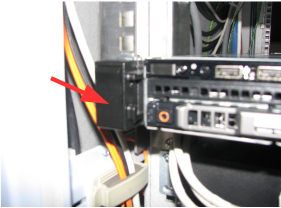
- Move the orange locking lever to the center of the supply and
then pull the power supply out of the ICN chassis.
Figure 2. Remove ICN Power Supply 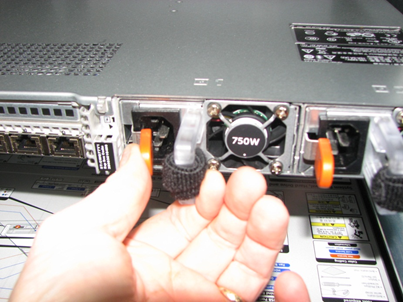
Finalization
- From the CSD, turn on the ICN. See ICN On/Off Procedure.
- Reboot the host system computer.
- Perform Check Scan.