• SIGNA MR355 / SIGNA MR360
  • Service Manual
  • 5856356-3EN Revision 5.0
  • Basic Service Documentation. Copyright General Electric Company.
  • Object ID: 00000018WIA301FF840GYZ
  • Topic ID: id_2015614 Version: 3.1
  • Date: Apr 23, 2020 8:56:37 PM

Setting the boot sequence - Dell T5810 (MR28 or later)

Specifies the order of host computer boot devices.

Prerequisites

Personnel requirements
Required personsPreliminary requirementsProcedureFinalization
1-5 minutes-

About this task

Use these steps for MR28 and later only. For MR27 and earlier, see Setting the boot sequence - Dell T5810/T5820 (MR27 or earlier).

Procedure

  1. Turn on or restart the computer. Press F2 to enter the BIOS Setup menu.
    Note: Optionally, press F12, then select the BIOS Setup menu.
  2. In the Settings pane, expand the General menu.
  3. Select the Boot Sequence option.
    Figure 1. Boot sequence setup
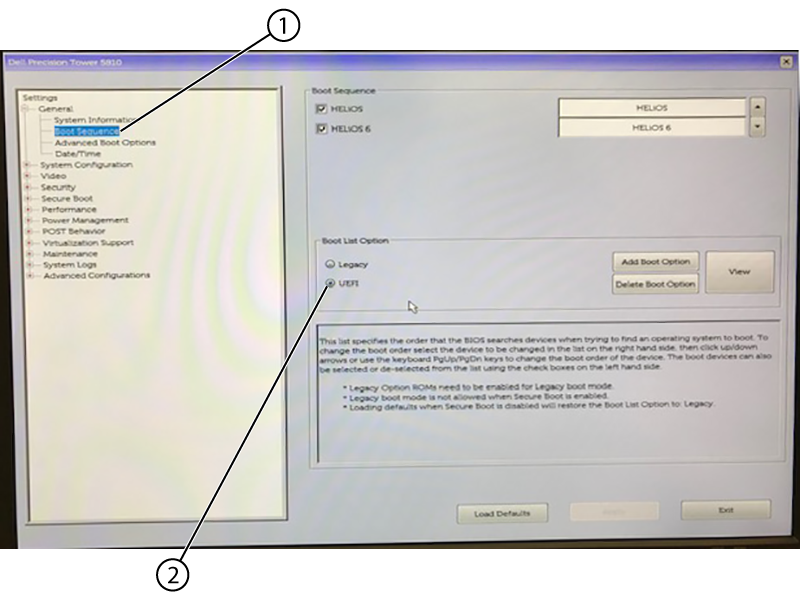
    1Boot sequence
    2UEFI
  4. In the Boot Sequence pane, select UEFI in the Boot List Option area.
    Note: All of the other options are auto-selected.
  5. At the bottom of the screen, click Apply, then click Exit to save changes and exit BIOS.
  6. If you are setting up the computer for the first time, see Setting the BIOS password - Dell T5810/T5820.