- SIGNA MR355 / SIGNA MR360
- Service Manual
- 5856356-3EN Revision 5.0
- Basic Service Documentation. Copyright General Electric Company.
- 00000018WIA30E1D630GYZ
- id_20117214.1
- Jun 2, 2020 12:00:45 PM
Setting the BIOS password - Dell T5810/T5820
Sets the password for the first time. Do not use this procedure if the password has been previously set.
Prerequisites
| Personnel requirements | |||
|---|---|---|---|
| Required persons | Preliminary requirements | Procedure | Finalization |
| 1 | - | 5 minutes | - |
Procedure
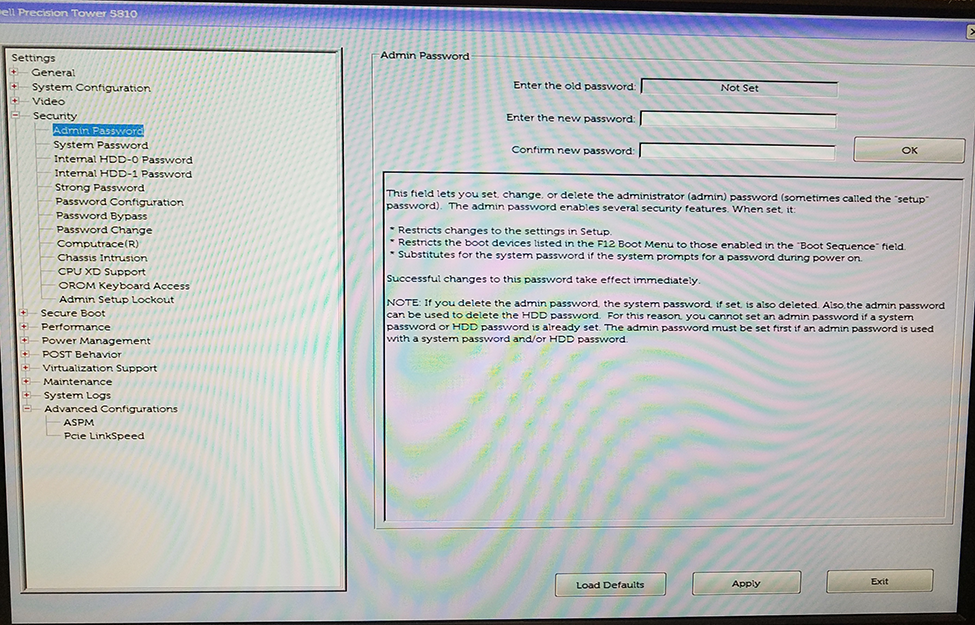
- In the Settings pane, expand the Security menu.
Figure 1. Password setup screen