- SIGNA MR355 / SIGNA MR360
- Service Manual
- 5856356-3EN Revision 5.0
- Basic Service Documentation. Copyright General Electric Company.
- 00000018WIA304C0030GYZ
- id_131062391.2
- Jul 5, 2019 10:46:04 PM
ICE SRI PAC Fiber Optic Checks
Prerequisites
| Required persons | Preliminary requirements | Procedure | Finalization |
|---|---|---|---|
| 1 | - | - | - |
| Item | Quantity | Effectivity | Part number | Manufacturer |
|---|---|---|---|---|
| Fiber Optic Light Meter Kit | 1 | - |
46-317830G1 | - |
| ||||||||


| Condition | Reference | Effectivity |
|---|---|---|
| - | - |
About this task
This procedure describes how to turn on the fiber optic drivers in a Signa system. Software output control is provided for the HFBR-1522/HFBR–1528 drivers (plastic cable) on the ICE, the HFBR-1522s (plastic cable) on the PAC and the SRI.
ICE, SRI, PAC FIBER OPTIC CHECKS
Procedure
- The Fiber Optic Test can be selected from the Diagnostics menu.
The drivers on the ICE (See Figure 1) remain on until the Fiber Optic Test is canceled.
The drivers on the link remain on until the test is canceled, or a
break occurs in the link upstream from the device being tested.
Figure 1. ICE LOCATION 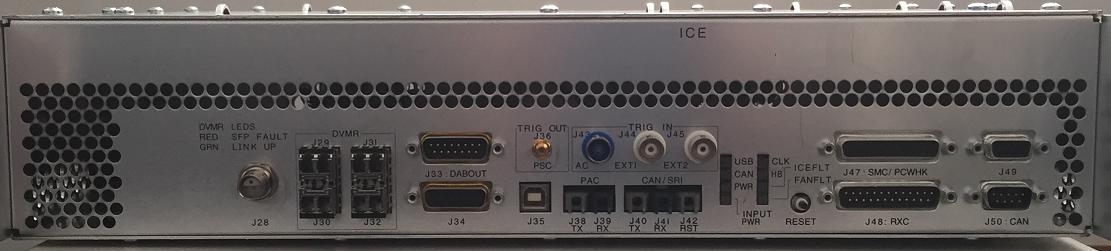
Fiber Optic Power Level Measurement
Procedure
- Remove protective cover and install the appropriate adapter
(46-320033G1 for plastic cables;
FOA-32 for glass cables) onto the fiber optic meter. Plug test cable
(1/2 m for plastic (46-307564P4),
1 m for glass (46-307584P3)) onto
the adapter. See Figure 2.
Figure 2. FIBER OPTIC MEASUREMENT CONFIGURATION 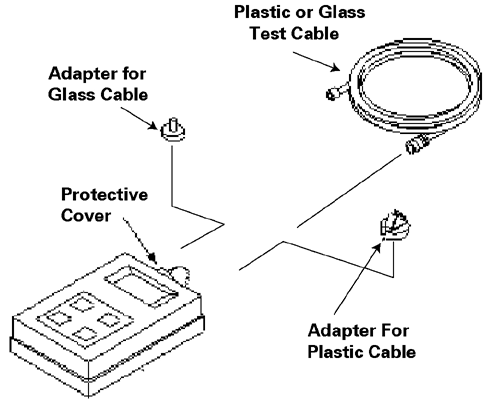
- Measure transmitter output through test cable with EXFO fiber
optic meter. Compare this value with specification. See Figure 3. If value
is out of spec, there is a problem. It could be a power supply problem,
transmitter problem, or functional problem with board. Do not proceed
until this value is within spec.
Figure 3. 1.5T FIBER OPTIC POWER LEVELS 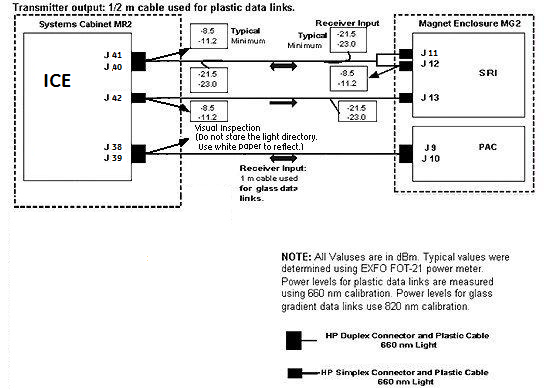 Note:
Note:The fiber optic connectors are a latching type connector. For the plastic cable connectors, press on the latch to release. For the glass cable connectors, press on the outer connector shell and rotate a quarter turn.
TEST SPECIFICATIONS
About this task
The following data characterize fiber optic power levels in a Signa system. Typical data were obtained from a limited sample of systems. Typical values may cover a wide range due to the effects of cable routing, connecting, and cable length which may vary from system to system. Minimum values, however, are absolute, and will be the same for fixed sites, mobiles, and T/R(s).
Procedure
ICE J41 to SRI J11; ICE J42 to SRI J13; SRI J12 to ICE J40; ICE J39 to PAC J9; PAC J10 to ICE J38;
-
Nonmodulated HFBR-1522/HFBR-1528 transmitter output through 1/2 m test cable:
Typical: -8.5 dBm
Minimum: -11.2 dBm
-
Nonmodulated HFBR-1522/HFBR-1528 transmitter output through 147 ft cable:
Typical: -21.5 dBm
Minimum: -23.0 dBm
Do not observe the light directory. Use white paper and reflect the beam to observe.
Finalization
Procedure
- Turn off the fiber optic meter. Disconnect all kit components
used in measurement scheme and return to kit.
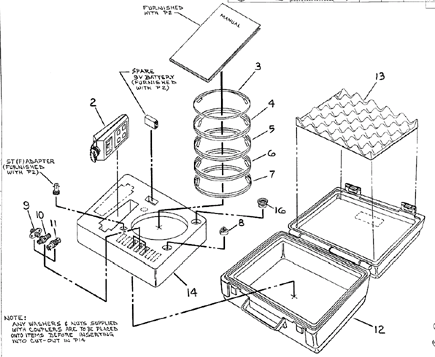
Figure 4. Fiber Optic Light Meter Kit