- id_2001664
- Version: 7.0
- Date: Oct 9, 2019 5:14:30 PM
Doing a TPS Reset
This document provides instructions for performing a TPS reset and examples of the results output.
Prerequisites
| Personnel Requirements | |||
|---|---|---|---|
| Required persons | Preliminary requirements | Procedure | Finalization |
| 1 | - | 15 minutes | 10 minutes |
| Safety |
|---|
|
Before working in any GE Healthcare MR suite or performing any GE Healthcare service procedure, you must:
If you have any safety concerns at any time, do not begin work or immediately stop work and move to a safe location. Immediately contact your supervisor or site safety officer for instructions on how to proceed. |
Procedure
- To perform a TPS reset, open the Common Services Desktop.
- Under the Utilities tab, click TPS Reset in the left navigation pane.
Figure 1. Utilities tab
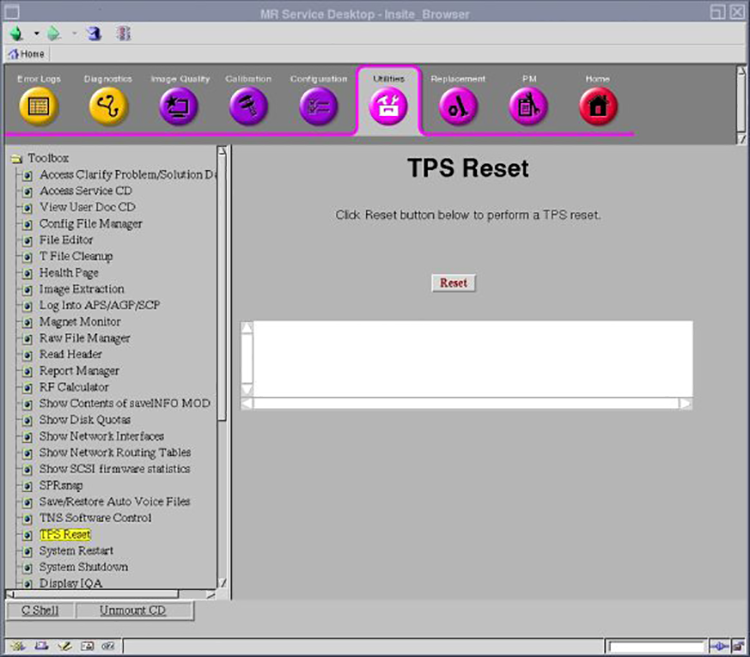
- Click Reset to begin the reset. The following sequence of messages appears:
- Reset/Download TPS was successful.
- Reset/Download TPS in progress.
- TPS reset has completed.