(For non-proprietary service tools) From the Common Service Desktop, select Calibration > Grafidy. Select Click here to start this tool.
Result
The Grafidy tool window appears.
Determine if the existing terms should be zeroed out.
For new system calibrations, click on the Zero Out tab.
Select all the terms on the left and click Zero Out Cal Values before proceeding to the next step.
For performance checks only, proceed to the next step.
Select the Auto Mode tab. All three coil axes are selected automatically.
Click Scan to start the calibration.
When the scan is active, it can be stopped by clicking Abort on the window and pressing Stop on the keyboard.
Highlight the desired axis and click Show to display the result graphs.
In auto and manual modes, a number of signal checks are performed to ensure the proper state of the Grafidy fixture. The following signals are examined from every channel. An error is reported if a problem is found.
Position
Signal-to-Noise Ratio (SNR)
Signal saturation
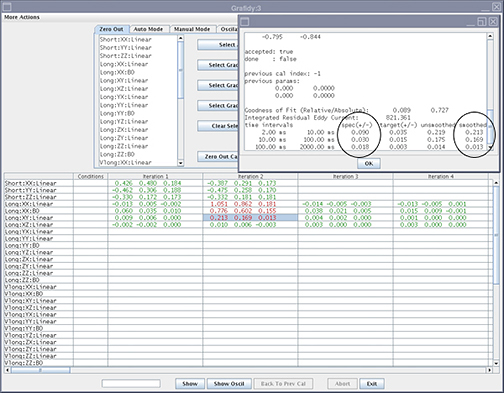
The Grafidy software runs multiple scans to bring each term into specification. It iterates up to the maximum amount specified (default is five iterations). When each component finishes a scan/analysis iteration, the residual of the eddy current of the measurement displays in the results table. The results are color-coded.
Text color
Definition
Red
Values above specification
Green
Values within specification
Auto mode acquires data in the following order:
DC
Vlong
Long
Short
Long (x & y) - second pass
Review the numeric output values from the auto mode scan. Verify that the results of the final iteration for each component are within specification (green).
Figure 1. Reading output with specifications and actual values (smoothed)
If a component is not within specification after the maximum number of iterations, use manual mode to calibrate that component.