• SIGNA™ Hero 3.0T Service Methods
  • 5852800-8EN Revision 1.0
  • Object ID: 00000018WIA3012C630GYZ
  • Topic ID: id_2011625 Version: 4.5
  • Date: Oct 11, 2021 6:31:30 PM

Checking the patient microphone

Topic ID: task_onc_v2k_xlb

Maximum SCIM Speaker Volume – Patient’s Voice

Procedure

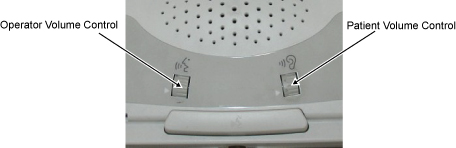
  1. At the SCIM, set the Patient Volume Control to the maximum setting by rotating the Patient volume wheel Up with your finger.
    Figure 1. Volume Controls on SCIM
  2. Work with the customer to speak into the patient microphone from the rear of the magnet bore. The second person listens at the SCIM/keyboard speaker and confirms that volume and sound quality are adequate.
  3. If adjustment is required, adjustments will be made after all volume checks have been performed.
  4. Proceed to Minimum SCIM Speaker Volume – Patient’s Voice.
Topic ID: task_plx_2dk_xlb

Minimum SCIM Speaker Volume – Patient’s Voice

Procedure

  1. At the SCIM, set the Patient Volume Control to the minimum setting by rotating the Patient volume wheel Down with your finger.
    Figure 2. Volume Controls on SCIM
  2. Work with the customer to speak into the patient microphone from the rear of the magnet bore. The second person listens at the SCIM/keyboard speaker and confirms that volume and sound quality are adequate.
  3. If adjustment is required, adjustments will be made after all volume checks have been performed.
  4. Proceed to Checking the patient speaker.