
- Discovery MR750 3.0T System Service Methods
- 5690009-2EN Revision 4
- 00000018WIA3090C630GYZ
- id_20115966.2
- Oct 11, 2021 6:31:29 PM
Checking and adjusting the patient intercom functionality
GOC Audio Assembly (GOCAA) controls are adjusted at factory for best sound quality. This document describes how to check and confirm volume and quality of sound heard from speaker in the magnet bore and from speaker at the Scan Control and Intercom Module (SCIM). Directions for sound adjustments are also provided if needed.
Prerequisites
| Personnel requirements | |||
|---|---|---|---|
| Required persons | Preliminary requirements | Procedure | Finalization |
| 1 | - | 5 minutes | - |
| Safety |
|---|
|
Before working in any GE Healthcare MR suite or performing any GE Healthcare service procedure, you must:
If you have any safety concerns at any time, do not begin work or immediately stop work and move to a safe location. Immediately contact your supervisor or site safety officer for instructions on how to proceed. |
About this task
Adjustment of GOCAA should only be necessary if:
- Field Engineer or customer determines that adjustment is required after performing checks or usage.
- GOCAA factory ideal settings are lost as a result of a past adjustment on the site.
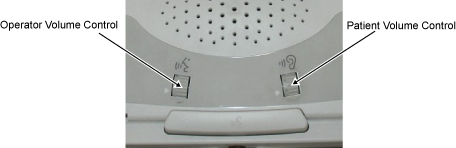
Two types of speaker volume settings can be adjusted during checks:
- Operator Volume - Controls the speaker volume in the bore (Operator’s voice).
- Patient Volume - Controls the volume of the speaker from the Scan Control and Intercom Module (SCIM)/keyboard (Patient’s voice)
Perform all available checks for Operator Volume and Patient Volume before making any adjustments.
Procedure
- Advance the cradle from the Home location 500 mm onto the bridge.
- Press Landmark, then Advance to Scan to position the cradle in the bore.