
- SIGNA MR355 / SIGNA MR360
- Service Manual
- 5856356-3EN Revision 5.0
- Basic Service Documentation. Copyright General Electric Company.
- 00000018WIA30E99030GYZ
- id_123738021.0
- May 30, 2018 1:22:27 PM
Pneumatic Patient Alert System Inspection
Prerequisites
| Required persons | Preliminary requirements | Procedure | Finalization |
|---|---|---|---|
| 1 | Not Applicable | 5 minutes | Not Applicable |
About this task
Overview
The Pneumatic Patient Alert System is a stand-alone system that allows the patient to alert the operator even when the console volume is turned down. Patient-to-Operator contact is accomplished when the patient compresses a hand-held squeeze bulb that activates an audible and visual alarm near the operator. Either a pulse or steady audible tone can be selected at the control box. The operator must reset the control box to stop the alarms. Follow the procedure below to verify proper functioning of the Pneumatic Patient Alert System.
Procedure
- Check that the green LED on the control box is lit.
Figure 1. Control and Indicator Locations 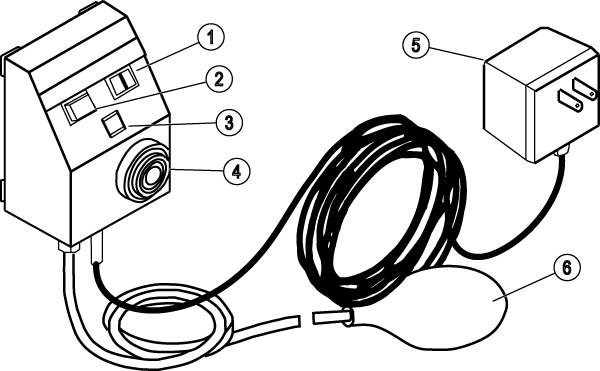
ITEM DESCRIPTION 1 Steady/Pulse Switch 2 Reset Switch Button 3 Green LED 4 Audible Alarm 5 Power Supply 6 Squeeze Bulb
Finalization
No finalization steps.