
- SIGNA MR355 / SIGNA MR360
- Service Manual
- 5856356-3EN Revision 5.0
- Basic Service Documentation. Copyright General Electric Company.
- 00000018WHA162890GYZ
- concept_a52_wq3_nmb1.6
- Sep 25, 2020 12:20:34 PM
Understand the IPM onboarding workflow
Learn about the implementation workflow stage for onboarding IPM at a customer site.
As a , you may be assigned to perform some initial onboarding activities as part of an implementation at a customer site. This part of the covers the onboarding activities you will perform in the and applications. You will perform some activities on imaging devices on site at the customer facility; those activities are outlined in this manual and described in detail in other documents (see Related documents). Instructions on using after initial onboarding are provided in the IPM User Manual (DOC2090977). For details, see Documentation access.
This figure illustrates the high-level onboarding workflow. The following descriptions identify which perform each stage and provide cross-references to topics providing more detailed information. For explanations of the components in this figure, see Edison Cloud description and Consult implementation project plans.
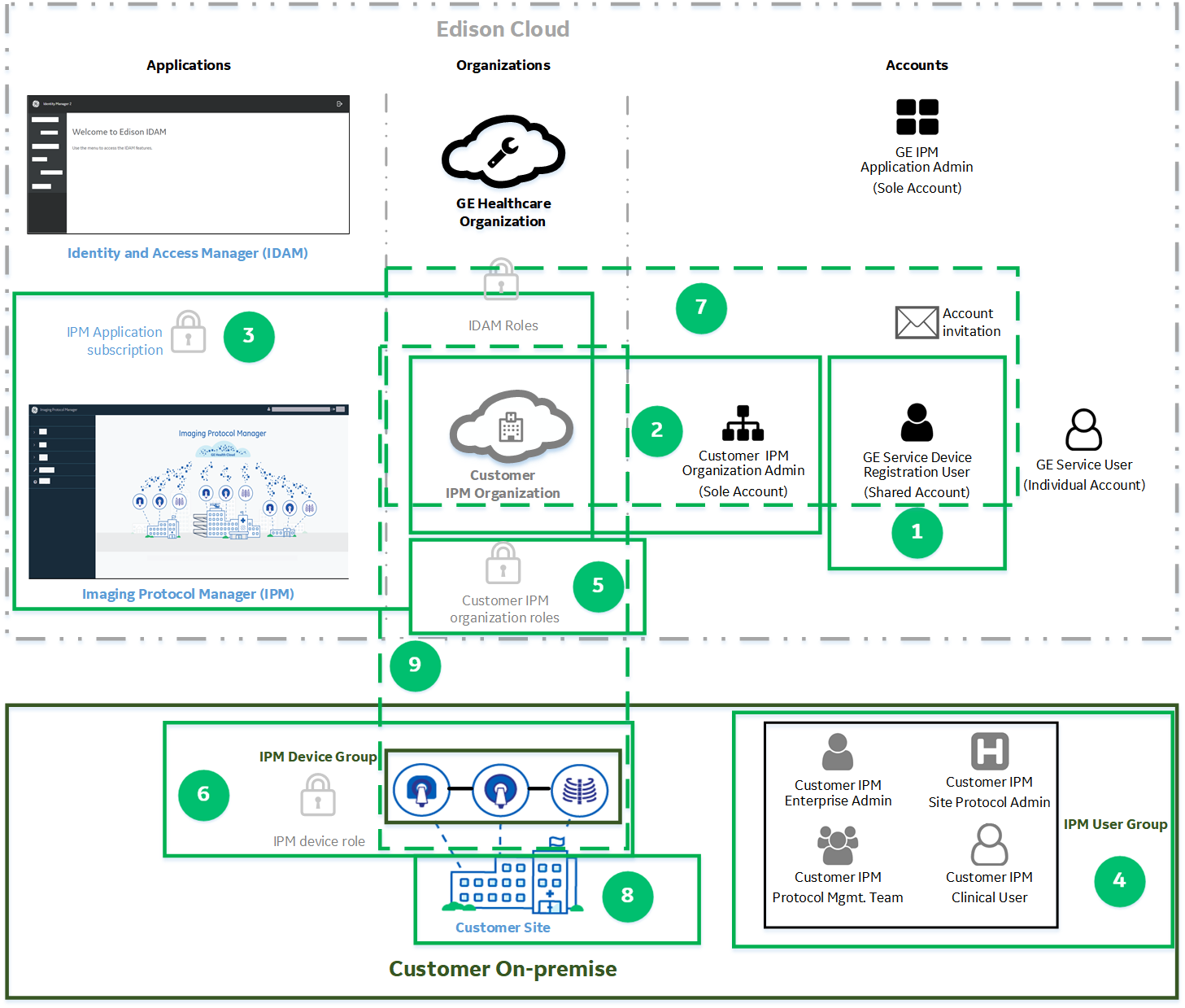
 | Create an IPM Device Registration User account The creates a account in the GE Healthcare organization and assigns it the appropriate role. |
 | Create a customer IPM organization in IDAM The creates the and invites a to create an account in the . |
 | Subscribe a customer IPM organization to the IPM application The creates a subscription request for the in the . The approves the subscription request. |
 | Create user accounts for a customer IPM organization The invites s involved in onboarding activities and s to create accounts. |
 | Assign roles to a customer IPM organization accounts The optionally creates user groups and adds members to them. The assigns appropriate roles to user groups or individual accounts for s and s. |
 | Create an IPM device group The adds a device group to the and assigns it the appropriate role. |
 | Link IPM Device Registration User and Customer IPM organization The associates the account with the .The signs signs in to and completes the bootstrap process. |
 | Create a site in a customer IPM organization The creates one or more sites for a in the application and adds other users to the sites. |
 | Connect imaging devices to IPM The connects imaging devices in the customer facility to the on the . |