- id_2010240
- Version: 1.6
- Date: Jul 4, 2019 9:08:47 PM
Running an SprSnap from the Service Desktop
Prerequisites
| Safety |
|---|
|
Before working in any GE Healthcare MR suite or performing any GE Healthcare service procedure, you must:
If you have any safety concerns at any time, do not begin work or immediately stop work and move to a safe location. Immediately contact your supervisor or site safety officer for instructions on how to proceed. |
Procedure
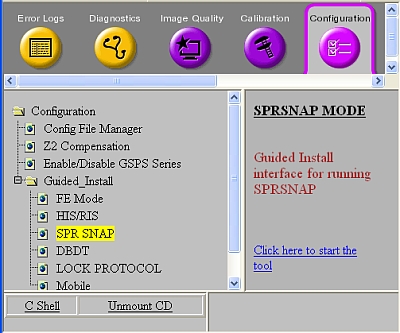
- Open the Common Service Desktop, and under the Configuration tab, expand Guided Install and select SPR SNAP. Click the Click here to start the tool link.
Figure 1. Guided Install SPR SNAP
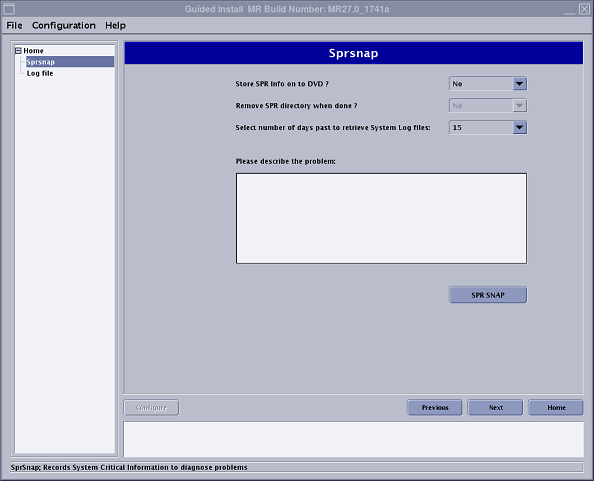
- When the SprSnap dialog window displays, fill in the required information:
-
Select or to store SPR information on DVD.
If you choose to save to DVD, you can select yes or no to delete the SprSnap directory after writing the DVD. If you select no, you need to delete the directory manually (see Deleting an SprSnap Directory)
- Enter a description of the problem and click SPR SNAP.
Figure 2. SprSnap Dialog Window
-
- When the SprSnap directory done message displays, make a note of the directory and click OK.
- If a message pop-up of “There is an existing sprsnap in progress, please wait and try later.” It indicates another instance of sprsnap running, you can wait until current one completes them click SPR SNAP again, or wait and collect new generated snap under /export/home/snap.