- id_2010242
- Version: 1.3
- Date: Jul 4, 2019 9:08:47 PM
Deleting an SprSnap Directory
Prerequisites
| Safety |
|---|
|
Before working in any GE Healthcare MR suite or performing any GE Healthcare service procedure, you must:
If you have any safety concerns at any time, do not begin work or immediately stop work and move to a safe location. Immediately contact your supervisor or site safety officer for instructions on how to proceed. |
Procedure
- Log in to the host computer as root. note:
It is possible that the customer changed the default password. If you cannot log in, contact the customer for the correct password.
- From a C Shell terminal, locate the directory you want to delete in /export/home/snap/site.
- Type cd/export/home/snap/site/ and press Enter.
- Type ls to view the files.
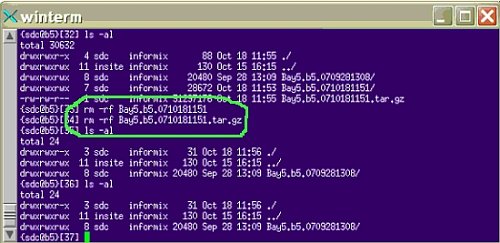
- Type rm-rf <filename>.
-r deletes the directory recursively, and -f forces all files to be deleted without asking permission.
note:If you created a tarball file, you should delete it with the command rm -rf tar zip directory, where tar zip directory is the name of your tarball file.
Figure 1. Remove Directory and Tarball
 note:
note:To avoid deleting the wrong files, do not use wildcards when deleting the SprSnap directory. Each SprSnap has its own directory in /export/home/snap/site.