- id_2010241
- Version: 1.2
- Date: Jul 4, 2019 9:08:47 PM
Running an SprSnap from a C Shell Terminal
Prerequisites
| Safety |
|---|
|
Before working in any GE Healthcare MR suite or performing any GE Healthcare service procedure, you must:
If you have any safety concerns at any time, do not begin work or immediately stop work and move to a safe location. Immediately contact your supervisor or site safety officer for instructions on how to proceed. |
Procedure
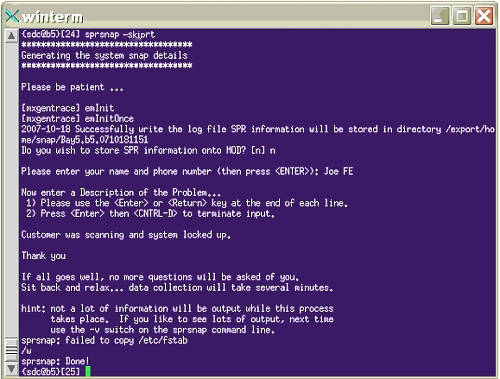
- Open a C Shell terminal and type sprsnapor sprsnap --skiprt at the command line.
When in doubt of potential scan going on, use sprsnap -–skiprt to avoid interferences with scan.
If you choose to save to DVD, you can select yes or no to delete the SprSnap directory after writing the DVD. If you select no, you need to delete the directory manually (see Deleting an SprSnap Directory).
- Enter the required informationof description of the problem.
Figure 1. SprSnap C Shell Dialog Window Example
- Press Esc, input :wq and press Enter to exit.
- When the SprSnap done message displays, type ls -al to view and make a note of the new directory.
Figure 2. Sprsnap Directory
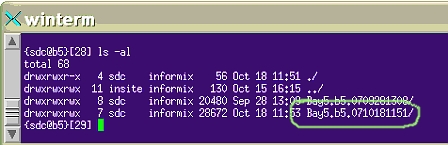
To view the collected data, navigate to the snap directory at /export/home/snap/site, where site is the name you noted.
note:SprSnap data takes up a lot of disk space. After the directory is saved on DVD, delete the SprSnap directory.