
- Optima MR450w BASE 1.5T System Service Methods
- 5690012-2EN Revision 3
- 00000018WIA309D1130GYZ
- id_152710943.1
- Jul 30, 2020 3:30:49 PM
Leveling Patient Table
Prerequisites
| Required persons | Preliminary requirements | Procedure | Finalization |
|---|---|---|---|
| 1 | - | 60 minutes | 5 minutes |
| Item | Quantity | Effectivity | Part number | Manufacturer |
|---|---|---|---|---|
| Non-ferrous Level | 1 | - | - | - |
| Non-ferrous measuring device (ruler) | - | - | - | - |
| Non-magnetic Service Tool Kit | 1 | - |
5112581 | - |
| ||||
About this task
Overview
The patient table is aligned vertically to the magnet by adjusting the caster height. However, the caster height must also be checked for uniform loading to ensure levelness.
Adjusting Patient Table for Floor Levelness
Procedure
- Raise the patient table to a fully raised position. Using a
nonferrous level, check levelness from front to back along the top
right or left edge of the bridge, and from left to right across the
front of the bridge.
Figure 1. Measuring levelness of patient table 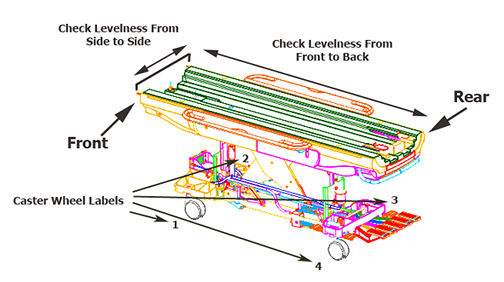 Note: Check that all casters are sharing the load equally by applying a small lifting force at each corner of the table, and watching the caster lift easily off the floor. If one caster or two diagonally-mounted casters seem to be unevenly loaded compared to the other casters, they will require adjustment.
Checking caster height adjustment
About this task
During installation, this procedure describes how to check the caster height (factory default) settings. If the patient table requires adjustment, proceed to Leveling patient table.
Procedure
- At each of the four caster wheel assemblies, measure the height
from the floor to the bottom edge of the aluminum support casting.
Figure 2. Caster Measurement 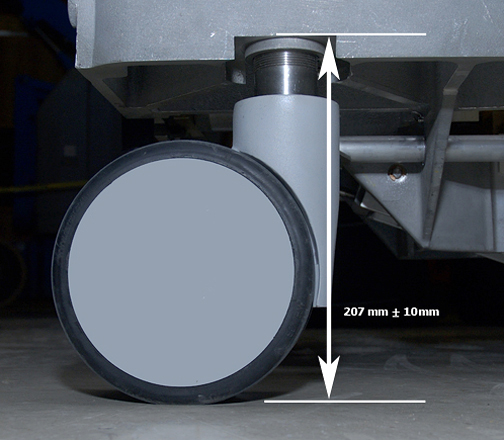
Leveling patient table
About this task
Although all four casters look identical from an exterior perspective, there is one notable difference regarding design when observing each caster assembly inside the caster covers. The patient table front left caster is known as the steer lock wheel, and its caster assembly design has a triangle-shaped bracket that differs from the other three casters.
Procedure
Fort the caster that requires adjustment, remove the caster linkage pin using a 3/8 inch wrench.Notice Figure 3. Caster linkage pin 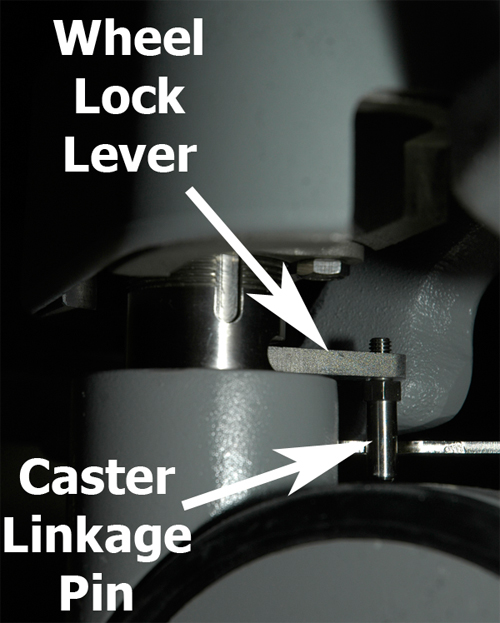
- Remove the collar bolt using an 7/16 inch wrench. (The illustration
below depicts a floor-level view looking at the right underside of
the caster assembly; the same view for all four casters.)
Figure 4. Remove collar bolt 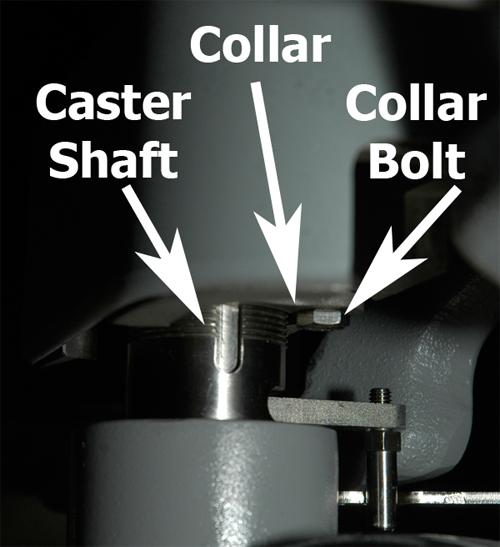
- Looking from the top down, move the wheel lock lever to the Full Lock position.
Figure 5. Wheel lock Lever positions 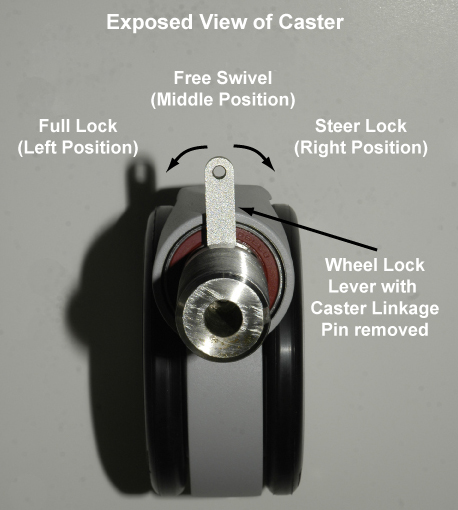
The wheel lock lever has three positions:
- Full Lock or Pivot Lock - Left position locks the caster so the patient table cannot move.
- Free Swivel - Middle position allows the caster to move freely.
- Steer Lock - Right position locks the caster in place, but the wheels can turn.
Finalization
Procedure
- Dock the table.
- Confirm that the cradle release functions properly.
- Confirm that the LPCA connects to the cradle and that the cradle can move into the bore.