
- Discovery MR750 3.0T System Service Methods
- 5690009-2EN Revision 4
- 00000018WIA307B9030GYZ
- id_123746815.1
- Oct 11, 2021 6:27:53 PM
Emergency Stop (E-Stop) planned maintenance
Prerequisites
| Personnel requirements | |||
|---|---|---|---|
| Required persons | Preliminary requirements | Procedure | Finalization |
| 1 | - | - | - |
About this task
Overview
This document provides the procedure for doing a check of the EMERGENCY STOP function of the Power Distribution Unit (PDU) for the Gradient subsystem, and RF subsystem.
Note: To do a check of the EMERGENCY OFF function of the power for the entire system, see Emergency Off (E-Off) planned maintenance.
The PDU EMERGENCY STOP buttons are located on the Operator Workspace Keyboard and on the Magnet Enclosure front cover (two buttons, left and right). A SYSTEM OFF button is located on the System Main Disconnect Panel.
Note: The other EMERGENCY OFF buttons are located by the customer.
Emergency stop
Procedure
- Push one of the EMERGENCY STOP buttons shown in the following illustration.
Figure 1. Emergency stop buttons 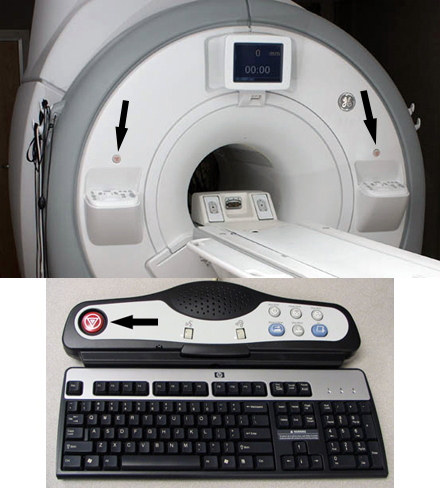
- Make sure the power to the Gradient subsystem and RF subsystem is shut off.
- Gradient verification: Look at the XPS (Gradient Power Supply) Signal Board and make sure that all four of the LEDs are off (see Figure 2).
Figure 2. XPS LEDs 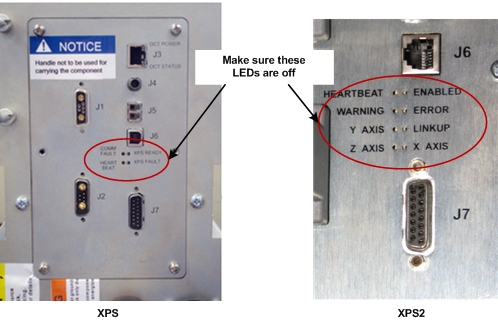
- RF Amplifier verification: Look at the bank on the front of the RF Amp and make sure that the AC Power LED is off. (See Figure 3).
Figure 3. AC power LED 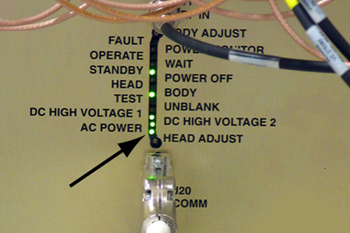 Note: Activation of the Emergency Stop button for the PGR cabinet will remove the high voltage from the gradient power supply and the RF Amplifier. However, be aware that the PDU voltage will stay enabled in the PGR cabinet after the Emergency Stop button is pressed.
- Gradient verification: Look at the XPS (Gradient Power Supply) Signal Board and make sure that all four of the LEDs are off (see Figure 2).
- On the PDU, press the EMO Reset button to return power to all affected cabinets. See Figure 4 for PGR PDU.Note: When you press the EMO Reset button, you should hear the contactor engage. This is another indication that the E-Stop was pressed and is active.
Figure 4. EMO reset and input test points 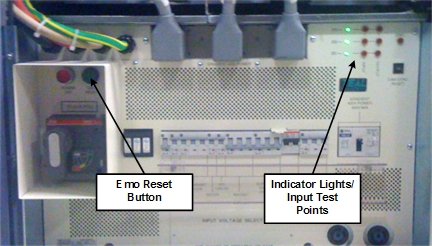
Finalization
Finalization
Run the Doing a check scan procedure to make sure the system is functioning normally.