- Discovery MR750 3.0T System Service Methods
- 5690009-2EN Revision 4
- 00000018WIA3089B030GYZ
- id_123748851.2
- Jul 5, 2019 10:03:33 PM
HP 8400 Linux PC Troubleshooting
Overview
The following information may assist in solving problems with the HP 8400 PC.
The only FRUs associated with the HP 8400 are the three hard drives, DVD-RW drive, the network card, and the actual PC.
The unique address on the network card is used for the host ID. If the PC is replaced, transfer the network card to maintain the customer's options.
LED Status
| LED Status | LED Color | System Status |
|---|---|---|
| Solid | Green | System is ON |
| Blinking | Green | System is in standby |
| Solid or blinking | Red | System has error |
| None | No light | System is in hibernate or is OFF |
Power On Self Test (POST)
Power On Self Test (POST) is a series of diagnostic tests that runs automatically when the system is turned on. A visual message displays if the POST encounters a problem.
| Activity | Beeps | Possible Cause |
|---|---|---|
| Red power LED blinks 2 times every second, followed by a 2 second pause | 2 | Processor thermal protection activated: A fan may be blocked or not turning. Heatsink assembly may not be properly attached to the processor. |
| Red power LED blinks 3 times every second, followed by a 2 second pause | 3 | Bad processor |
| Red power LED blinks 4 times every second, followed by a 2 second pause | 4 | Power failure, power supply is overloaded |
| Red power LED blinks 5 times every second, followed by a 2 second pause | 5 | Pre-video memory error |
| Red power LED blinks 6 times every second, followed by a 2 second pause | 6 | Pre-video graphics error |
| Red power LED blinks 7 times every second, followed by a 2 second pause | 7 | System board failure (ROM detected failure prior to video) |
| Red power LED blinks 8 times every second, followed by a 2 second pause | 8 | Invalid ROM based on bad checksum |
| Red power LED blinks 9 times every second, followed by a 2 second pause | 9 | System powers on, but does not boot |
Disk Drive Configuration
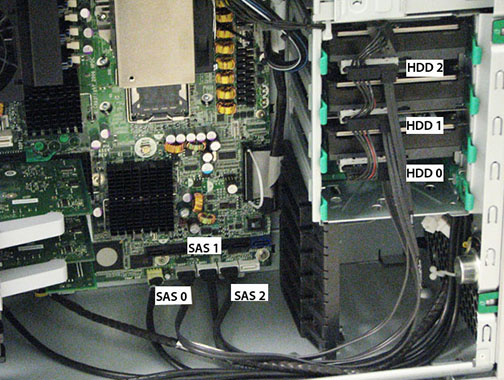
There are no jumpers required for configuring the disk drives on the HP 8400. Ensure that the drives are plugged into the correct ports on the motherboard.
Video Output Troubleshooting for DVMR System Only
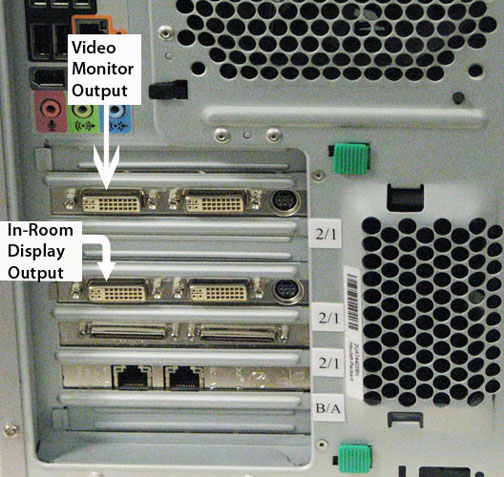
The HP 8400 PC has two video outputs for DVMR systems only. Any Excite (11.1 or 15.x) system has only one video output.
The HP 8400 has two video cards with outputs for the system monitor and the in-room display.
SAS Devices
The SAS 0 output must connect to HDD O (lower) hard drive. This drive contains the application software.
The SAS 1 output must connect to HDD 1 (middle) hard drive. This drive contains image data.
The SAS 2 output must connect to HDD 2 (upper) hard drive. This drive contains image data.