
- Discovery MR750w and SIGNA™ Architect T 3.0T System Service Methods
- 5690002-2EN Revision 4
- 00000018WIA30BCBE20GYZ
- id_131064943.4
- Oct 11, 2021 6:13:21 PM
Body coil air flow functional check
Prerequisites
| Required persons | Preliminary requirements | Procedure | Finalization |
|---|---|---|---|
| 1 | Not Applicable | 10 to 15 minutes | Not Applicable |
| ||||
| Condition | Reference | Effectivity |
|---|---|---|
|
System software must be booted. | - | - |
About this task
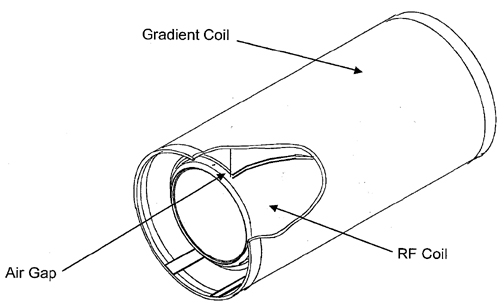
This test checks the functionality of the body coil air blower system, which cools the patient bore wall surfaces by forcing air between the gradient coil and the RF coil Figure 1. Air enters the magnet through two rear air ports; therefore, the rear of the magnet needs to have an airtight seal in order to maintain a sufficient pressure head to force air to flow. This helps to transfer heat away from the bore wall with convection. If there is not an air tight seal in the rear of the magnet, there will not be enough pressure to force air through the space between the gradient and RF coils.
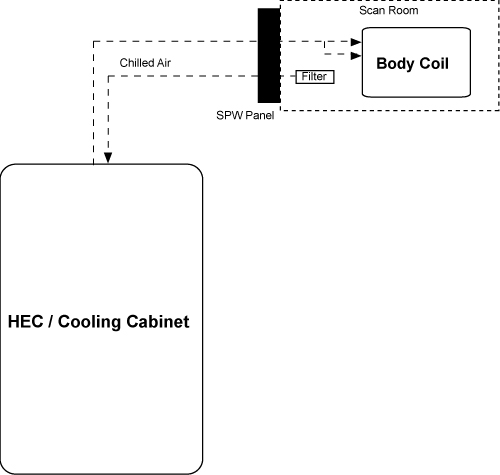
The block diagram below shows the system configuration. Air is pulled out of the magnet room, and travels through the penetration wall and into the heat exchange cabinet (HEC). This air is then cooled and sent back through the penetration wall and into the magnet room. This cooled air then travels from the penetration wall, splits into two air hoses, and into the back of the magnet through tubing in the rear end bell or through tubing in the body coil. At the front of the magnet are two air sensors that capture an average airflow measurement and relay the information back to the HEC display. This airflow requires a measurement of greater than 500 feet per minute (fpm) during scanning operations. If the airflow measurement is less than 500 fpm, see Troubleshooting body coil air flow.
Checking body coil air flow
About this task
This procedure consists of taking readings from the HEC display on the heat exchanger cabinet and determining if an error is occurring with the air flow system.
Procedure
- Go to the heat exchanger cabinet and view the display.
- Select the following buttons from the main menu display in order
to view the airflow set point and feedback readings:
- Note: Select ESC multiple times to return to the main menu display.Monitor (F3)
- Blower (F4)
- Confirm that the airflow set point corresponds to a measurement equal to or greater than 550 fpm.
- Confirm that the air flow feedback corresponds to a measurement
greater than 500 fpm.
- If the feedback is lower than 500 fpm, see Troubleshooting body coil air flow to troubleshoot the body coil air flow.
- If the feedback is greater than or equal to the Normal mode set point, the system is functioning properly.
Troubleshooting body coil air flow
About this task
Procedure
- Check that both air flow sensors are functioning by running the SRI Real-Time Data test. The results of this test include information about the air flow sensors. Scroll down the Test Results window to find the results for Air Flow Sensor 0 and Air Flow Sensor 1.
Figure 3. Air flow sensor readings from SRI real-time data test 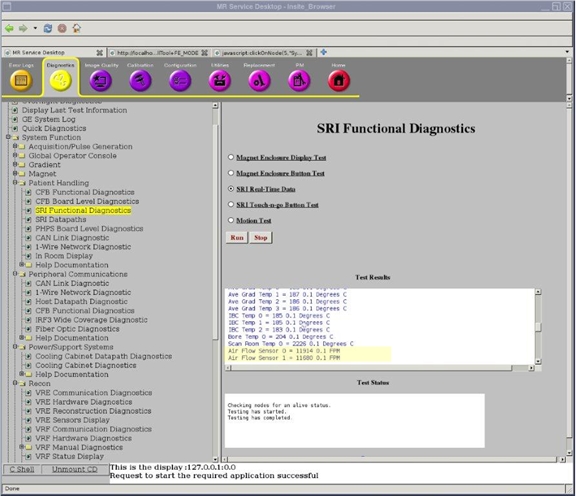
Compare the readings for Air Flow Sensor 0 and Air Flow Sensor 1. These two sensors measure the same air flow. If the readings vary from each other by more than a few percent, there is most likely a problem with one of the air flow sensors or one of the sensors is blocked. See Gradient and RF Body Coil Air Flow Sensor Replacement for information about accessing and replacing the air flow sensors.
The results of the SRI Real-Time Data test also show an additional set of data for the air flow sensors: Air Flow 0 and Air Flow 1. The data is somewhat different because the measurements are performed at different times, but either set of data indicates whether the air flow sensors are operating. (Air Flow 0 and Air Flow 1 also show the voltage of the temperature sensor.)
The air flow must always be greater than 500 fpm. In situations where the air flow falls under 500 fpm, follow the remaining steps in this section. After each step, refer to the HEC control panel to see if the air flow is 500 fpm or greater.
- Ensure that the farthest right blower variable frequency drive (VFD) display is reading 60 Hz.
Figure 4. VFD Blower Display in HEC 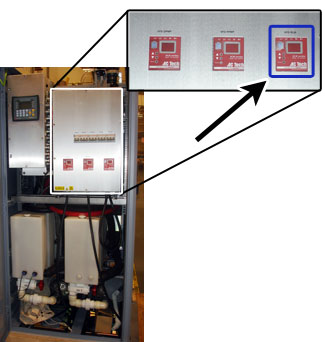
- Check for any gaps between the rear end bell and the RF body
coil, as well as between the front end bell and the RF body coil.
The rear end bell gap should be 2.5 mm ± 0.5 mm. The front end bell gap should be between 2.0 mm and 5.0 mm.
If an end bell gap is incorrect, see Front End Bell Removal and Installation or Rear End Bell Removal and Installation to correct the gap.
If you see any further leakage of air flow after the end bell re-installation, apply duct tape between the end bell and the body coil interface to avoid the leakage.Figure 5. End bell gap 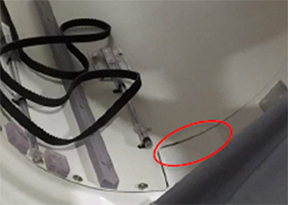
- Remove the right front cover to perform the steps below. See Front Cover Removal and Installation.
- Check the orientation of the sensors. Verify that the sensor head is in the center of the cutout, and that the orientation of the sensor head is perpendicular to air flow (the flat surface of the sensor is perpendicular to air flow).
- Check that there is no cable routing obstructing the air flow.
Figure 6. Front end bell sensors 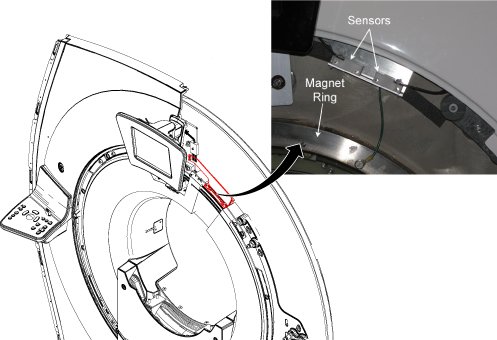
- Check that the air flow sensors are completely below the edge of the front end bell. The bracket position can be adjusted without removing the front end bell.
Figure 7. Sensor locations 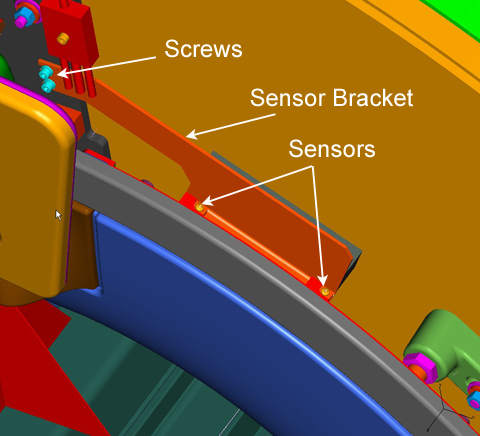
- Remove the front end bell and confirm the foam material installed in the gap between the RF coil and the gradient coil with the space in the foam centered at around the 12 o'clock position. Confirm that there is a steady flow of air through the gap across the air flow sensors. Be aware that the foam present at the rear end bell must also be installed.
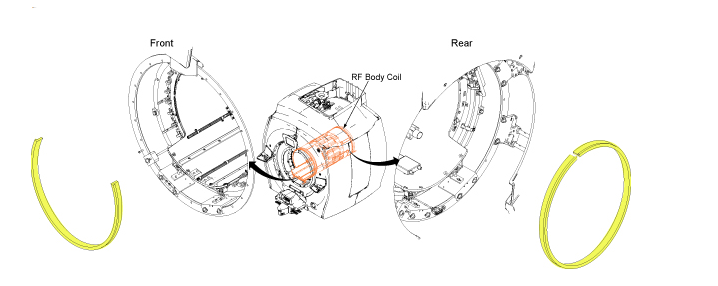 .
.
Finalization
Finalization
No finalization steps.