• Discovery MR750w and SIGNA™ Architect T 3.0T System Service Methods
  • 5690002-2EN Revision 4
  • Object ID: 00000018WIA30941E20GYZ
  • Topic ID: id_13106450 Version: 9.1
  • Date: Oct 11, 2021 6:20:13 PM

8 kW 3.0T MNS amplifier calibration

Prerequisites

Personnel requirements
Required personsPreliminary requirementsProcedureFinalization
1-120 minutes-
Tools and test equipment
ItemQuantityPart numberManufacturer
Flathead Screwdriver, at least 2 inches long1--
RF Power Measurement Kit (use one of the listed)1

Kit PN 5307511-2 (Bird wattmeter)

or

Kit PN 5307511-3 (Bird wattmeter)

-
Digital Multimeter (DMM)1--
3.0T 31P T/R Switch (available on site with customer)1

2354050 (non-RoHS)

5409918 (RoHS)

-
Safety

About this task

Follow this procedure after MNS Installation and Upgrade (3.0T) to calibrate either the CPC or AMT/Herley 8 kW amplifier for 3.0T.

The 8 kW AMT/Herley amplifier is the original amplifier and is easily identified by cables connecting to the rear of cabinet.
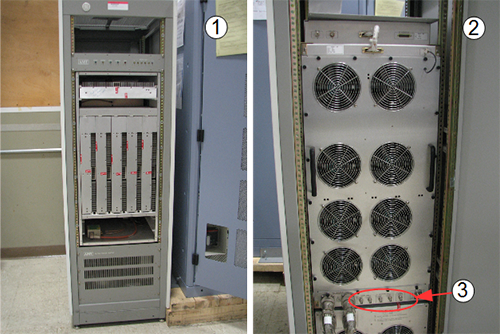
Figure 1. 8 kW AMT/Herley cabinet - front and back
Item Description
1Front of 8 kW AMT/Herley cabinet
2Back of 8 kW AMT/Herley cabinet
3Cable connections

The CPC MNS amplifier is a new amplifier. Cables connect to the top of the cabinet for the CPC MNS amplifier. There are now two versions of the CPC MNS amplifier.
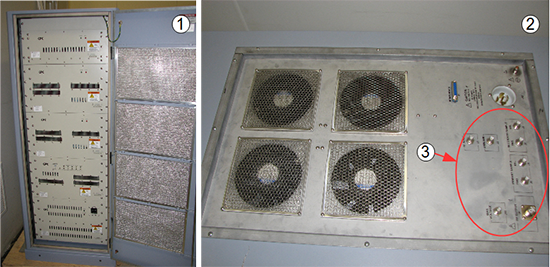
Note: The CPC MNS amplifier is only compatible with DV systems, MR750, and MR750w. It is not compatible with HD systems.
Figure 2. CPC cabinet - front and top
Item Description
1Front of CPC cabinet
2Top of CPC cabinet
3Cable connections
Topic ID: id_SL5438063-1058084

Calibration setup

Topic ID: id_SL5438064-1058084

System Setup

Procedure

  1. Make sure the system is idle and all coils have been removed from the magnet bore.
  2. Open the front door of the PEN cabinet.
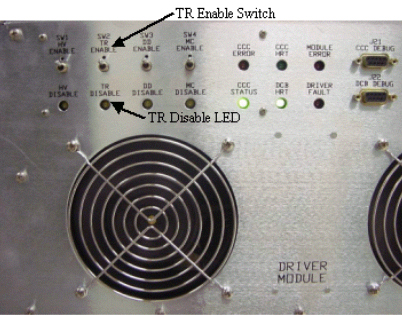
  3. On the front of the driver module, set the T/R switch to Disable. This disables the T/R fault reporting.
    Note: Leave HV and DD set to Enable.
    Figure 3. Driver module switch
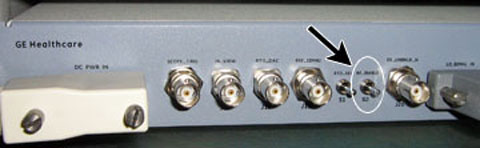
  4. Move the RF Enable S2 switch on the MNS exciter to the DISABLE (down) position.
    Figure 4. RF enable switch on exciter
  5. Proceed to set up the RF amplifier.
Topic ID: id_SL5438069-1058084

AMT/Herley amplifier setup

Procedure

  1. Note: If the amplifier type is CPC, proceed to section Bird Wattmeter setup.
    Remove the front cover of the AMT/Herley amplifier.
    Note: There are 50+ screws. This step takes about 8 minutes.
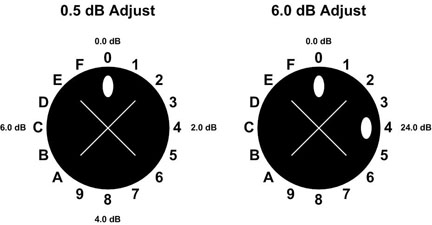
  2. With the covers removed, notice the two holes for gross (6.0 dB) and fine (0.5 dB) attenuation adjustments as pictured in Figure 5 and Figure 6.
    Note: It is possible that these two holes are covered with an external screw. If so, remove the screw so that the amplifier looks like the one in Figure 5.
    Figure 5. AMT/Herley amplifier with covers removed
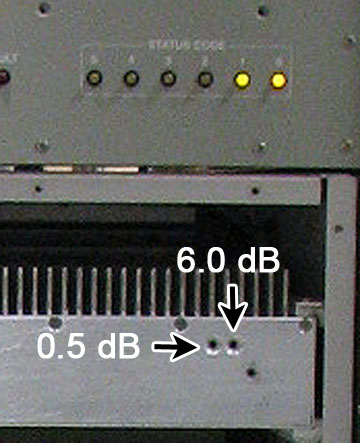
    Indicators point to adjustment points.

    Figure 6. AMT/Herley amplifier detail of dB adjustment
  3. Set up the power measurement kit. See Bird Wattmeter setup
Topic ID: id_SL5437779-1058084

Bird Wattmeter setup

Procedure

  1. Move the RF Enable S2 switch on the MNS exciter to the DISABLE (down) position.
  2. Disconnect the MNS output cable.
    • (For AMT/Herley amplifier) Disconnect J4 from the RF amplifier.
    • (For the original CPC amplifier, part number 5411744) Open the rear door and disconnect J3 from the combiner module at the top of the cabinet.
    • (For the new CPC amplifier, part number 5750811) Open the rear door and disconnect J2 from the power amplifier at the bottom of the cabinet.
    Figure 7. Coupler attached to J3 on combiner
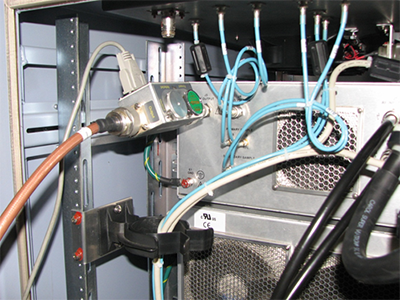
    Figure 8. Coupler attached to J2 on power amplifier
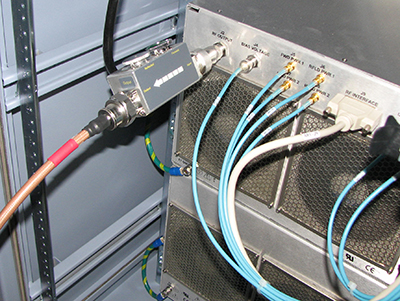
  3. Set up the wattmeter as shown below.
    • (For AMT/Herley amplifier) Connect the input of the coupler to J4 (output connector).
    • (For the original CPC amplifier, part number 5411744) Connect the input of the coupler to J3 (output connector). Do not connect the coupler at the top of the MNS cabinet as the cable may not reach the dummy load.
    • (For the new CPC amplifier, part number 5750811) Connect the input of the coupler to J2 (output connector). Do not connect the coupler at the bottom of the MNS cabinet as the cable may not reach the dummy load.
    Figure 9. Wattmeter setup – bird wattmeters
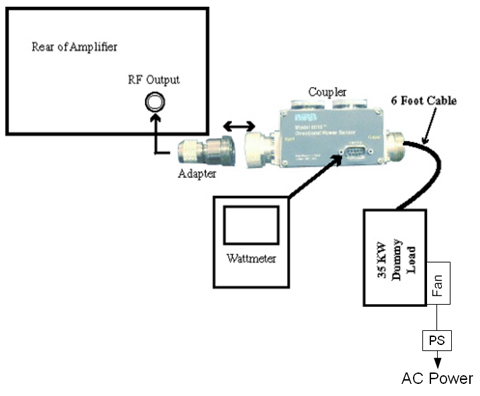
  4. Use a digital multimeter to measure the resistance between the dummy load RF connector center pin and the shield. Confirm a reading of 50Ω (± 5Ω). Replace the dummy load if the resistance is out of range.
  5. Make sure the dummy load fans are running before proceeding.
  6. Insert the 50 kW element (green 4300A374-2) into the forward sensor port, and make sure the arrow points from input to output.
  7. As a safety measure, place the 5 kW (blue 4300A374-6) or blank slug element into the reflected port, and make sure the arrow points from output to input (if applicable).
  8. Lock the elements into place using the locking tab on each sensor.
    Figure 10. RF coupler setup
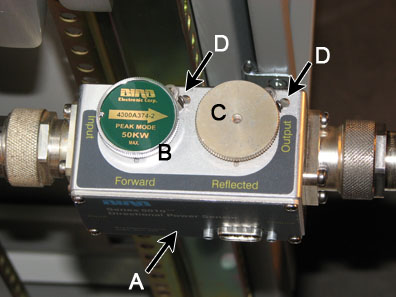
    A

    Wattmeter sensor

    B

    Forward sensor element

    C

    Blank slug

    D

    Sensor locking tabs

  9. Move the RF Enable S2 switch on the MNS exciter to the ENABLE (up) position.
  10. The power measurement kit can have one of two Bird wattmeters. The setup instructions are different for each.
Topic ID: id_SL15529708-1058084

Setting up Bird 5000-EX wattmeter to measure forward MNS maximum power

About this task
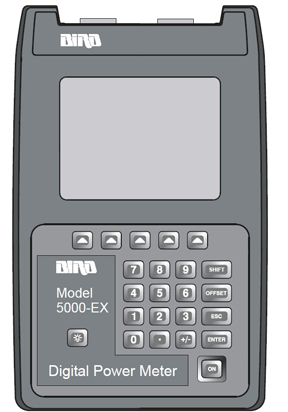
This procedure is for the Bird 5000-EX. If you have a Bird 5000-XT, see Setting up Bird 5000-XT Wattmeter to measure forward MNS maximum power.
Figure 11. Bird 5000-EX wattmeter

Procedure

  1. Press the ON button on the wattmeter. (If the coupler and sensor are not correctly attached to the amplifier you will see a No Sensor indication.)
  2. Press the arrow ▲ button under Scale.
  3. Enter 50000 to set the range.
  4. Press ENTER.
  5. Check the setting by pressing the arrow button under Scale.
  6. Press ENTER to exit.
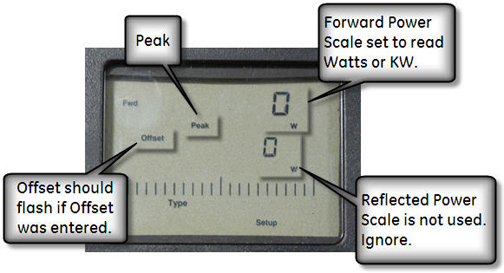
  7. Press the arrow button under Fwd Units. Make sure the scale reads W (or kW on some wattmeters). If the scale reads dBm, select the arrow button under Fwd Units again to toggle the scale to read W (Watts) or kW (kiloWatts) on the TOP, forward power scale. Ignore the BOTTOM, reflected power scale value. It is not used during maximum power calibration.
  8. Press SHIFT.
  9. Press the arrow button under Setup.

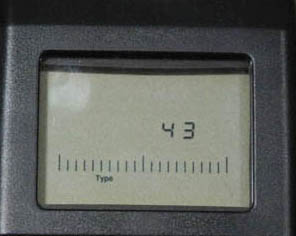
    This displays the sensor type configured in the wattmeter. This procedure uses sensor type 43, which is optimized for peak power measurement.

  10. Verify that the output reads 43, and then press ENTER.
    Figure 12. Wattmeter display set to read
  11. Press ENTER.
  12. Press the arrow ▲ button under Type and then toggle to change the unit of measurement to Peak.
  13. All kits require an offset to make sure of accurate measurement. Locate the Element Offset Factors card in the kit.

    (For single drive RF amplifiers) Find the offset for 3T G3 or DVMR Body Output.

    (For MNS amplifiers) Find the offset for 3T MNS 8kW Output.

    Figure 13. Example element offset factors card
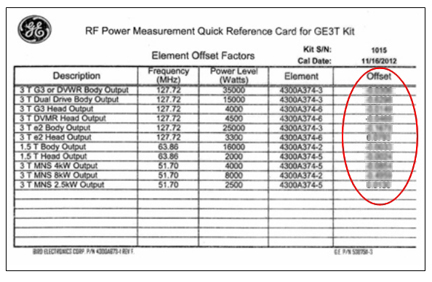
  14. Press OFFSET on the wattmeter. Enter the numerical value from the offset card and press Enter.
    Note: To enter a negative value, first enter the numerical value, then the minus symbol (–).
    Figure 14. Wattmeter set to display peak power
  15. Proceed to Calibrate MNS amplifier.
Topic ID: id_SL15529779-1058084

Setting up Bird 5000-XT Wattmeter to measure forward MNS maximum power

About this task
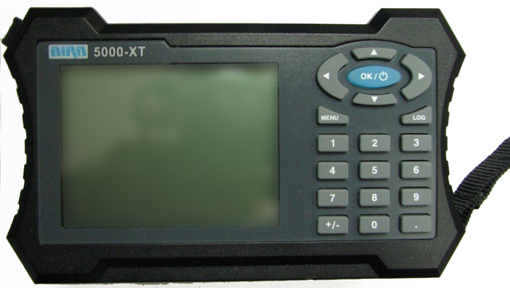
This procedure is for the Bird 5000-XT. If you have a Bird 5000-EX, see Setting up Bird 5000-EX wattmeter to measure forward MNS maximum power.
Figure 15. Bird 5000-XT wattmeter

Procedure

  1. Press the OK button on the wattmeter.
  2. Press the MENU button. Press the ▼ button to SCALE MENU, and then press OK.
  3. Press 50000 to set the range, and then press OK.
  4. Check the setting by pressing ▼ to SCALE MENU, and then press OK.
  5. Press OK to exit. Press ◄ to return to measurement mode.
  6. Press ▲ to make sure the scale reads W (or uW or kW on some wattmeters). If the scale reads dBm, press ▲ again to toggle the scale to read W (or uW or kW on the TOP, forward power scale. Ignore the BOTTOM, reflected power scale value. It is not used during maximum power calibration.
  7. Press MENU.
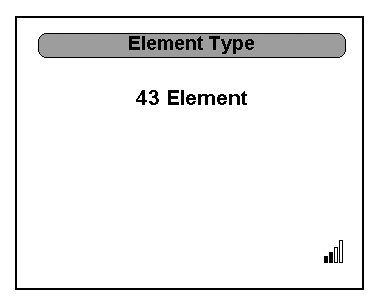
  8. Press ▼ to select ELEMENT TYPE, and then press OK.

    This displays the sensor type configured in the wattmeter. This procedure uses sensor type 43, which is optimized for peak power measurement.

  9. Verify that the output reads 43, and then press OK.
    Figure 16. Wattmeter set to read
  10. Press OK. Press ◄ to return to measurement mode.
  11. All kits require an offset to make sure of accurate measurement. Locate the Element Offset Factors card in the kit.

    Find the offset for “3T MNS 8kW Output.”

    Figure 17. Example element offset factors card
  12. Press the MENU button on the wattmeter. Select OFFSET, and then press OK. Enter in the numerical value that was displayed on the kit’s offset card and press OK. (The wattmeter rounds to three significant digits.) Press ◄ to return to measurement mode.
    Note: To enter a negative value, first enter the numerical value, and then the minus symbol (–).
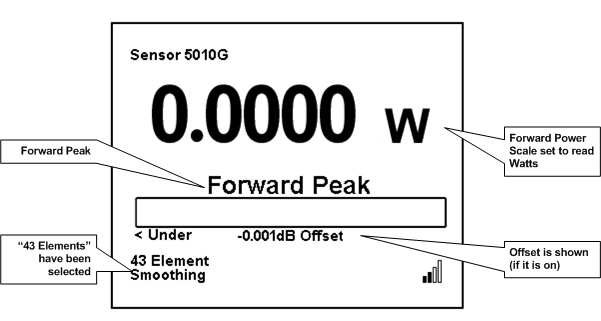
  13. Press MENU. Press ▼ until SMOOTHING is selected, and then press OK.
  14. To verify that SMOOTHING has been set, press ▼ until SMOOTHING is selected, and then press OK.
  15. The wattmeter should display 4 Samples. Press OK.
  16. Press ◄ to return to measurement mode.
    Figure 18. Wattmeter set to display peak power
  17. Proceed to Calibrate MNS amplifier.
Topic ID: id_SL5438081-1058084

Calibrate MNS amplifier

About this task

Procedure

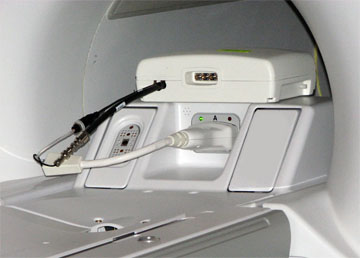
  1. Connect the MNS 31P T/R switch to the LPCA.
    Figure 19. MNS 31P TR switch connection to LPCA
  2. Landmark in the center of the head coil area and select Advance to Scan.
  3. Start the RF/UPM tool:
    1. (For non-proprietary Service Tools)
      1. On the Common Service Desktop, select Calibration > UPM Tool.
      2. Select Click here to start this tool.
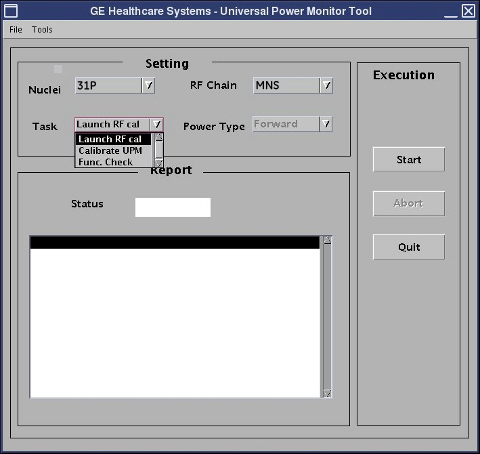
    Figure 20. UPM tool interface
  4. Configure the UPM tool as follows:
    1. Set Task to Launch RF Cal.
    2. Set RF Chain to MNS.
    3. Select Start.
    4. When a dialog window appears asking if the system is properly set up, click Yes.

      The system sets the proper sequence for RF calibration of the MNS channel. This process takes about 1 minute.

    5. A dialog window titled RF Amp Calibration appears. Do not select anything.
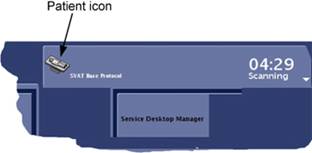
    6. Click the Patient icon to go to the Scan workplace.
      Figure 21. Patient icon
  5. If the RF amplifier faults, close the Manual Prescan window and click Failure on the RF Amp Calibration dialog window. Click Start again on the UPM Tool interface and attempt the RF amplifier calibration procedure again.

    If no power is output from the MNS amplifier during UPM forward power calibration, close the UPM Tool and start a new exam in geservice mode with a patient weight of 50 kg. Create a landmark with the MNS 3T Service T/R Interface. Prescribe 31P Func Check series from Service > MNS Setup. Save and Download sequence with any acceptable scan parameters. Open Spectro Prescan, select Start, and let the sequence run for about 10 seconds. Stop the sequence, end the exam, and continue with the UPM calibration.

  6. Proceed to:
Topic ID: id_SL12727913-1058084

For AMT/Herley amplifier

Procedure

  1. Slowly increase TG to 200 or until the wattmeter reads 8 kW. Specification is 7.2 kW to 8.2 kW.
    Note: Make attenuator adjustments slowly. Give the wattmeter about 5 seconds between changes to settle. If the amplifier faults, reverse the previous adjustments and restart the calibration procedure through the UPM Tool.
  2. If TG equals 200, but the wattmeter reads less than 7.2 kW, rotate 0.5 dB adjustment control counterclockwise to achieve a specification is 7.2 kW to 8.2 kW.
  3. If output is still less than 7.2 kW and TG = 200:
    1. Adjust the 0.5 dB adjustment control for minimum wattmeter reading.
    2. Reduce TG from 200 to 50, and then rotate the 6.0 dB adjustment control counterclockwise by one step.
    3. Slowly increase TG from 50 to 200, and then adjust the 0.5 dB control for the correct reading on the wattmeter.
  4. If the wattmeter reads between 7.2 kW and 8.2 kW:
    1. Reduce TG to 0 and then rotate the 6.0 dB adjustment control clockwise by one step.
    2. Return to Step 1.
  5. Select Done to end manual prescan.
  6. After the amplifier is calibrated to 7.2 kW to 8.2 kW at TG = 200, select Done to end manual prescan. Switch to the UPM Tool and select Success on the RF Amp Calibration dialog window.
  7. Proceed to Finalization.
Topic ID: id_SL12727926-1058084

For CPC amplifier

Procedure

  1. Slowly increase TG to 200 or until the wattmeter reads 8 kW. Specification is 7.2 kW to 8.2 kW.
    Note: Make attenuator adjustments slowly. Give the wattmeter about 5 seconds between changes to settle. If the amplifier faults, reverse the previous adjustments and restart the calibration procedure through the UPM Tool.
  2. Verify that RF output is 7.2 kW to 8.2 kW at TG of 200.
    Note:

    (For the original CPC amplifier, part number 5411744) Control switches are used to adjust RF output. See Figure 22.

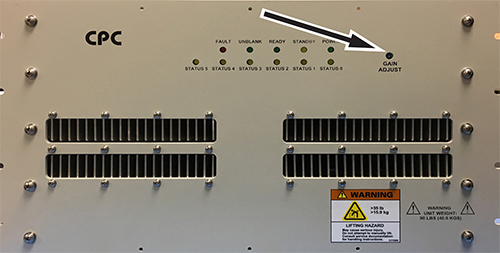
    (For the new CPC amplifier, part number 5750811) A potentiometer is used to adjust RF output. See Figure 23.

  3. Adjust for proper RF output by either toggling the switches on the original amplifier, or by adjusting the potentiometer on the new amplifier.
    Figure 22. Control switches on CPC amplifier
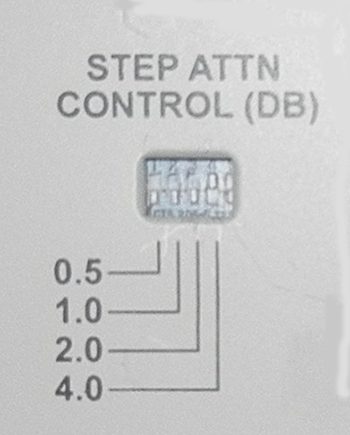
    Figure 23. Potentiometer on CPC amplifier
  4. After the amplifier is calibrated to 7.2 kW to 8.2kW at TG = 200, select Done to end manual prescan. Switch to the UPM Tool and select Success on the RF Amp Calibration dialog window.
  5. Proceed to Finalization.