
- SIGNA MR355 / SIGNA MR360
- Service Manual
- 5856356-3EN Revision 5.0
- Basic Service Documentation. Copyright General Electric Company.
- 00000018WHA30D962GYZ
- id_20014039.1
- Jun 24, 2021 11:46:36 PM
Running the About MR Scanner tool
The About MR Scanner tool displays scanner information. This procedure confirms that this information is correct.
Prerequisites
| Personnel requirements | |||
|---|---|---|---|
| Required persons | Preliminary requirements | Procedure | Finalization |
| 1 | - | 5 minutes | - |
| Required conditions |
|---|
| Complete software setup before running the About MR Scanner tool. |
| Note down the serial number on the magnet rating plate that is physically located on the scanner. |
| Review the magnet and system configurations in Guided Install and take note of the values before running About MR Scanner. |
| A service key is required to launch the Installation and Calibration Wizard. |
About this task
The About MR Scanner tool displays information and provides values for:
- Magnet serial number
- Magnet enclosure type
- Field strength
- Gradient type
This procedure is to confirm that the scanner information displayed in the About MR Scanner tool is correct.
The About MR Scanner tool displays values recommended by International Electrotechnical Commission (IEC) standards. The hardware configuration and product configuration values selected while executing this tool determines the safety information to be shown specifically for the site system. Safety data will not be displayed until this procedure has been completed. If any of the configurations are modified, the safety data will no longer be displayed until this procedure is repeated. This feature does not impact functionality of any other subsystem.
Procedure
- Launch the About MR Scanner tool.
- From the Common Service Desktop select .
Figure 1. About MR Scanner 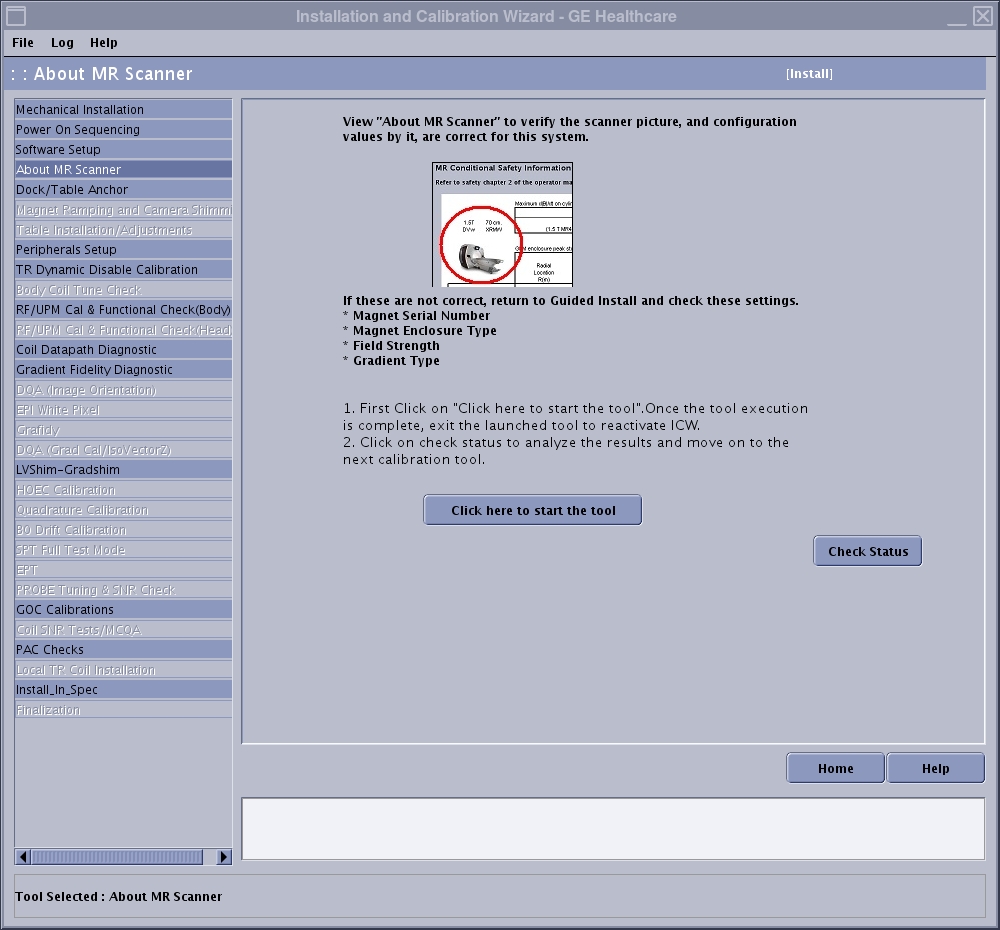
Result
An alert message will require verification that setup steps have been completed before activating this tool.