
- SIGNA MR355 / SIGNA MR360
- Service Manual
- 5856356-3EN Revision 5.0
- Basic Service Documentation. Copyright General Electric Company.
- 00000018WIA30377E20GYZ
- id_131070603.0
- Aug 29, 2019 1:36:45 AM
Passive Shim (S-V Magnets Only)
Prerequisites
| Required persons | Preliminary requirements | Procedure | Finalization |
|---|---|---|---|
| 1 | - | - | - |
| Item | Quantity | Effectivity | Part number | Manufacturer |
|---|---|---|---|---|
| · LVshim Phantom Assembly | 1 | - |
2125245 | - |
| · Nesting Plate Assembly | 1 | - |
2125247 | - |
| ||||

About this task
This procedure applies to S-V magnets only.
Procedure
- Start the LVShim tools as shown in .
Figure 1. STARTING THE LVSHIM TOOL FROM THE SERVICE BROWSER 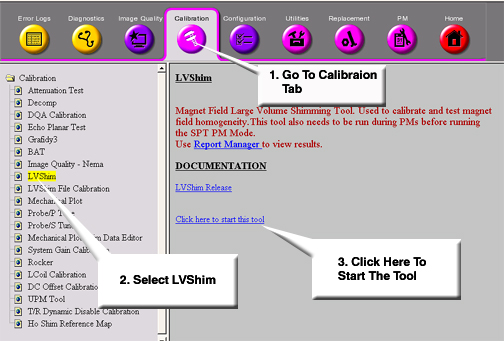
Finalization
No finalization steps.