
- SIGNA MR355 / SIGNA MR360
- Service Manual
- 5856356-3EN Revision 5.0
- Basic Service Documentation. Copyright General Electric Company.
- 00000018WIA30E17F20GYZ
- id_131074381.2
- Jul 6, 2019 12:17:31 AM
Fixed Table Installation
Prerequisites
| Required persons | Preliminary requirements | Procedure | Finalization |
|---|---|---|---|
| 1 | Not Applicable | 30 minutes | Not Applicable |
| Item | Quantity | Effectivity | Part number | Manufacturer |
|---|---|---|---|---|
| Standard Tool (Non-Magnetic) | 1 | - | - | - |
| ||||
About this task
This procedure describes how to install Fixed Table.
This procedure is for Fixed Table. For Low Height Fixed Table, refer to Low Height Fixed Table Installation.
Procedure
- Fix the Table to the dock frame using four bolts.Note:
Align the Table and Dock Frame by adjusting the 4 wheels.
Note:Do not tighten the screws too tight now since Table adjustment will be performed later.
Figure 1. Dock Mounting Support Installation 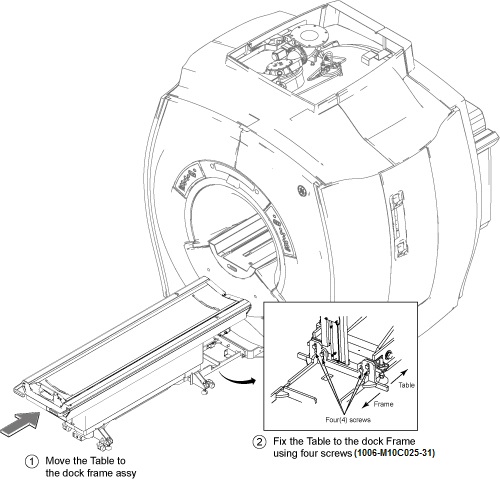
- Connect all cables.
-
Connect 6111111-J1 to 6111113-J1
-
Connect 6111112-J2 to 6111114-J2
-
Connect 6111112 - J2 to Table Control Box J3
-
Connect 6111111 - J2 to Table Control Box J4
-
Ground Cables (x2)
-
Connect RUN#M1509 (from Mega Switch J22) to Convert Board 3 (P6)
-
Connect RUN#M3511 (from Mega switch J17) to Convert Board 3 (P5)
-
Express Coil Cables (x2) to Convert Board 3 (P3 and P4)
Note:Make sure the following cables are already connected to Table Control Box.
-
RUN421 to Table Control Box J1
-
RUN#2009 (MG2-A29-J1) to Table Control Box J2
Figure 2. Cable Wiring 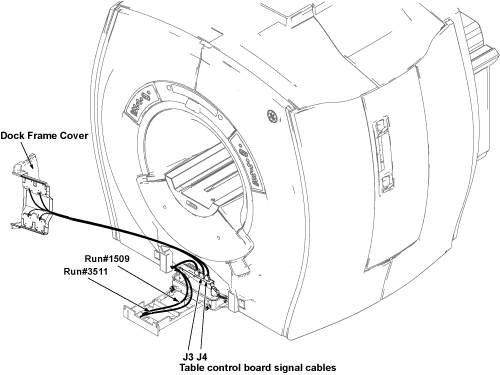
Figure 3. Wiring Diagram 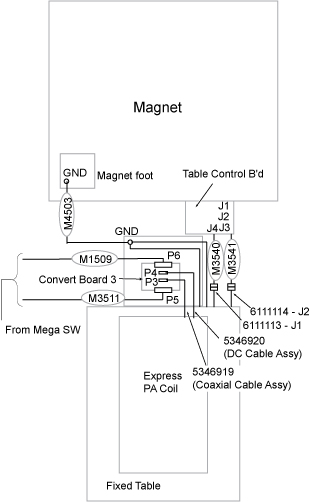
Figure 4. Cable Wiring Detail 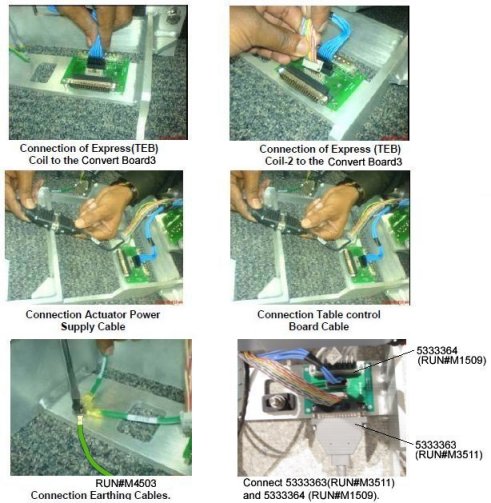 Note:
Note:Dock Frame Cover and Bottom cover will be installed after Table Adjustment.
-
Finalization
No finalization steps.