
- SIGNA MR355 / SIGNA MR360
- Service Manual
- 5856356-3EN Revision 5.0
- Basic Service Documentation. Copyright General Electric Company.
- 00000018WIA30F16E20GYZ
- id_131061264.0
- Feb 14, 2020 4:05:07 PM
Dock Centering and Dock Hardware Adjustments
Prerequisites
| Required persons | Preliminary requirements | Procedure | Finalization |
|---|---|---|---|
| 2 | Not Applicable | Not Applicable | Not Applicable |
| Item | Quantity | Effectivity | Part number | Manufacturer |
|---|---|---|---|---|
| Nonferrous Adjustable Wrench | 1 | - | - | - |
| Nonferrous Flat-head Screwdriver | 1 | - | - | - |
| Socket Wrench | 1 | - | - | - |
| Allen Screwdriver | 1 | - | - | - |
| Item | Quantity | Effectivity | Part number | Manufacturer |
|---|---|---|---|---|
| Loctite® 242 | 1 | - | - | - |
| ||||||||||||
About this task
The Dock Hardware Adjustment procedures describe how to adjust the Motor On Switch Actuation and a number of Gear Assembly components for noise reduction. Each of these procedures requires removal of the dock as the initial step:
-
Motor On Switch Actuation Adjustment - The Motor On Actuation Switch in the dock assembly should be adjusted so it is activated when the Table Up foot pedal is pressed approximately 3/4 of its total length of travel. This is factory adjusted; however, it is possible to adjust the position of the Motor On Switch in the field to maintain the proper actuation level.
-
Gear Assembly Noise Adjustments - The Dock Motor Gear Box has a clutch that prevents backlash on the gears in the gear box. This clutch is not intended to regulate dock motor speed; it prevents gear backlash, which would make the gear assembly noisy. Perform the procedures in Cam Adjustment Procedure, Motor Tube Spring Check, and Clutch Adjustment in the sequence presented to correct excessive gear assembly noise. There are three probable causes of a noisy gear assembly:
-
Cam improperly adjusted
-
Excessive play on motor tube spring
-
Clutch improperly adjusted
-
The Dock Centering procedure provides the Longitudinal Adjustment (in and out), and the Lateral Adjustment (left to right) to center the dock. For proper Patient Transport docking, the dock assembly must be adjusted to meet two criteria:
-
Gap between patient transport top and front of magnet enclosure must be 3/4, ±1/4 inch (19.0, ±6.4 mm) to ensure the gap is narrow enough so UP Limit Sensor operates properly, and wide enough so there is no finger pinch hazard when docking the transport.
-
Dock assembly must be square to the bridge, so axis of cradle travel is the same for both the patient transport and bridge.
Dock Removal
Procedure
Follow instructions in Section 4.1 of LCC Dock Replacement to remove the dock from the Magnet Room.DANGER 
Motor On Switch Actuation Adjustment
Procedure
- Slide the main dock cover forward until Up Limit Switch pushrod
just clears the main dock cover holes.
Figure 1. Dock Cover Removal 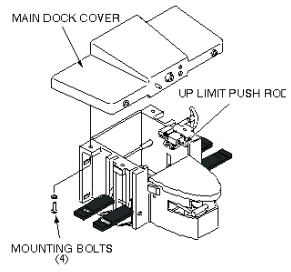
- Loosen the two mounting screws securing the Motor On Switch
to the side of the dock assembly.
Figure 2. Motor On Switch Adjustment 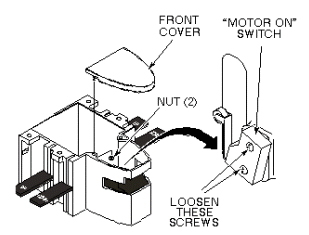
Cam Adjustment
Procedure
- Slide the main dock cover forward until the Up Limit Switch
push rod just clears the dock cover holes.
Figure 3. Dock Cover Removal - Check the four set screws on the Motor Cam shown below. If the
set screws are loose, apply Loctite 242 to the set screws and tighten
them. Allow 15 minutes to harden.
Figure 4. Dock Motor Cam Adjustment 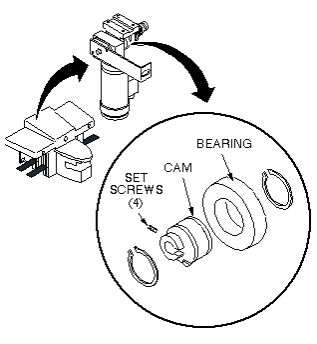
Follow instructions in Section 4.4 of LCC Dock Replacement to reinstall the dock assembly.Warning 
Motor Tube Spring Check
Procedure
Follow instructions in Section 4.1 of LCC Dock Replacement to remove the dock from the Magnet Room.Warning - Remove the four mounting bolts from main dock cover shown below.
Figure 5. Dock Cover Removal - Check the play between the Tube Spring and the Motor Mounting
Bracket shown below.
Figure 6. Tube Spring and Motor Bracket 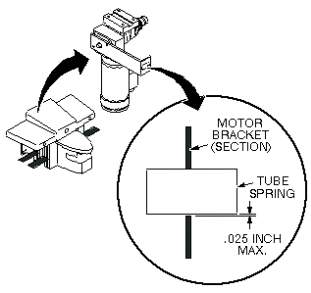
Follow instructions in Section 4.4 of LCC Dock Replacement to reinstall the dock assembly.Warning
Clutch Adjustment
Procedure
If the dock is not already removed from the Magnet Room, follow instructions in Section 4.1 of LCC Dock Replacement to remove it.Warning - Remove the four mounting bolts from the main dock cover shown
below.
Figure 7. Dock Cover Removal - Loosen the set screw on the Clutch Adjustment Knob shown below.
Figure 8. Dock Motor Clutch Knob 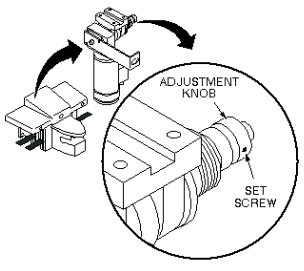
Adjust the knob two clicks tighter (clockwise), and tighten the set screw.Notice 
Follow instructions in Section 4.4 of LCC Dock Replacement to reinstall the dock assembly.Warning
Longitudinal Adjustment (In and Out)
Procedure
- With the Patient Transport docked, measure the distance from
the patient transport top to the front end bell as shown below. Dimensions
A and B should be 3/4, ±1/4 in. (19.0, ±6.4 mm) and
equal to each other so the patient transport top is colinear with
the bridge.
Figure 9. Table Docking Measurement for Dock 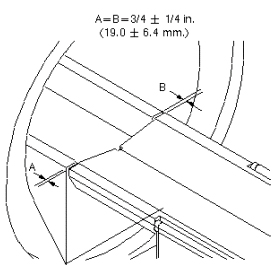
- If adjustment is required, add or remove washers until the proper
gap is achieved as shown below.
Figure 10. Dock Positioning Adjustment 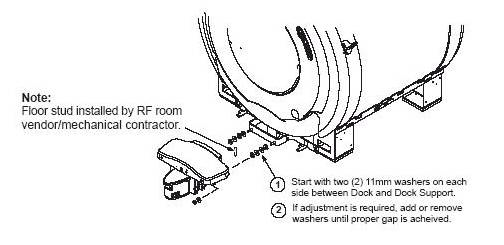
Follow instructions in Section 4.4 of LCC Dock Replacement to reinstall the dock assembly.Warning
Lateral Adjustment (Left to Right)
Procedure
- Check the alignment of the Patient Transport against the bridge.
The guide rail down the length of Patient Transport top should match
the guide rail down the length of bridge as shown below.
-
Left-to-Right Only: Follow Table Top Height Adjustment.
-
Left-to-Right Only: Follow Table Top Height Adjustment.
Figure 11. Aligning Guide Rails 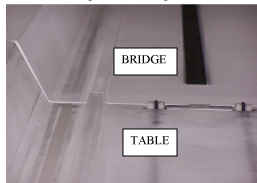
-
If dock adjustment is required:Warning - Move the dock to a proper position so the guide rails line up.
Lift the dock bracket slightly off the ground (approximately 1 mm)
and tighten all fasteners.
Figure 12. Dock Positioning Adjustment 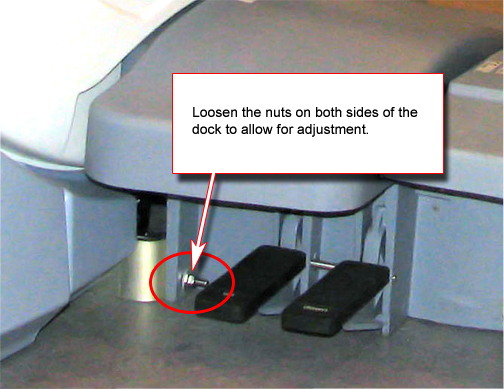
- Move the dock to a proper position so the guide rails line up.
Lift the dock bracket slightly off the ground (approximately 1 mm)
and tighten all fasteners.
What to do next
Finalization
No finalization steps.