Configure DICOM image transfers to an archive node.
Prerequisites
| Personnel requirements |
|---|
| Required persons | Preliminary requirements | Procedure | Finalization |
|---|
| 1 | - | 10 minutes | - |
Procedure
- In the Configure Network Hosts window, click Add.
Figure 1. Add a remote host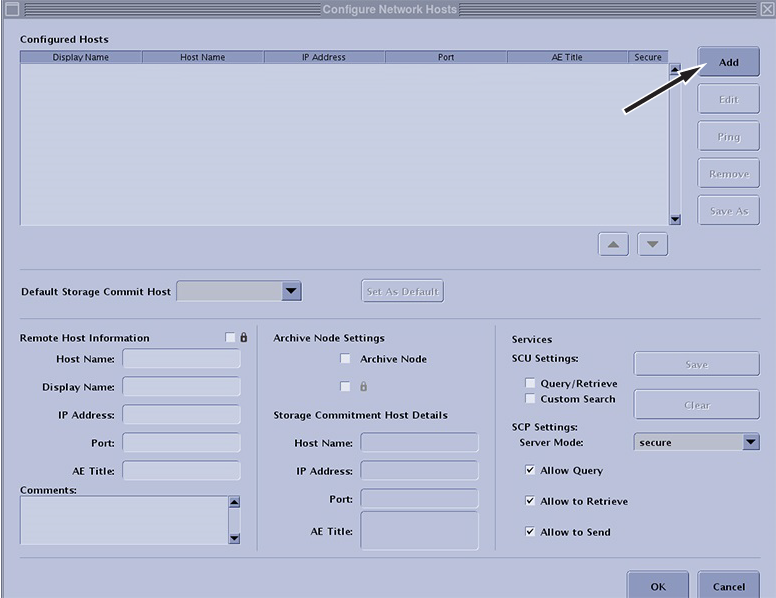
- Configure the network node by choosing one of the following:
| Option | Description |
|---|
| DICOM over TCP/IP (Legacy method unsecure) |
- Enter the host name, display name, IP address, port, and AE title information of the server. The default port for other GE devices is 4006.
- Select the Archive Node option and configure the Storage Commitment Host Details.
|
|---|
| DICOM over TLS (secure, available with SW version and later only) | Proceed only if certificates have been installed and set up per workflow MR Scanner set up as secure client in Importing and exporting TLS certificates. - Enter the host name, display name, IP address, port, and AE title information of the server. The default port for other GE devices is 2762.
- Select the Archive Node option and configure the Storage Commitment Host Details.
- Select the lock icon for both Remote Host Information and Storage Commitment Host Details.
|
|---|
- To archive images, check the Archive Node checkbox.
- Click Save.
- Click OK.
