
- SIGNA MR355 / SIGNA MR360
- Service Manual
- 5856356-3EN Revision 5.0
- Basic Service Documentation. Copyright General Electric Company.
- 00000018WIA30091130GYZ
- id_152710543.0
- Aug 29, 2019 1:54:40 AM
1.5T HD 8 Channel Neurovascular Array Setup for SNR Test
Prerequisites
| Required persons | Preliminary requirements | Procedure | Finalization |
|---|---|---|---|
| 1 | Not Applicable | 25 minutes | Not Applicable |
| Item | Quantity | Effectivity | Part number | Manufacturer |
|---|---|---|---|---|
| 17cm TLT Head Spherical Phantom | 1 | - |
46-265826G6 | - |
| 10cm Spherical Phantom | 1 | - |
46-317586G1 | - |
| Large Cylindrical unified phantom | 1 | - |
5342679 | - |
| Phantom positioner, NV | 1 | - |
5344806 | - |
| Condition | Reference | Effectivity |
|---|---|---|
|
The following coil configuration names must be installed to run this tool:HD 8Ch NV Array by Invivo | - | - |
About this task
Overview
Follow this process to prepare for the automated SNR test using the 1.5T HD 8Ch NV Array Coil by Invivo (M3335M)
Procedure
- Place the base of the NV array coil on the patient table and
latch it to the table as shown in Figure 1.
Figure 1. Place the base of the NV array coil 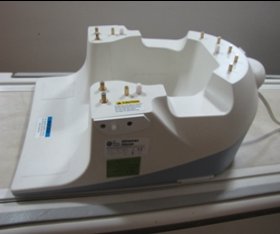
- Place the phantom positioner in the coil as shown in the Figure 2.
Figure 2. Place the phantom positioner 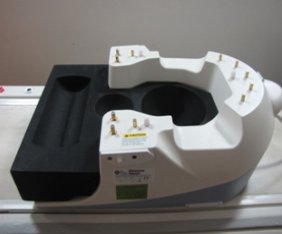
- Place the phantoms in the positioner as shown in the Figure 3.
Figure 3. Place the phantoms 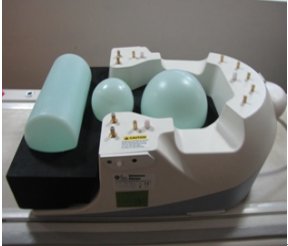
- Carefully align the connector pins on the base of the Coil with
the top part of the coil and latch both the coil sections into place
as in Figure 4. (The scanner will not operate
if the coil sections are not latched correctly).
Figure 4. align the connector pins 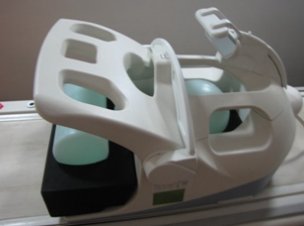
- Connect the coil to respective port of the system LPCA. Landmark
the coil at the cross mark as shown in Figure 5 and advance to scan.
Figure 5. Landmark 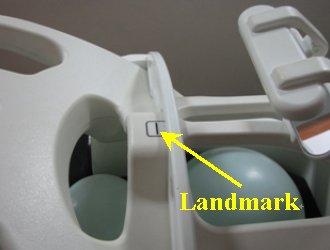
Finalization
No finalization steps.