
- SIGNA MR355 / SIGNA MR360
- Service Manual
- 5856356-3EN Revision 5.0
- Basic Service Documentation. Copyright General Electric Company.
- 00000018WIA30962F20GYZ
- id_131069801.1
- Jul 5, 2019 11:49:11 PM
1.5T HD 8-Channel Foot Ankle Coil MCQA Test Setup
Prerequisites
| Required persons | Preliminary requirements | Procedure | Finalization |
|---|---|---|---|
| 1 | 0 minutes | 15 minutes | 0 minutes |
| Item | Quantity | Effectivity | Part number | Manufacturer |
|---|---|---|---|---|
| Small, Cylindrical Unified Phantom | 1 | - |
5342680 | - |
| Cubical Unified Phantom | 1 | - |
5342681 | - |
| Item | Quantity | Effectivity | Part number | Manufacturer |
|---|---|---|---|---|
| See 1.5T HD 8-Channel Foot Ankle Coil FRUs | - | - | - | - |
| ||||
| Condition | Reference | Effectivity |
|---|---|---|
|
This coil configuration name must be installed to run the SNR Test Tool: HD Foot Ankle. Install this coil configuration with Config File Manager. | - | - |
About this task
Note:
Coils do not ship with phantoms. Phantoms come in a unified phantom set with the MR system.
Procedure
- Place the Foot Ankle Coil baseplate on the table as shown below.
Figure 1. Foot Ankle Coil Baseplate on Table 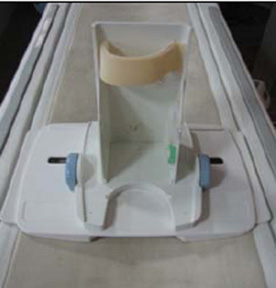
- Place the Small, Cylindrical Unified Phantom horizontally on
the baseplate as shown below.
Figure 2. Cylindrical Unified Phantom on Baseplate 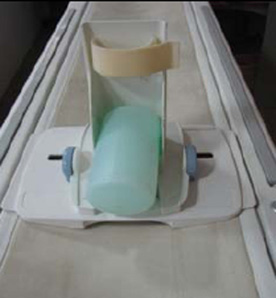
- Place the Cubical Unified Phantom vertically, and fix the phantom
to the baseplate using the Velcro as shown below.
Figure 3. Cubical Unified Phantom on Baseplate 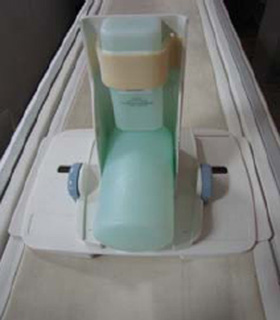
- Cover the baseplate with the coil as shown below.
Figure 4. Coil Over Baseplate 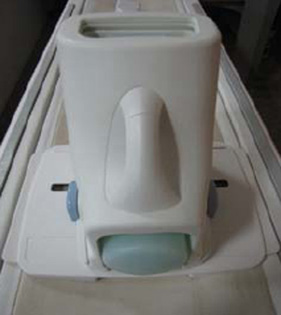
- Connect the Foot Ankle Coil to Port A of the system LPCA, and
landmark the coil at the crossmark on the coil handle.
- Advance to scan.
- Perform the MCQA Test.
Figure 5. Crossmark on Coil Handle 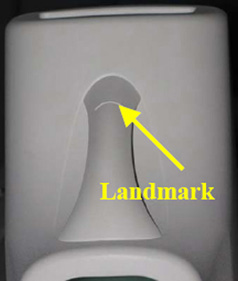
Finalization
No finalization steps.