
- SIGNA MR355 / SIGNA MR360
- Service Manual
- 5856356-3EN Revision 5.0
- Basic Service Documentation. Copyright General Electric Company.
- 00000018WIA301C2F20GYZ
- id_131068733.0
- Aug 29, 2019 1:55:20 AM
Express Coil: Posterior Array Coil Troubleshooting
| Required persons | Preliminary requirements | Procedure | Finalization |
|---|---|---|---|
| 1 | 0 minutes | 30 minutes | 0 minutes |
| Item | Quantity | Effectivity | Part number | Manufacturer |
|---|---|---|---|---|
| TL UNIFIED PHANTOM | 2 | - |
5343347 | - |
| Item | Quantity | Effectivity | Part number | Manufacturer |
|---|---|---|---|---|
| Defined in FRUs List | - | - | - | - |
| Condition | Reference | Effectivity |
|---|---|---|
|
The following coil configurations must be installed to run the MCQA test for the coil: SpineArray_12, SpineArray_23, SpineArray_34 | - | - |
The following tips can be used to troubleshoot common problems with the Express Posterior Array Coil troubleshooting.
Receiving No Signal
-
Problem: You are unable to pre-scan or are scanning, yet receiving no signal, and receiving part of signal from coil elements.
-
Possible Solution: Refer to the following steps.
- Verify that the system has correctly detected the coil by checking
in the “Currently Connected” in the GUI to select coils
in Rx as shown in Illustration 1.
Figure 1. Currently Connected Coils Window In The Scan Screen 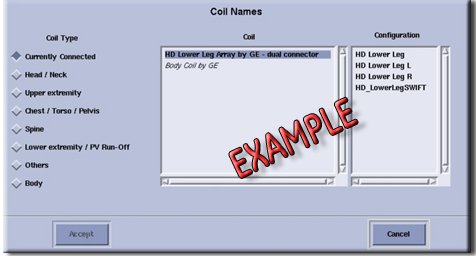
Image Quality
-
Problem: Poor IQ, shaded images, MC Bias Failure or if MCQA fails
-
Possible Solution: Refer to the following steps.
- · Perform the MCQA Test for all the Modes.
- Replace the Cradle as per Cradle Replacement Procedure, if it fails the MCQA Test.
Finalization
No finalization steps.