
- SIGNA MR355 / SIGNA MR360
- Service Manual
- 5856356-3EN Revision 5.0
- Basic Service Documentation. Copyright General Electric Company.
- 00000018WHA167070GYZ
- concept_tly_v4t_flb1.8
- Aug 4, 2020 4:41:34 PM
Access data from the IPM menu panel
Learn how to navigate data in the IPM menu panel.
On the left of the window, you use the menu panel to select menus determining the data to display in the content area. You can expand and contract the menu panel to suit your viewing needs.
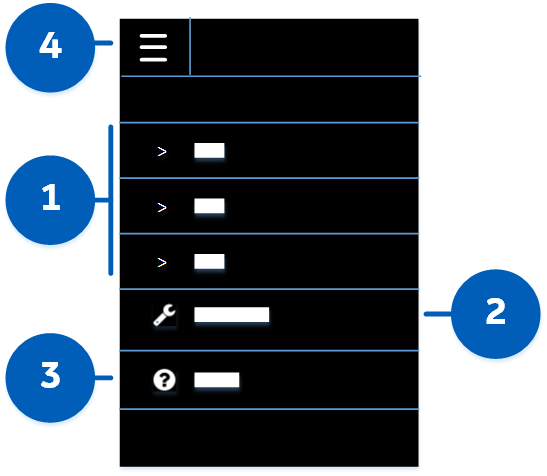
To navigate using the menu panel, select the desired option:
 Modality menus
- Select to expand the modality whose imaging protocols you want to view or manage:
- CT
- MR
For the selected modality, you can then select a data view:- Transaction status (Transactions view)
- Protocol libraries (Libraries view)
- Devices (Devices view)
 Settings menu
- Select to access options for customizing :
- Devices
- Libraries
- Preferences (Leave default English, or select another language. For details of supported languages, see the IPM User Guide described in Related documents.)
 Help menu
- Click to display information for learning about :
- FAQ
- User manual (in PDF format; see Documentation access)
- About
 Expand/contract menu panel icon
- By default, the menu panel is expanded with both icons and labels displayed.
Click the icon to contract the menu panel. This reduces the size of the menu panel with only icons displayed, leaving more of the window available to the content area.
Click the icon again to expand the menu panel, so you can view labels for all of the navigation options.