
- SIGNA MR355 / SIGNA MR360
- Service Manual
- 5856356-3EN Revision 5.0
- Basic Service Documentation. Copyright General Electric Company.
- 00000018WIA30019F20GYZ
- id_131058406.0
- Feb 21, 2021 9:01:45 PM
Doing the host-Image Compute Node (ICN) remote shell diagnostic
The host-Image Compute Node (ICN) remote shell diagnostic verifies remote shell connectivity to the ICN.
Diagnostic path
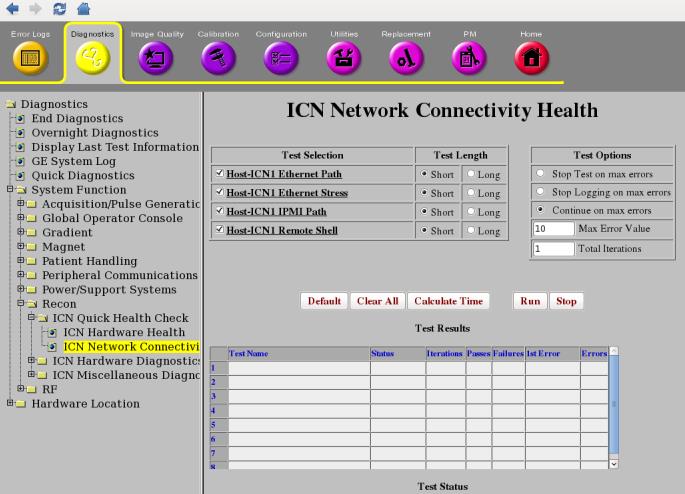
Purpose
The purpose of this diagnostic is to verify remote shell connectivity to the ICN. This diagnostic attempts to execute a command on the ICN through the remote shell protocol.
Components tested
Remote shell service on the ICN.
Requirements
- The ICN is turned on and has a network connection to the host.
- ICN configuration has been completed.
- If ICN configuration fails, run VRE configuration.
Block diagram
Test sequence
- On the ICN Network Connectivity Health screen, select the ICN Remote Shell Diagnostic.
- Click Run.Note: After you click Run, do not click anywhere else in the Common Service Desktop until the test is complete. If you need to abort the test, click Stop.
- Make sure the ICN passes the diagnostic by reviewing the status in the Diagnostic Results table.
Results
Diagnostic results display a status of Pass, Fail, or No ICNs Defined. If you receive a Fail status, click GE System Log to view the error message. The system log records errors with the date, time, the process tested, and a detailed error message.
Additional responses to the diagnostic's results are outlined below.
| Result | Description | GE Field Action |
| Pass | The ICN passed the diagnostic. | No further action required. |
| Fail | The ICN failed the diagnostic. |
|
| No ICNs defined | The host has no ICNs defined. | Run the VRE reconfiguration. See Configuring the ICN - VRE. |