• SIGNA MR355 / SIGNA MR360
  • Service Manual
  • 5856356-3EN Revision 5.0
  • Basic Service Documentation. Copyright General Electric Company.
  • Object ID: 00000018WHA305172GYZ
  • Topic ID: id_2001523 Version: 9.0
  • Date: Feb 21, 2021 9:01:46 PM

Configuring the ICN (VRE)

VRE configuration copies the VRE operating system onto the host computer during first-time software loads onto new ICNs.

Prerequisites

Personnel requirements
Required PersonsPreliminary requirementsProcedureFinalization
1-45 minutes-
Tools and test equipment
ItemQuantityPart numberManufacturer
MR VRE Linux OS DVD1--
Safety

Before working in any GE Healthcare MR suite or performing any GE Healthcare service procedure, you must:

  • Have read and understood all hazard conditions and safety requirements in the latest revision of the GE Healthcare MR Service Safety Manual (5452735).
  • Have successfully completed all relevant GE Healthcare Environmental Health and Safety (EHS) courses (or for non-GE employees, equivalent workplace training courses).
  • Comply with all site-specific training and workplace safety requirements.

If you have any safety concerns at any time, do not begin work or immediately stop work and move to a safe location. Immediately contact your supervisor or site safety officer for instructions on how to proceed.

About this task

Volume Recon Engine (VRE) and Image Compute Node (ICN) are terms that are used interchangeably.

Procedure

  1. Insert the MR VRE Linux OS DVD.
    Note: The ICN OS ships in the USB software media for software versions 28 and later. Insert the USB media if required.
  2. Select ICN Configuration, click Configure ICN, and click OK.
    The VRE OS copy-to-host-PC procedure takes about 20 minutes.
  3. Remove the DVD after it ejects and the procedure is complete.
    The ICN configuration starts and takes about 20 minutes to complete.
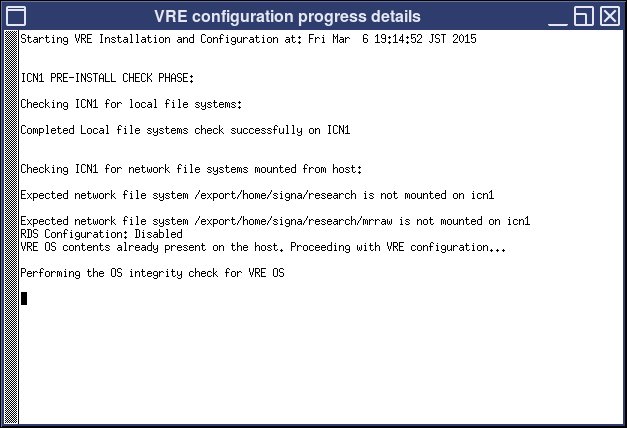
  4. Review the ICN configuration progress and details that appear in a separate window.
    Figure 1. ICN progress details
  5. At the end of VRE configuration, a dialog box displays with either a success or failure message. If VRE configuration fails, review the dialog box message and details in the separate window to determine next steps.
    Note: On the ICN configuration screen, you can click View VRE Configuration file to view the output status of the ICN.
  6. Click OK twice for the VRE configuration success and ICN configuration success messages.
    Note: A reboot is required after complete ICN configuration.