- id_2001808
- Version: 4.0
- Date: Aug 29, 2019 1:51:05 AM
Adjusting the intercom for the GOC audio assembly
Adjust the minimum and maximum volume of the keyboard speaker (patient’s voice) and the maximum volume of the patient speaker (operator's voice).
Prerequisites
| Personnel requirements | |||
|---|---|---|---|
| Required Persons | Preliminary Requirements | Procedure | Finalization |
| 2 | 10 minutes | 30 minutes | 10 minutes |
| Tools and test equipment | |||
|---|---|---|---|
| Item | Quantity | Part Number | Manufacturer |
| Nonmagnetic Titanium Service Tool Kit, Large Set | 1 | 5112581 | - |
| Safety |
|---|
|
Before working in any GE Healthcare MR suite or performing any GE Healthcare service procedure, you must:
If you have any safety concerns at any time, do not begin work or immediately stop work and move to a safe location. Immediately contact your supervisor or site safety officer for instructions on how to proceed. |
The following volume adjustments are made on the SCIM:
Figure 1. SCIM volume controls
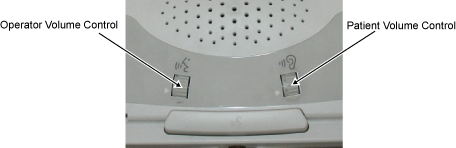
| Operator Volume Control | Controls the speaker volume in the bore (operator’s voice). |
| Patient Volume Control | Controls the volume of the speaker from the keyboard (patient’s voice). |
The following volume adjustments are made on the GOC Audio Assembly (GOCAA).
Figure 2. GOCAA volume controls
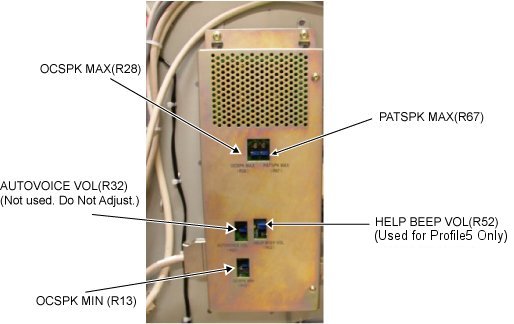
| OCSPK MAX (R28) | Maximum keyboard speaker volume R28 (patient’s voice) |
| OCSPK MIN (R13) | Minimum keyboard speaker volume R13 (patient’s voice) |
| PATSPK MAX (R67) | Maximum patient speaker volume R67 (operator’s voice) |
note: The minimum patient speaker volume is fixed; there is no adjustment for it. Do not adjust AUTOVOICE VOL (R32) or HELP BEEP VOL (R52) (used only for Profile5).
Procedure
- Remove the GOC service cover and disconnect the ground cable.
Figure 3. Remove the GOC service cover and disconnect the ground cable
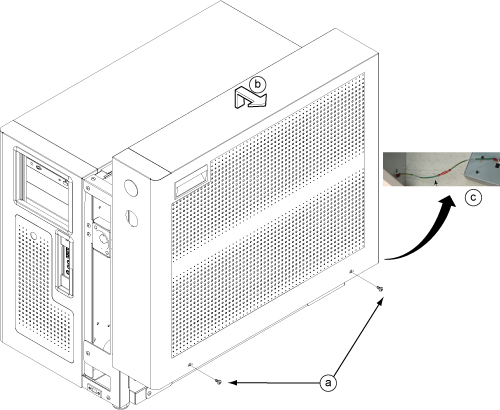
- Remove the two screws.
- Lift up and remove the service cover.
- Disconnect the ground cable.
- Adjust the maximum keyboard speaker volume R28.
- Adjust the patient volume control on the SCIM to the maximum setting by rotating the volume wheel up.
- While one person speaks into the patient microphone in the magnet bore, the second person should adjust R28 on the GOCAA to set the desired maximum keyboard speaker volume. This is an iterative process. Repeat the voice test until the maximum desired level is achieved.
- Adjust the minimum keyboard speaker volume R13.
- Adjust the patient volume control on the SCIM to the minimum setting by rotating the volume wheel down.
- While one person speaks into the patient microphone in the magnet bore, the second person should adjust R13 on the GOCAA to set the desired minimum keyboard speaker volume.
- Adjust the maximum patient speaker volume R67.
- Adjust the operator volume control on the SCIM to the maximum setting by rotating the volume wheel up.
- While one person listens to the patient speaker in the magnet bore, the second person should speak into SCIM microphone and adjust R67 on the GOCAA to set the desired maximum patient speaker volume.note: If R67 is turned up too much, a howling sound (feedback) may be heard from the patient speaker. Adjust R67 down to fix this problem.
- Reconnect the ground cable and secure the service cover back in place.