
- 00000018WIA301F0130GYZ
- id_123738791.11
- Aug 26, 2020 1:16:39 PM
Scan Room Blower Box Replacement
Prerequisites
| Required persons | Preliminary requirements | Procedure | Finalization |
|---|---|---|---|
| 2 | Not Applicable | 30 minutes | Not Applicable |
| Item | Quantity | Effectivity | Part number | Manufacturer |
|---|---|---|---|---|
| Non-magnetic tool set | 1 | - | - | - |
| Item | Quantity | Effectivity | Part number | Manufacturer |
|---|---|---|---|---|
| Cable ties (standard 4-6 inch) | - | - | - | - |
| Electrical insulating tape | - | - | - | - |
| Item | Quantity | Effectivity | Part number | Manufacturer |
|---|---|---|---|---|
| Dual blower box | 1 | RRx receive chain systems |
5213397–100 | - |
| ||||||||||||||||
| Condition | Reference | Effectivity |
|---|---|---|
|
All persons performing this procedure must complete GE-certified MR safety training. | - | - |
Power Down and LOTO
Procedure
| DANGER | |
|---|---|
Removing Blower Box
Procedure
- In the magnet room, remove the two top screws and two bottom
screws from the blower box power supply cover on the lower right corner
of the PEN panel.
Figure 1. Blower Box Power Supply Cover 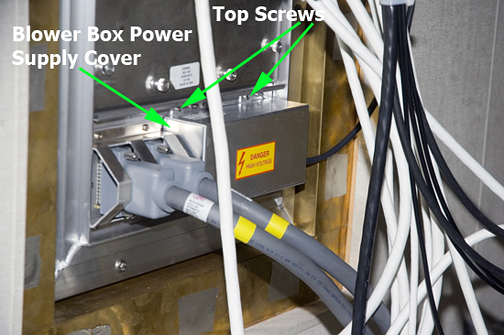
- Be sure the power cables are properly marked or labeled for
later reconnection. Disconnect the power cable connectors from the
AC power filters. See Table 7for a list of cables and connections.Note:
The single blower box has five power cables. The dual blower box has seven power cables.
Figure 2. AC Power Filters 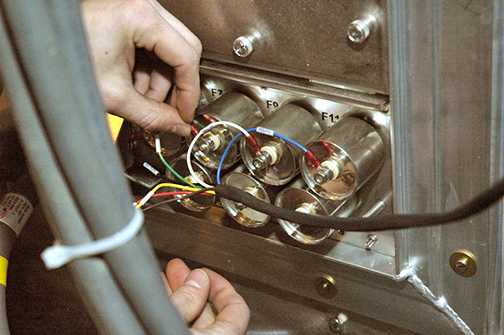
- Remove both air hoses at the top of the blower box.
Systems with the RRx receive chain use the dual blower box, which uses two hoses to provide air for both patient comfort and the RF hub.
Note:Mark or label the two air hoses at the top of the blower box to note their mounting location.
Figure 3. Air Hose Clamps 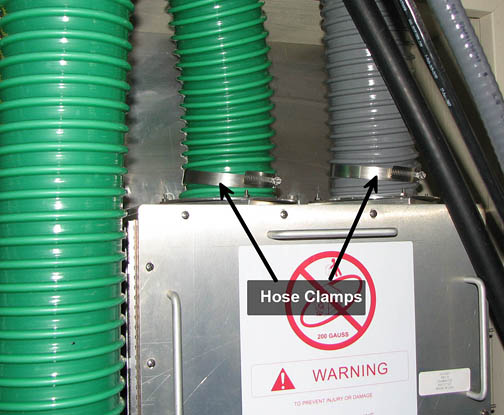
- Note:Loosen, but do not remove, the four screws securing the blower box to the PEN panel.
Some sites have a closet service hatch installed in the scan room wall. Use the closet service hatch to safely remove the blower box from the scan room.
Note:If the slot on the mounting flange does not provide enough clearance for placing over the existing flange studs, remove the mounting screws, position the blower box on the SPW, and attach with the removed screws.
At least two people are required for this procedure.
Figure 4. Side View of Blower Box 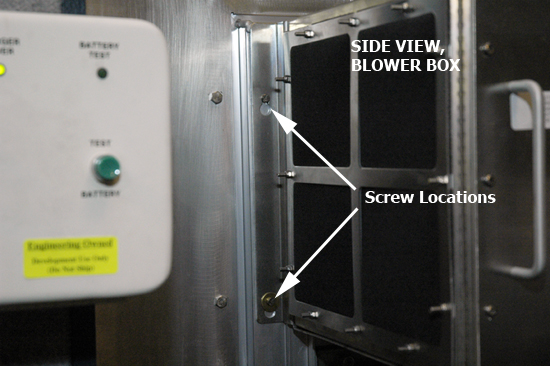
DANGER 
Warning 
With two people holding the blower box, exit the magnet room by walking as close to the wall on the coldhead side of the magnet as possible. See Figure 5.Notice
Installing New Blower Box
About this task
The following steps explain how to install the scan room blower box.
Procedure
- With one person holding the box in place, tighten the four screws
to secure the blower box to the PEN panel frame.
Figure 5. Mounting New Blower Box 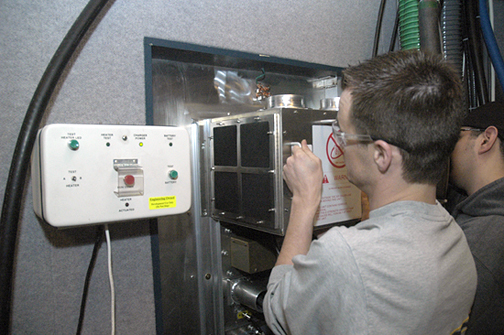
Attach the blower box power cable to the power supply panel filters, matching the labels on each connector to its corresponding filter.Warning  Important: Arc flash may occur if exposed terminals contact AC power filter connections.Note:
There should be a washer above and below each ring terminal on the filter stud.
Figure 6. AC Power Filter Cable Connections 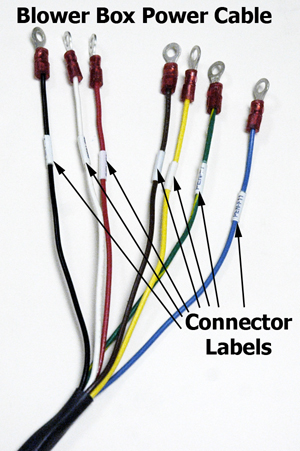
Table 7. Cables and Connections Power cable color
PEN panel AC power connection
Blower type (single, dual, or both)
Blue
PEN-F11
Both
Yellow
PEN-F10
Both
Red
PEN-F9
Both
White
PEN-F8
Both
Green and yellow
PEN-F7
Both
Brown
PEN-F6
Dual blower only
Black
PEN-F5
Dual blower only
Finalization
Procedure
- Remove LOTO from the PEN cabinet. See the MR Service Safety Manual, PN 5452735.
- Ensure air is flowing to the patient bore.
- (For systems equipped with the legacy RF hub) : Ensure air is flowing to the RF hub.